 Snappixify


Ever wonder why some creators can jump on a viral TikTok trend in minutes while you are still struggling to download the original clip without those annoying watermarks? For anyone into content re-creation, the biggest pain point is losing video quality or dealing with messy overlays that scream "low effort." Mastering the right way to source and edit existing videos is the fastest shortcut to catching trending traffic and growing your audience without starting from scratch.
Why Is Content Re-creation the Fastest Way to Go Viral?
Many top creators don't start from zero; they start with what is already working. Content re-creation allows you to tap into existing momentum and scale your account quickly. Here is why this strategy is the ultimate shortcut for TikTok growth:
-
Leveraging "Viral DNA": Trending videos have already been "vetted" by the algorithm. When you re-create a popular clip, you are using a format that has already proven to keep viewers watching.
-
High Efficiency, Low Stress: You don't need to spend hours brainstorming new concepts. By repurposing high-quality footage, you can focus your energy on creative editing and storytelling rather than raw production.
-
Riding the Trending Wave: TikTok’s algorithm prioritizes trending topics. Re-creating content around these trends puts your profile in front of millions of users who are already searching for and engaging with that specific topic.
-
Faster Testing and Learning: Because you can produce re-created videos much faster than original ones, you can post more frequently. This gives you more data to see what your audience likes, helping you find your niche in half the time.
-
Global Content Localization: You can take a viral video from one region and adapt it for your local audience with new captions or voiceovers, making you the first to bring a "global" hit to your specific market.
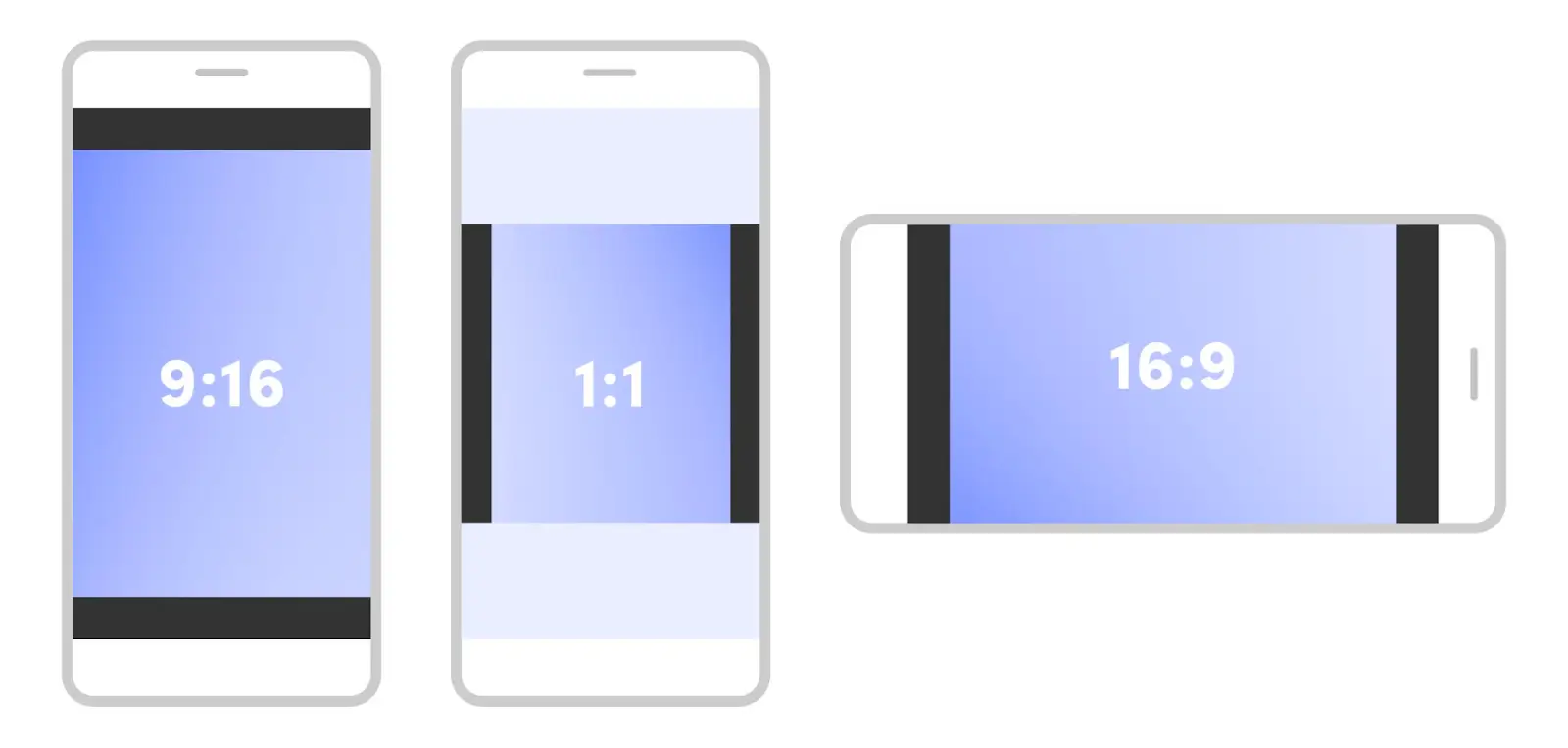
Which TikTok Video Size Should You Choose?
To ensure your re-created content looks professional and fits every mobile screen perfectly, you must follow these standard specifications. Using the wrong size can lead to awkward cropping or blurry footage.
The Gold Standard: Portrait (9:16)
This is the native format for TikTok. Most creators choose 1080 x 1920 pixels to ensure the best viewer experience.
-
Full-Screen Immersion: Vertical videos cover the entire smartphone screen, providing a deeply engaging experience that feels native to the platform.
-
Algorithm Friendly: TikTok’s interface is built for vertical scrolling. 9:16 videos are much more likely to be promoted on the "For You" Page (FYP).
-
High Engagement: Because it fits the natural way people hold their phones, viewers are more likely to like, comment, and share.
-
Versatility: This format is also perfect for cross-posting to Instagram Reels and YouTube Shorts.
The Cinematic Choice: Landscape (16:9)
While TikTok is a vertical platform, it now supports a landscape mode where users can tap a "Full Screen" button to rotate their phones.
-
Broader Field of View: Perfect for high-production content, cinematic scenery, or complex tutorials where you need to show more of the background.
-
Traditional Storytelling: This 1920 x 1080 format is the standard for YouTube and film, making it easier to repurpose long-form horizontal content.
-
Easier to Reformat: It is technically simpler to crop a high-quality horizontal video into a vertical or square clip than the other way around.
Other Dimensions (1:1 and 4:5)
While less common, you may occasionally see square (1:1) or slightly taller (4:5) videos. These are typically used for specific ad formats or stylized edits, but they often result in black bars at the top and bottom, which can distract the viewer.
How to Get High-Quality TikTok Videos Without Watermarks
For content re-creators, the biggest challenge is finding a way to download source material that is clean and professional. Standard downloads often include distracting watermarks that the TikTok algorithm may penalize. This is where Snappixify becomes your essential tool.
Whether you are sourcing clips from TikTok, YouTube, Facebook, or Twitter, Snappixify allows you to grab high-definition, watermark-free videos in just a few clicks. Here is the exact process to get your raw material ready for editing:
Step 1: Copy the Video Link Open TikTok (or any platform like YouTube or Facebook) and find the video you want to re-create. Click the "Share" button and select "Copy Link."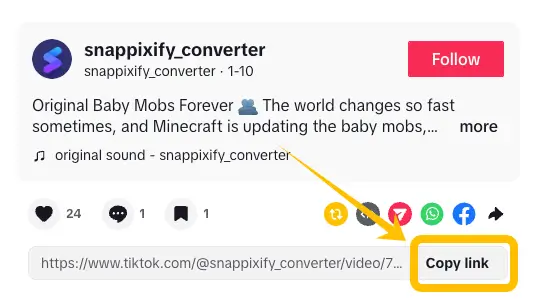
Step 2: Paste into Snappixify Head over to the Snappixify TikTok downloader online. Paste your copied link into the search bar at the top of the page.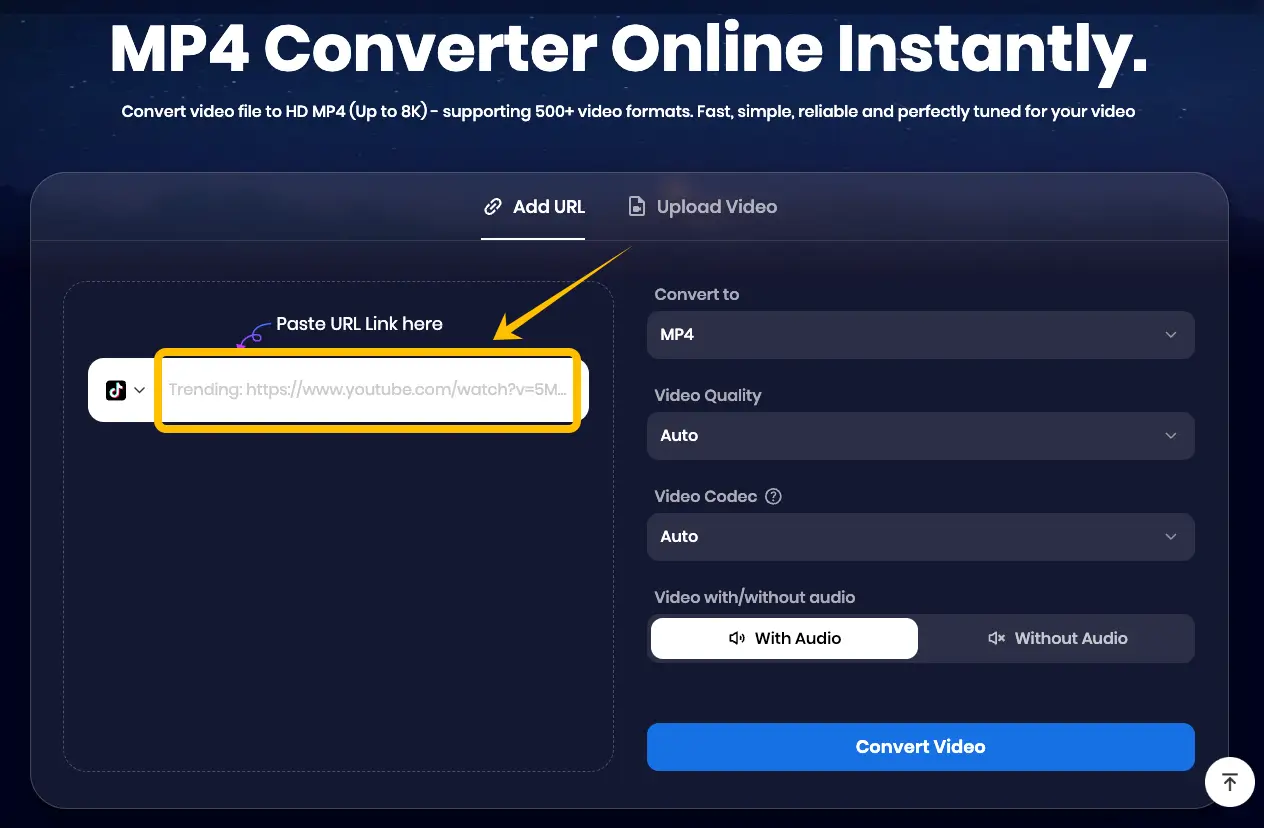
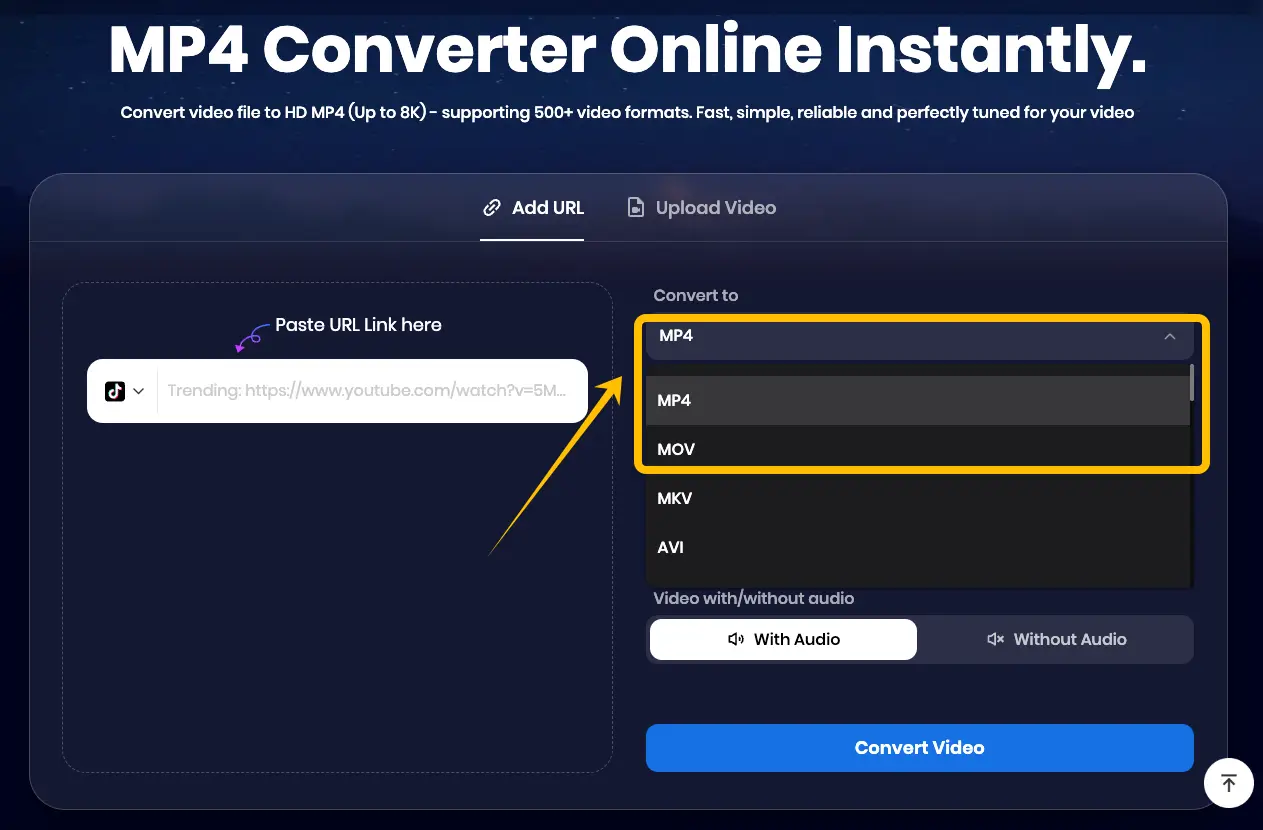
Step 3: Customize Your Export Settings One of the best features of this tool is the ability to choose your technical specs before downloading:
-
Format: Select MP4 or MOV for the best compatibility with editing software like CapCut or Premiere Pro.
-
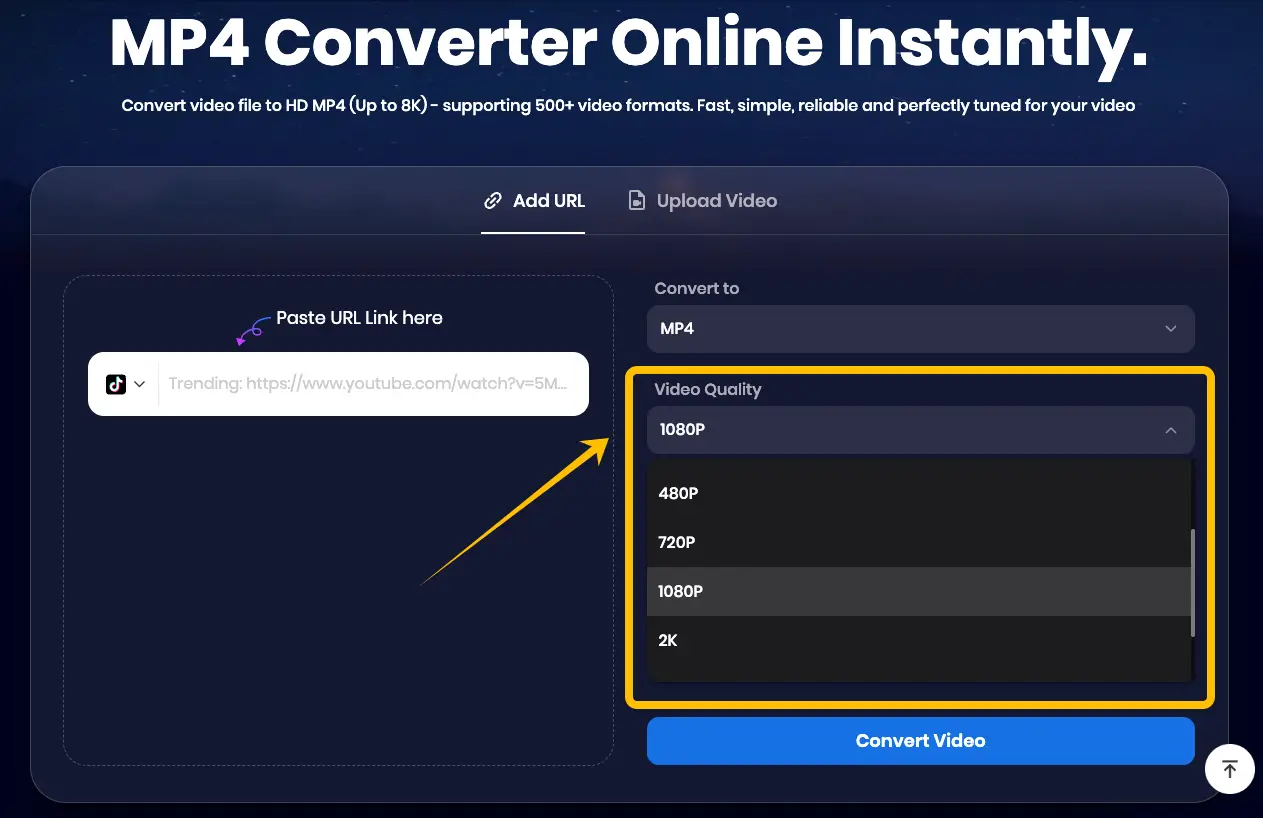
Video Quality: Choose the highest available resolution (typically 1080p) to ensure your re-creation stays crisp.
-
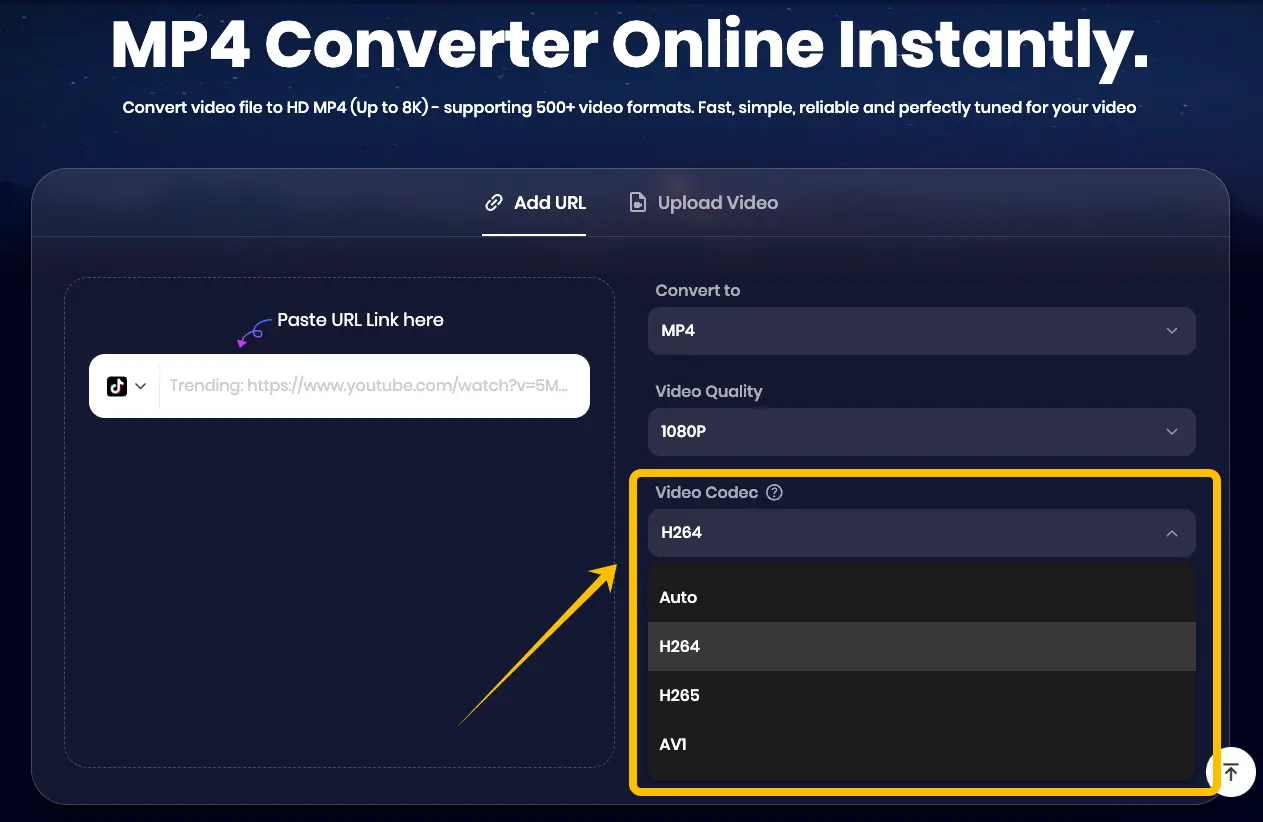
Video Codec: You can choose between H.264, H.265 (HEVC), or AV1. For most TikTok creators, H.264 is the recommended standard for fast processing and stability.
Step 4: Convert and Download Click the "Convert Video" button. The system will process the file to remove watermarks and apply your chosen settings. Once finished, simply click "Download" to save the file to your device.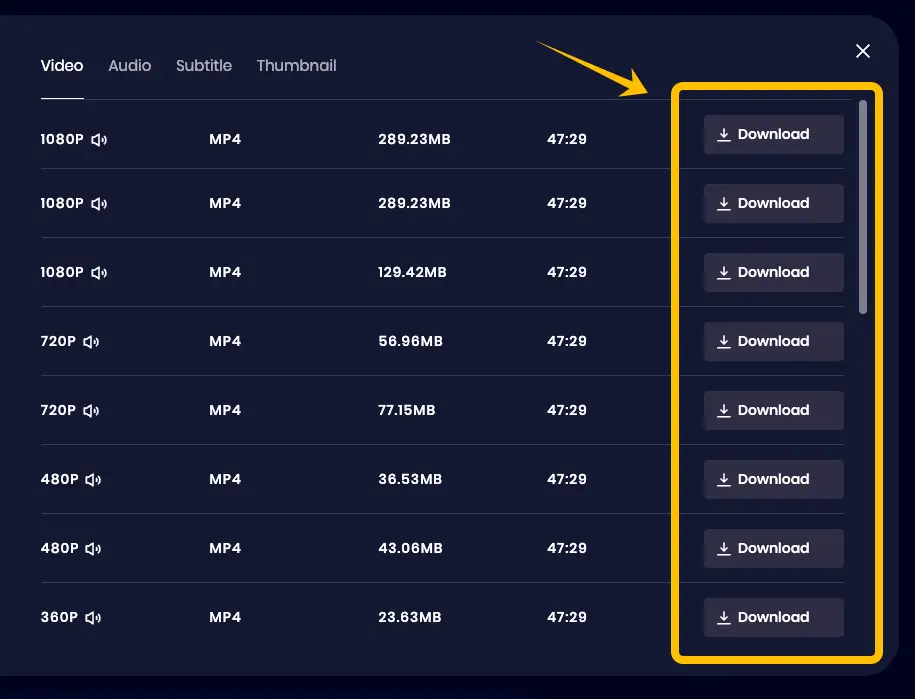
By using this online video downloader, you start your editing process with a clean, high-bitrate file that looks like an original recording.
Why Is Snappixify the Best Choice for Content Creators?
Snappixify is a powerful, free online video downloader and converter designed to simplify the workflow for digital creators. Unlike many other tools that offer limited options or require software installation, Snappixify operates entirely in your browser, providing a professional-grade solution for sourcing high-quality media.
Here is why thousands of creators prefer this free video downloader for their daily editing needs:
-
Completely Watermark-Free Downloads: The biggest hurdle in re-creation is the original platform's logo bouncing around the screen. Snappixify removes these watermarks automatically, giving you a "clean" canvas. This means you don't have to waste time cropping edges or using "blur" effects to hide unwanted logos.
-
Multi-Platform Versatility: You are not limited to just one source. Whether you need a clip from TikTok, a cinematic shot from YouTube, or a trending reel from Facebook and Instagram, Snappixify supports almost every major social media platform.
-
Precision Control Over Format and Bitrate: Professional editors know that quality starts with the source file. When using this video downloader, you can manually select your preferred format and bitrate. High bitrate ensures that even after you edit and re-upload the video, it remains sharp and free of pixelation.
-
No Registration or Software Needed: You can start downloading immediately without creating an account or risking your computer's safety with suspicious .exe files. It is a fast, safe, and efficient online video downloader.
-
High-Speed Conversions: Time is money in the world of trending content. Snappixify uses advanced server-side processing to convert your links into downloadable files in seconds, allowing you to stay ahead of the competition.
Mastering TikTok "Safe Zones"
One of the most common mistakes in content re-creation is placing important text or visuals where the TikTok UI (like the Like button, captions, or profile icon) covers them. To ensure your audience sees everything, you must design within the "Safe Zones."
-
Avoid the Right Side: The right-hand column is reserved for the creator's avatar, Like, Comment, Share, and Music buttons. Avoid placing any critical subjects or text in this area.
-
Keep the Bottom Clear: The bottom 20% of the screen is where your video description and hashtags appear. If you place subtitles too low, they will overlap with the caption text and become unreadable.
-
Watch the Top Margin: While the top is generally safer, remember that the "Following" and "For You" tabs occupy the top center. Don't place your main headline too high.
-
The "Golden Middle": Keep your most important visual elements and main captions in the center of the 9:16 frame. This ensures your message is clear on every smartphone screen size.
-
Visual Aid Tip: Many professional editors use a "Safe Zone Overlay" in their editing software (like CapCut or Premiere) as a guide. This prevents your re-created masterpiece from looking cluttered or unprofessional once uploaded.
3 Essential Export Settings to Boost Your TikTok Reach
When the TikTok algorithm analyzes your video, it looks for high-quality metadata. If your video is blurry or pixelated, it won't be pushed to the "For You" Page. To maintain professional quality, you must optimize these three key settings:
-
Bitrate (The Quality Factor): For a 1080p TikTok video, aim for a bitrate between 8 Mbps and 15 Mbps. A higher bitrate means more detail is preserved, but going over 30 Mbps may trigger TikTok’s aggressive compression, which can actually make your video look worse. You can use the Snappixify video converter to precisely adjust the bitrate of your source material.
-
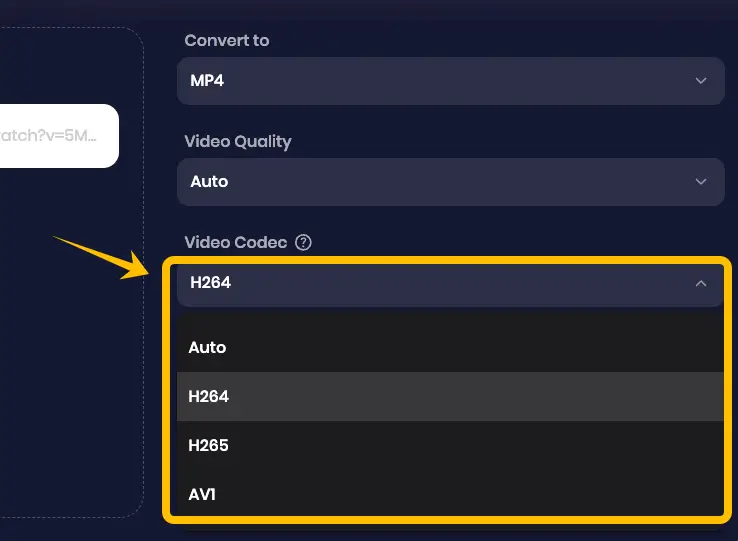
Codec (H.264 vs. H.265): Always use H.264 for the best compatibility. While H.265 (HEVC) offers smaller file sizes, H.264 is the global standard that TikTok’s servers process most efficiently. This ensures your video starts playing instantly for viewers without buffering.
-
Frame Rate (FPS): Stick to 30 FPS or 60 FPS. Most viral videos are shot at 30 FPS, which provides a natural look. However, if your re-creation involves fast motion or gaming, 60 FPS is superior as it makes the movement look fluid and high-end.
TikTok Upload Rules: MP4 vs. MOV
To avoid upload errors or aggressive compression that ruins your video quality, you need to understand TikTok's technical boundaries. Even the best re-created content will fail if the file format is incorrect.
-
MP4: The Universal Standard: This is the most recommended format for TikTok. It offers the best balance between high visual quality and small file size. If you are using a pc video downloader to grab source clips, always prioritize saving them as MP4.
-
MOV: High Quality, Large Size: While TikTok supports .MOV files (common for Apple users), these files are often much larger. If your .MOV file exceeds the size limit, TikTok will compress it heavily, making the video look blurry.
-
Maximum File Size Limits:
-
Android: Generally capped at 72 MB.
-
iOS: Allows up to 287.6 MB.
-
Desktop Uploads: If you use the TikTok web uploader, you can often upload files up to 10 GB, which is a great trick for high-quality re-creations.
-
Conclusion
Success in TikTok content re-creation relies on balancing viral trends with high-quality technical execution. By mastering the 9:16 aspect ratio and using Snappixify to source clean, watermark-free material, you can transform existing inspiration into professional-grade content that the algorithm loves. Whether you are using this free video downloader for TikTok, YouTube, or Facebook clips, starting with a high-bitrate source is the fastest way to grow your audience and stay ahead of the competition.
FAQs About TikTok Content Recreation
1. Is it legal to re-create content from other TikTok creators?
Simply re-uploading is risky. To be safe, your content must be transformative. This means adding your own value—like commentary, unique edits, or educational overlays—so the algorithm views it as a new, original creation rather than a copy.
2. What is the "3-Second Rule" on TikTok?
You only have three seconds to grab a viewer's attention. For re-creators, the best strategy is to place the most exciting or shocking clip at the very beginning. This "hook" triggers immediate curiosity and stops users from scrolling past your video.
3. What is the best TikTok downloader?
Snappixify is the top choice for editors. It provides watermark-free, high-bitrate files that don't lose quality during editing. Its ability to handle multiple platforms and customize export settings like bitrate and codecs makes it an essential tool for professional re-creations.


