 Snappixify


Ever been scrolling and stopped dead at a catchy, looping video wondering how they did it? Boomerangs are the ultimate social media hack, turning a one-second moment into an addictive, high-energy loop that's impossible to look away from. Now, let’s dive right in.
What Is a Boomerang Video on Instagram?
At its core, a Boomerang is a burst of photos stitched together into a high-quality mini-video that plays forward and then reverses—creating a seamless, looping effect.
Think of it as the middle ground between a GIF and a video. Unlike a standard loop that simply restarts from the beginning, a Boomerang "ping-pongs" back and forth. It was originally launched as a standalone app by Instagram, but because it became so popular, it is now a built-in feature directly inside the Instagram Stories camera.
It’s the go-to tool for turning everyday actions into something cinematic, rhythmic, and—most importantly—shareable.
Why Are Boomerangs So Catchy?
Even though they are only a few seconds long, Boomerangs have a unique way of stopping your thumb mid-scroll. Here is why this format is so addictive:
-
The "Visual Brainworm": The back-and-forth "ping-pong" rhythm is incredibly satisfying. Your brain gets hooked on the predictable, rhythmic loop, creating a hypnotic effect that’s hard to look away from.
-
Amplified Emotion: By stripping away the narrative and repeating a single action—like a clinking glass or a burst of confetti—it magnifies the energy of that specific moment, turning a simple movement into a piece of "dynamic art."
-
Breaking Reality: Boomerangs defy the laws of physics. By blending forward and backward motion, they create a surreal experience that feels more exciting than a standard video or a still photo.
-
Instant Impact: In a world of short attention spans, Boomerangs deliver a punch instantly. They don't need sound or a long setup to tell a story; they capture the "vibe" of a moment in a single glance.
How to Boomerang a Video on Instagram (Step-by-Step)
Creating a Boomerang directly within Instagram is the most common way to get that perfect loop. Here is the quick process:
-
Open the Instagram Camera: Swipe right from your home feed or tap the "+" icon and select "Story."
-
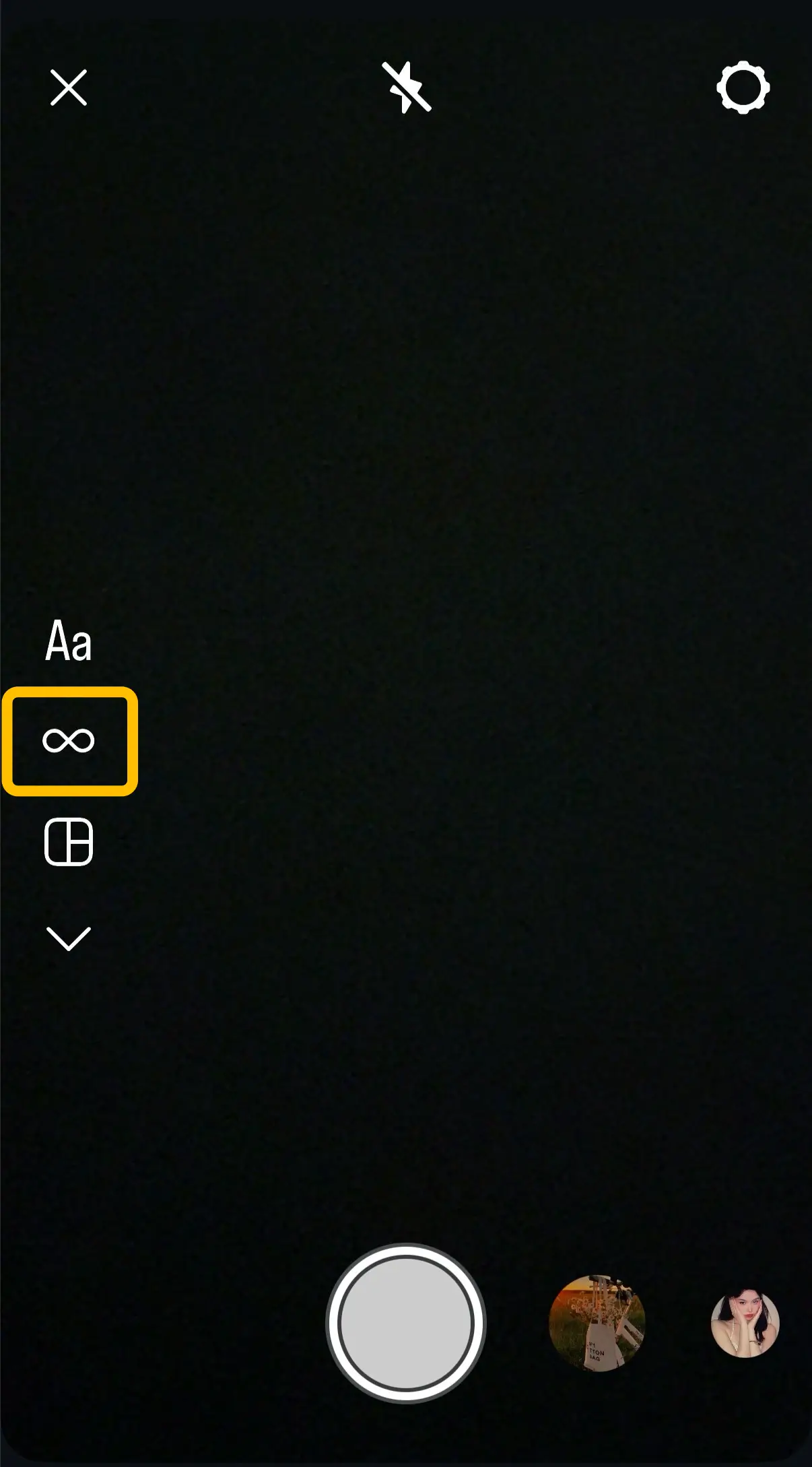
Select the Boomerang Tool: On the left side of the screen, tap the Infinity symbol (∞).
-
Record Your Clip: Tap or hold the shutter button to capture a short burst of motion.
-
Quick Tip: For the best results, keep your hand steady and make sure the subject has a clear, repetitive movement.
-
-
Customize Your Loop: After recording, tap the Infinity icon at the top again to access secondary effects like Slo-mo, Echo (motion blur), or Duo (a glitchy transition). You can also trim the length of your Boomerang here.
Common Limitations of Instagram Boomerang
While the built-in tool is fun and easy to use, it comes with several frustrating "walls" that limit your creativity. If you’ve ever tried to keep a Boomerang for yourself, you’ve likely run into these roadblocks:
-
❌ No Direct Download Option: Instagram is designed to keep you inside the app. There is no simple "Save to Gallery" button for a Boomerang once you’ve added stickers or music, leaving your masterpiece stuck on their servers.
-
❌ The "24-Hour" Expiry Trap: Unless you save it to a Highlight, your Story—and that perfect Boomerang—will vanish forever after 24 hours. It’s a "now or never" situation that makes archiving your memories impossible.
-
❌ Locked Within the App: Want to share your Boomerang in a WhatsApp group, send it via email, or post it on a different platform? Since it’s not saved as a local video file, you’re forced to stay within the Instagram ecosystem.
-
❌ A Nightmare for Cross-Platform Creators: If you want to use that same loop for a TikTok or YouTube Short, you're out of luck. Without the raw video file, you can’t easily move your content across platforms to grow your audience elsewhere.
-
❌ Impossible to Re-edit: Once a Boomerang is posted, you can’t take it back to your professional editing software on your computer to add better color grading, advanced effects, or combine it with other clips.
How to Save a Boomerang Video from Instagram
You’ve made a masterpiece—now how do you keep it? Since Instagram doesn’t make it easy to export your Boomerangs, you generally have two choices. One is a quick "fix," while the other is the professional standard for creators.
1. Screen Recording
Many users resort to their phone's built-in screen recorder. It is easy to record—just tap a button and it starts. While it works in a pinch, it’s far from ideal:
-
❌ Quality Loss: Screen recording compresses the video twice, leaving you with a blurry, pixelated version of your original work.
-
❌ UI Clutter: You’ll capture the Instagram "Story" interface, including the search bars, stickers, or "Send Message" icons, making it look unprofessional for other platforms.
-
❌ Tedious Editing: You have to manually trim the start and end of the recording to hide the recording controls.
So, we recommend you use online tools.
2. Use Snappixify Instagram Video Downloader
If you want to treat your content like a pro, using a dedicated tool like Snappixify is the way to go. It isn't just about "downloading"; it's about reclaiming your creative work.
-
Save in Original Quality: Get the crisp, clear loop exactly as it was meant to be seen.
-
Perfect for Cross-Platform Growth: Easily repurpose your Boomerangs for TikTok or YouTube Shorts without annoying watermarks or UI overlays.
-
Backup Your Portfolio: Don't let your best ideas disappear after 24 hours. Keep a high-quality backup of all your creative experiments.
How to Download a Boomerang Video in 3 Simple Steps
Getting your Boomerang out of Instagram and onto your device is faster than you think. Using Snappixify, the process is seamless:
-
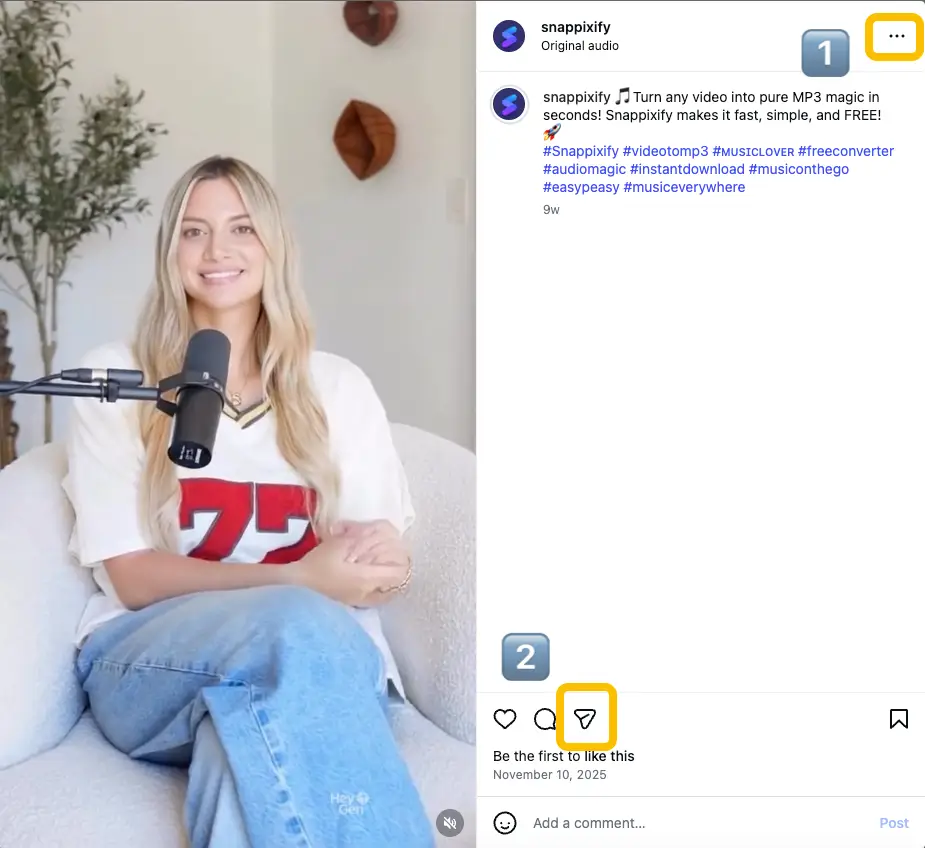
Copy Link: Open Instagram and find the Boomerang you want to save. Tap the "three dots" or the "Share" icon and select "Copy Link." You can copy links for Photos, Videos, Reels, or even IGTV.
-
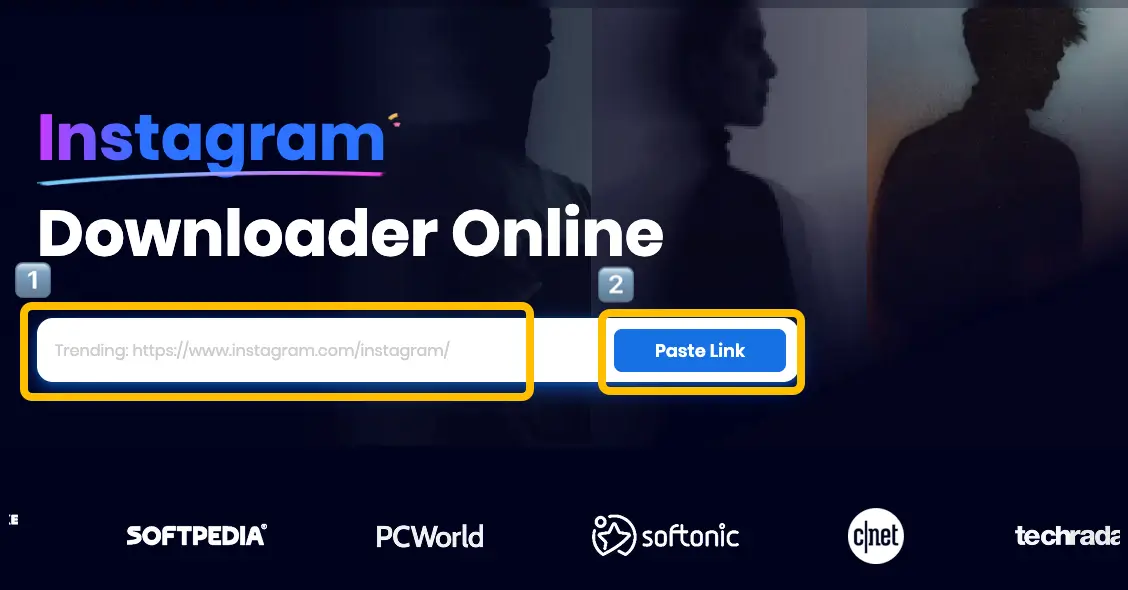
Paste Link: Head over to the Snappixify website. Paste the link into the input box and click the "Paste Link" button to let the tool recognize your content.
-
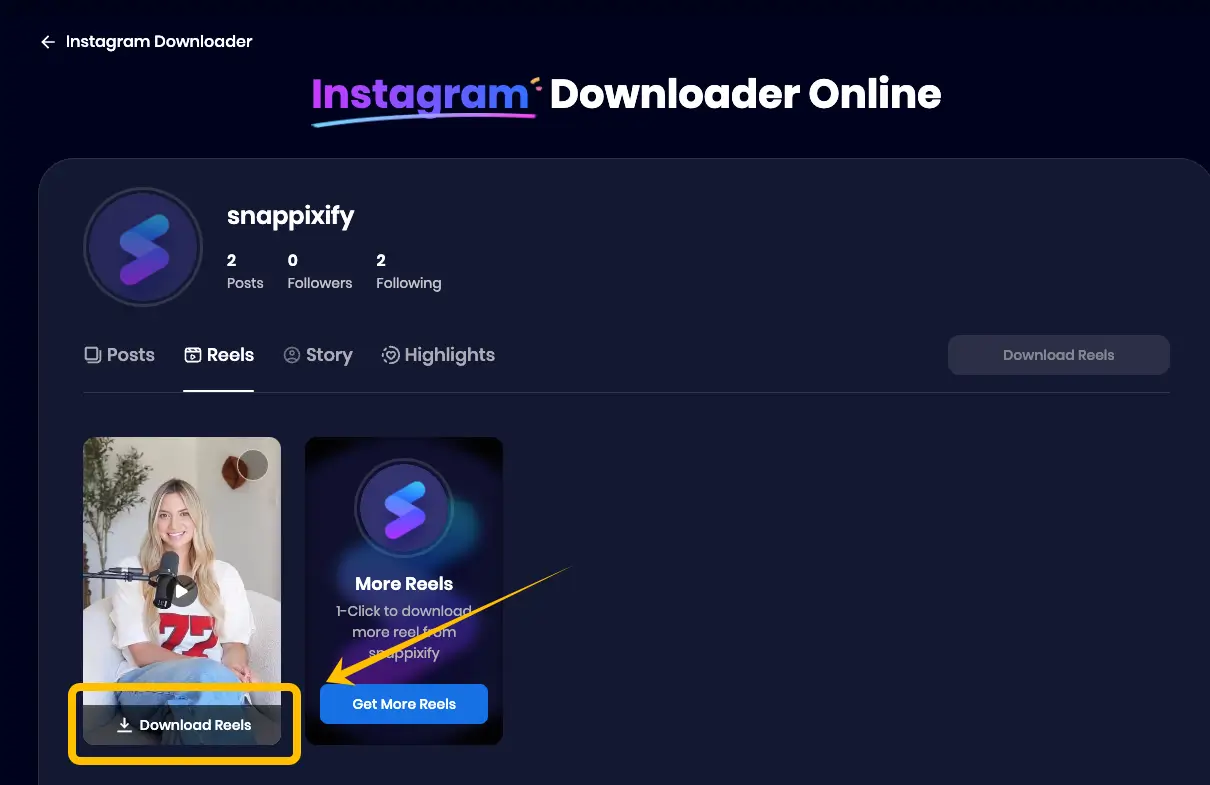
Download: Wait a few seconds for our server to extract the high-quality data. Once processed, simply click "Download" to save the video directly to your gallery or computer.
FAQs About Boomerang a Video on Instagram
Do Instagram Reels play on a loop?
Yes. In the main feed, Reels automatically play twice before pausing. This makes the Boomerang effect a powerful "growth hack"—if your video starts and ends seamlessly, viewers often watch it twice without realizing it. This extra watch time tells the Instagram algorithm your content is highly engaging!
What is the best way to export my video from Snappixify?
Always choose 1080p. While 4K sounds higher in quality, social platforms like Instagram and TikTok use aggressive compression. If you upload in 4K, the platform will "crush" the file to save data, often making it look worse. 1080p is the sweet spot—it matches phone screens perfectly and keeps your Boomerang crisp without being ruined by platform compression.
Is software needed for video downloading?
Not at all. One of the best things about Snappixify is that it is a 100% web-based tool. You don’t need to download any bulky apps, install suspicious software, or deal with browser extensions. Plus, you can use it without the hassle of creating an account—there is no registration, no login, and no subscription required. Just paste your link and download your content instantly.
Conclusion
Boomerangs are more than just a fun camera trick—they are a high-energy way to turn simple moments into addictive, digital art. However, don't let your creativity be trapped by Instagram's 24-hour limits or low-quality screen recordings. To truly grow your brand across TikTok and YouTube, you need high-quality, professional files. Stop letting your best loops vanish: use Snappixify to save your masterpieces in crisp 1080p today, with no registration or software needed!


