 Snappixify


The Super Bowl is no longer just a championship football game; it is a global cultural phenomenon and a massive "traffic feast" for content creators. Often called the "American Spring Festival," the 2026 event (Super Bowl LX) at Levi’s Stadium promises to be an unforgettable spectacle, featuring a high-octane Halftime Show led by global superstar Bad Bunny. Whether you're here for the tactical plays or the viral entertainment, this guide covers everything you need to watch the game and capture the hottest trends of 2026.
What Are the Key Details for Super Bowl 2026?
Planning your viewing party starts with knowing exactly when and where the big game takes place. Super Bowl LX (Super Bowl 60) is scheduled for Sunday, February 8, 2026.
Here are the key details you need to know:
-
Venue: The game will be played at Levi’s Stadium in Santa Clara, California, the state-of-the-art home of the San Francisco 49ers.
-
Kickoff Time: While the official time is subject to the pre-game festivities, kickoff is traditionally set for approximately 6:30 PM ET (3:30 PM PT).
-
Halftime Show: Set to take place roughly 90 minutes after kickoff, the 2026 show is one of the most anticipated in years, expected to draw record-breaking digital engagement.
With the game being held on the West Coast, viewers should prepare for a prime-time experience that kicks off in the afternoon sunlight and ends under the stadium's brilliant LED canopy.
How to Watch the Super Bowl on Different Devices
Whether you are hosting a watch party at home or catching the game while traveling, there are plenty of reliable ways to stream Super Bowl LX. In the United States, NBC holds the broadcasting rights for 2026, meaning their platforms will be the primary hubs for all the action.
Best Ways to Stream on PC (NBC & Peacock)
Watching on a PC or laptop offers the best experience for multi-tasking or connecting to a larger monitor.
-
Peacock TV: This is the most direct way to stream. Simply log into the Peacock website with a premium subscription to watch the full NBC broadcast live.
-
Web-Based Cable Alternatives: If you use "cord-cutting" services, you can watch through YouTube TV, FuboTV, or Hulu + Live TV. These platforms allow you to stream the NBC channel directly through your web browser in high definition.
How to Watch on Your Phone: Apps for On-the-Go Viewing
If you can't be at your desk, your smartphone is a powerful alternative. According to CableTV, there are several high-quality apps to keep you in the loop:
-
NBC Sports App: Available on both iOS and Android, this app lets you stream the game live by logging in with your TV provider credentials.
-
NFL App: The official NFL app usually provides a live stream of the Super Bowl for mobile users, along with real-time stats and play-by-play updates.
-
Mobile Streaming Services: Apps like YouTube TV and Peacock are highly optimized for mobile data, ensuring a smooth experience even if you are on 5G.
International Fans
For fans outside the United States, watching the Super Bowl (and its iconic American commercials) can be a bit different:
-
NFL Game Pass (via DAZN): In most international markets, the NFL Game Pass on DAZN is the gold standard. It provides the full US broadcast, including the halftime show and the original high-budget ads.
-
Local Broadcasters: Check your local listings, as major networks like Sky Sports (UK), Seven Network(Australia), and TSN (Canada) often provide localized coverage of the event.
Creative Ideas for Viral Super Bowl Videos
The Super Bowl is a goldmine for short-form content. To go viral, you need to be both fast and creative. Here are three proven strategies to dominate the 2026 trending page.
Turning Super Bowl Memes into Viral TikTok Trends
Every Super Bowl produces "meme-worthy" moments—from celebrity reactions to funny glitches. Speed is key on TikTok; being among the first to edit and share an HD clip of a viral moment allows you to ride the initial wave of the platform's search traffic before it becomes oversaturated.
Extracting Full-Length Songs from the Halftime Show Performance
Live "Super Bowl versions" of songs often feature unique remixes or surprise guest appearances that fans can't find on streaming platforms immediately. Creating content like "Halftime Show Highlights" or lyric videos using the high-quality live audio is a highly effective way to attract music fans and gain massive views.
Using Viral Super Bowl Audio for Your Reels
On Instagram Reels, unique and high-quality audio is a major driver for discovery. Whether it’s an iconic line from a multi-million dollar commercial or the specific roar of the stadium, using custom sound bites helps your video stand out. If other creators start using your original audio, it can drive a massive secondary wave of traffic back to your profile.
Snappixify: Your All-in-One Tool for Super Bowl Video Creation
To turn these creative ideas into reality, you need a powerful and reliable partner. Snappixify is the ultimate toolkit designed specifically for creators who need to process Super Bowl media with speed and precision.
Professional-grade quality for content creators
Quality is non-negotiable for the social media algorithm. Snappixify ensures that your source material remains pristine, supporting 4K video downloads and high-fidelity audio extraction. Whether you are cutting a highlight reel or a music tribute, your content will look and sound professional on every screen.
One-stop solution from download to subtitling
Forget jumping between multiple websites. Snappixify offers a comprehensive workflow in one place. You can download raw footage with the MP4 Converter, extract catchy halftime tracks via the MP3 Converter, and even generate precise captions using the MP4 to SRT tool—all without leaving the platform.
Fast and reliable for real-time trending topics
During the Super Bowl, trends expire in minutes. Snappixify is optimized for peak performance, allowing you to process and convert clips almost as fast as they happen on screen. This speed ensures you are the first to post, giving you the best chance to capture the "trending" wave.
Safe, ad-free, and no annoying pop-ups
Content creation requires focus, and your security is a priority. Unlike many online tools, Snappixify is completely safe and ad-free. You won't have to deal with intrusive pop-ups or risky redirects, allowing you to work in a clean, secure environment during the high-pressure game day.
A Complete Guide to Using Snappixify
Mastering the technical side of content creation is easy with the right toolkit. Snappixify simplifies the process of preparing high-end assets, allowing you to focus on the creative side of storytelling. Here is how you can leverage our suite of tools to handle any media challenge.
Snappixify MP4 Converter: High-Definition Video Processing
Capturing the game in high definition is the foundation of any great video. Unlike standard downloaders that compress files and lose detail, Snappixify preserves the original 4K resolution. This is crucial for creators who need to crop or zoom into clips for TikTok or Reels without sacrificing sharpness.
Steps to download high-quality video:
-
Find the Video: Find the Super Bowl highlight or clip you want on YouTube TV or other supported platforms and copy the URL.
-
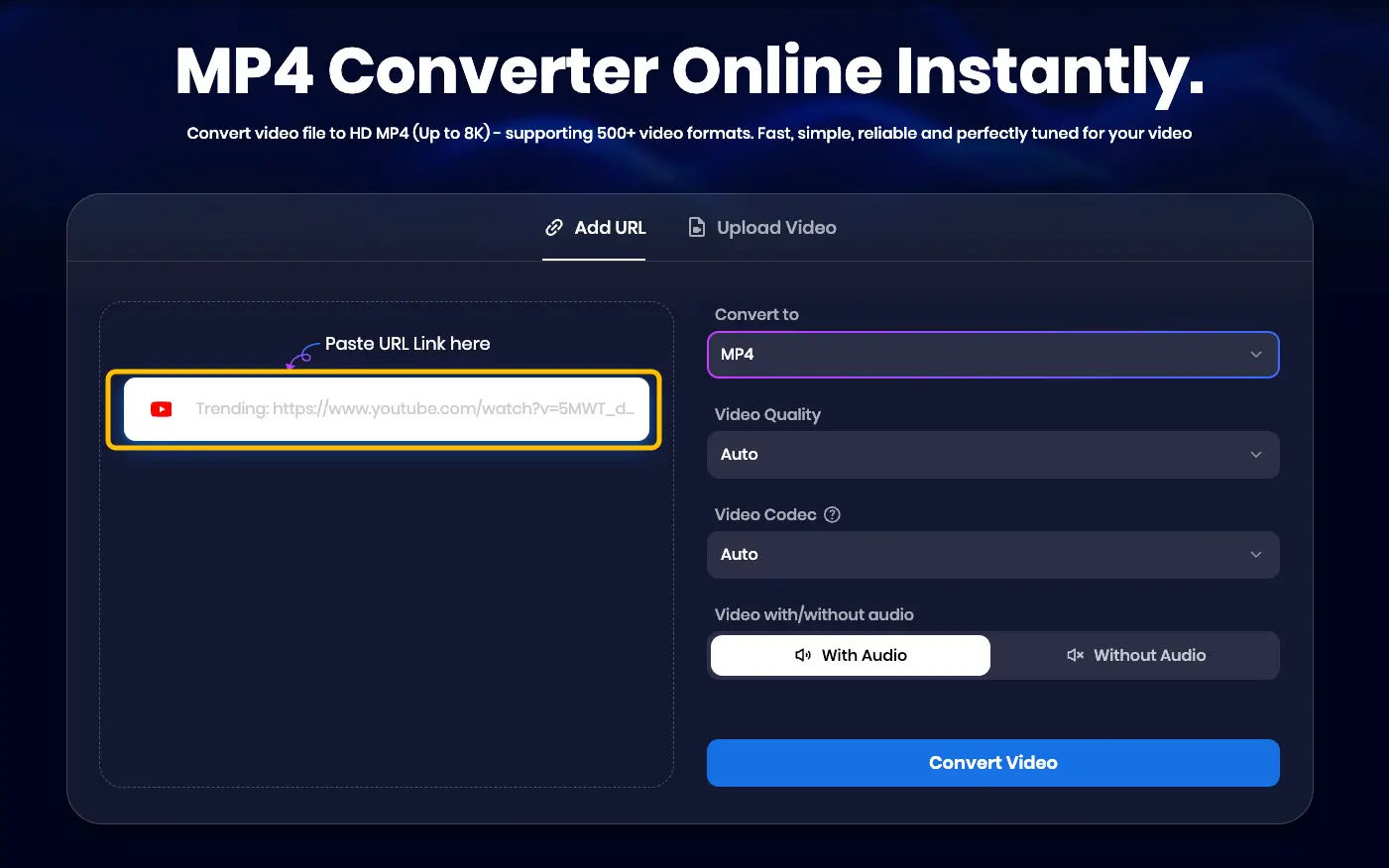
Paste into Snappixify: Visit the Snappixify MP4 Converter and paste the link into the conversion box.
-
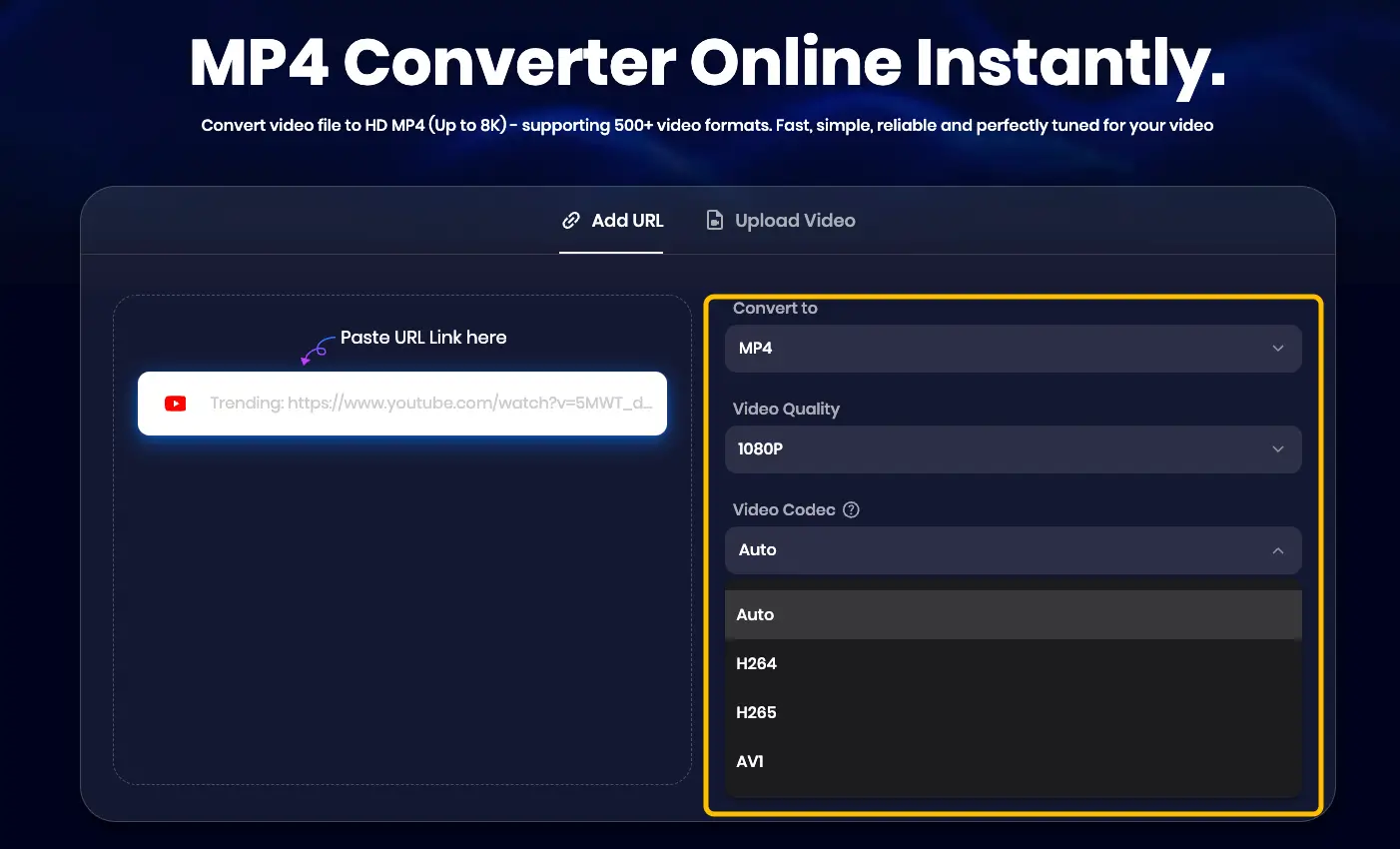
Configure Settings: Select your desired format and video quality. For the best result, we recommend an video quality of 1080p and your preferred video codec (H265, H264, or AV1). You can also select "Auto" for optimized compatibility.
-
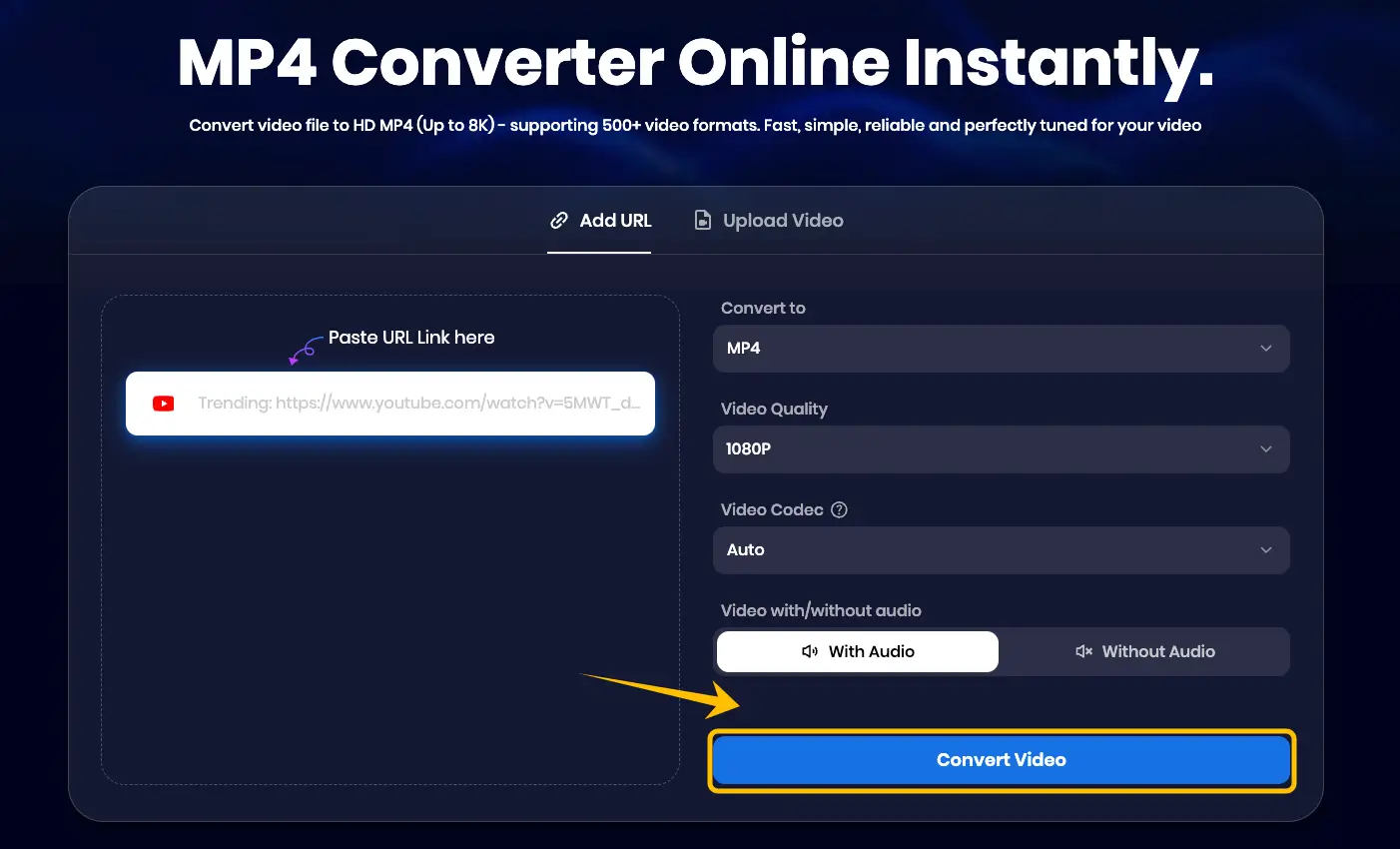
Convert & Download: Click "Convert Video" to process the file, then click "Download" to save your high-quality asset.
Snappixify MP3 Converter: Crystal-Clear Audio Extraction
Audio quality can make or break a video's retention rate. Snappixify extracts audio at the highest possible bitrate, perfectly preserving everything from the booming energy of a live performance to the subtle sound bites of a viral commercial.
Steps to extract premium audio:
-
Copy the link: Find the video containing the audio you want to extract and copy the URL from your browser or app.
-
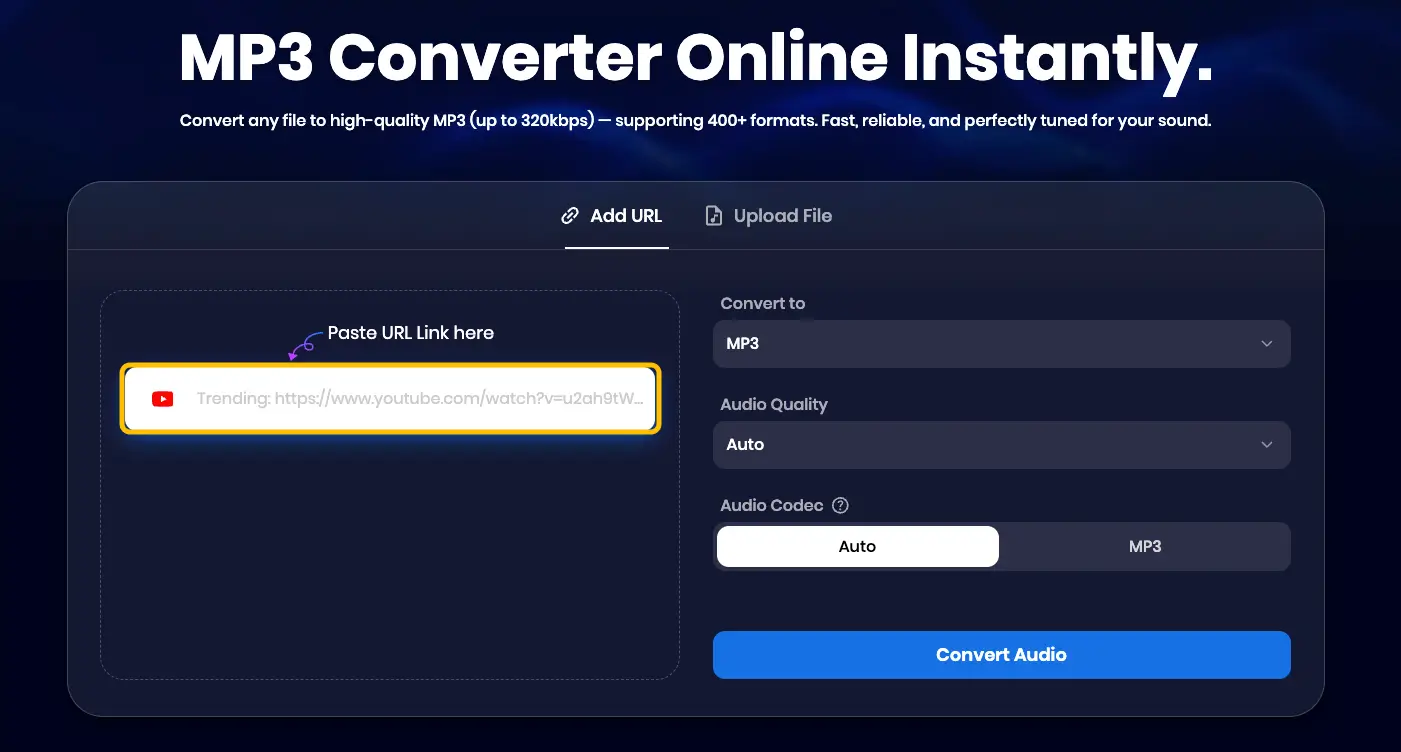
Paste the link into Snappixify: Navigate to the Snappixify MP3 Converter and paste the link into the search bar.
-
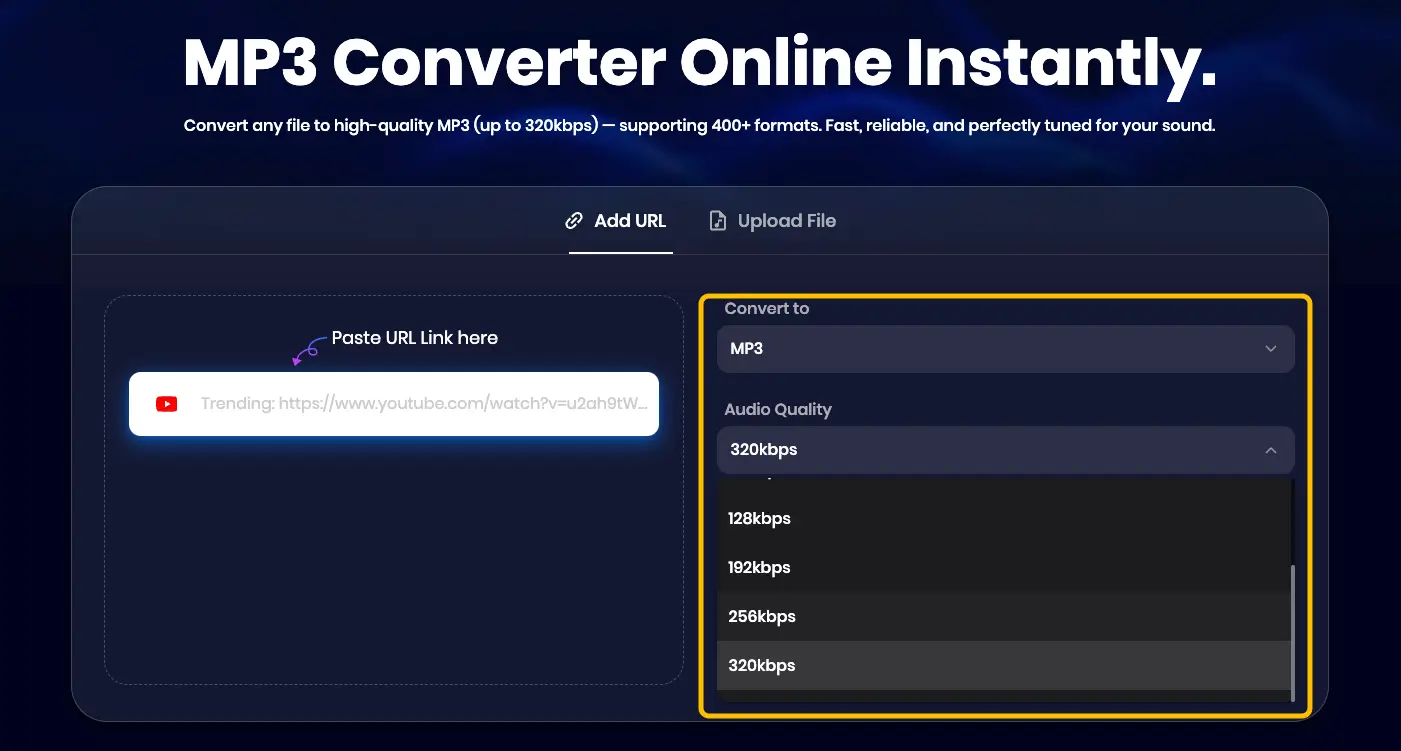
Choose format and audio quality: Select the MP3 format and choose your desired audio quality (we recommend 320kbps for the best sound).
-
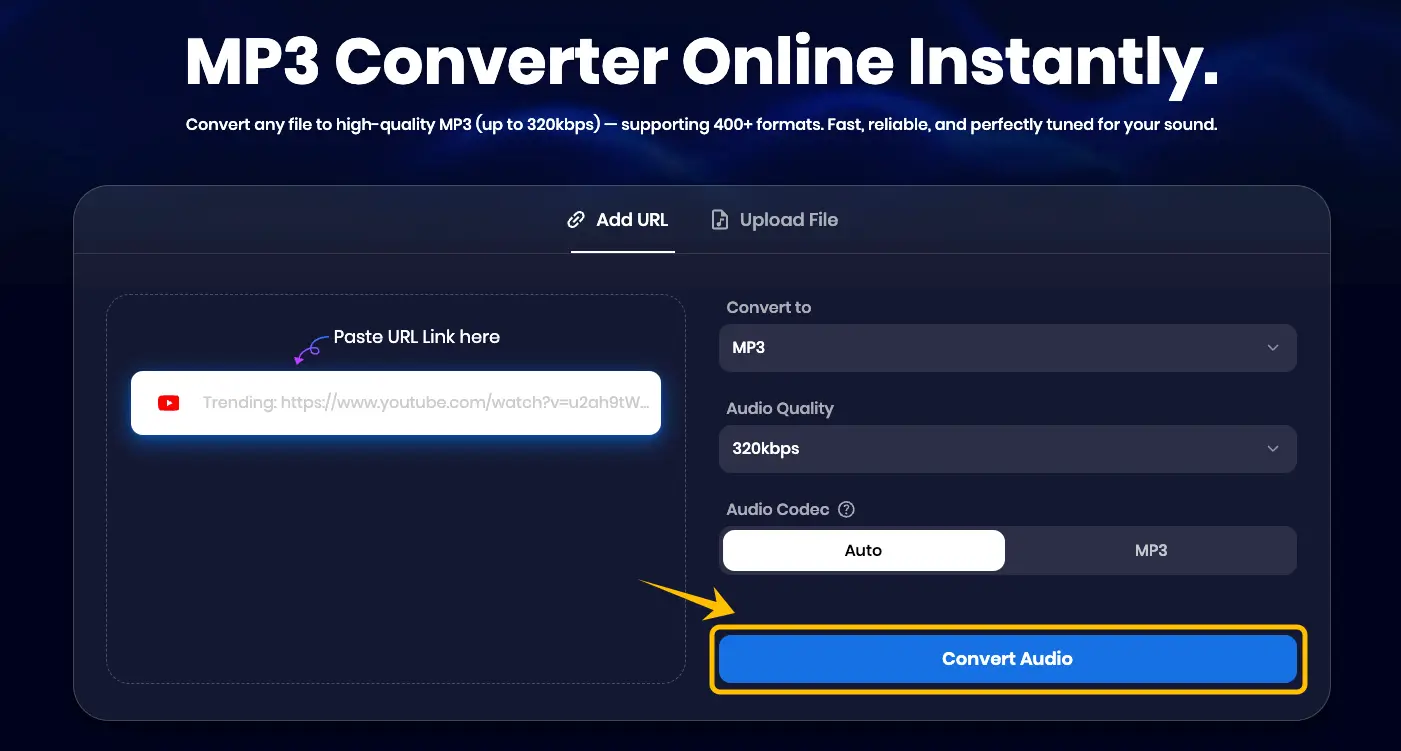
Click convert and then click download: Click the "Convert" button to process the file, then click "Download" to save the audio instantly.
Snappixify MP4 to SRT: Professional Subtitling Made Easy
With so many users browsing social media on mute, subtitles are essential for maintaining engagement. They not only make your content accessible to a global audience but also help social media algorithms understand and categorize your video more effectively.
Steps to generate precise subtitles:
-
Copy the YouTube link: Find the video you need to subtitle and copy the URL from your browser.
-
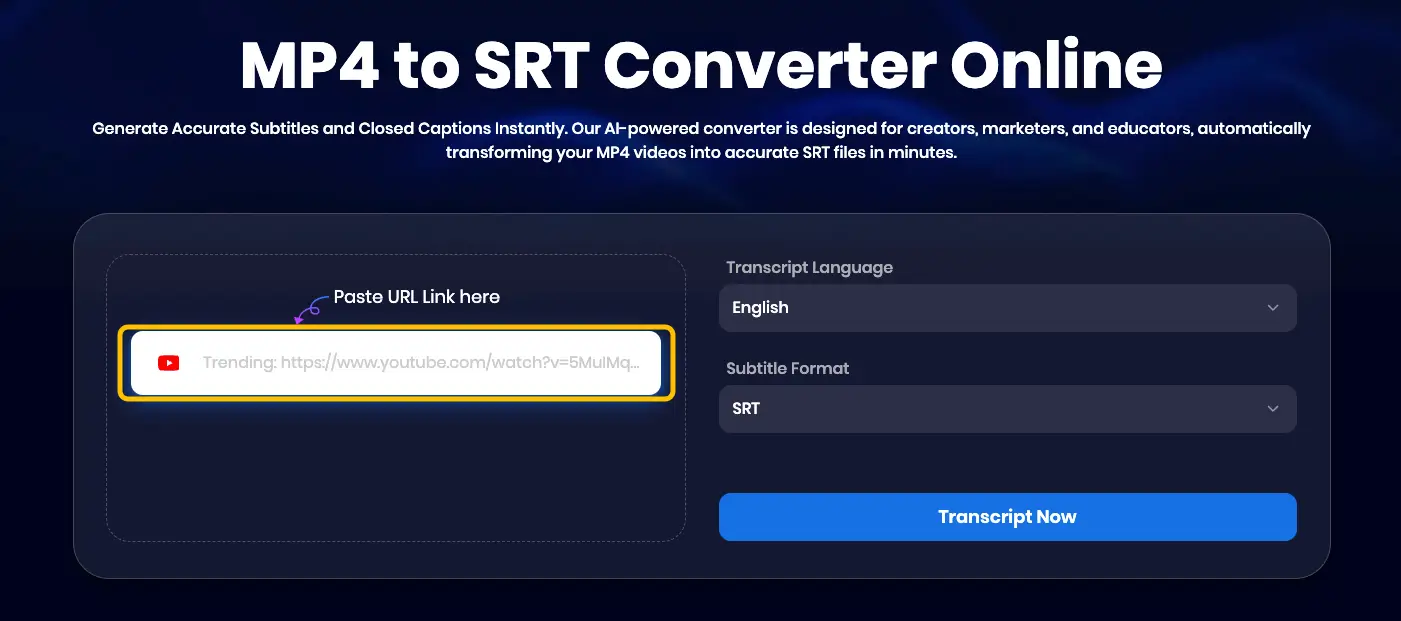
Paste the link into Snappixify: Visit the Snappixify MP4 to SRT tool and paste the link into the box.
-
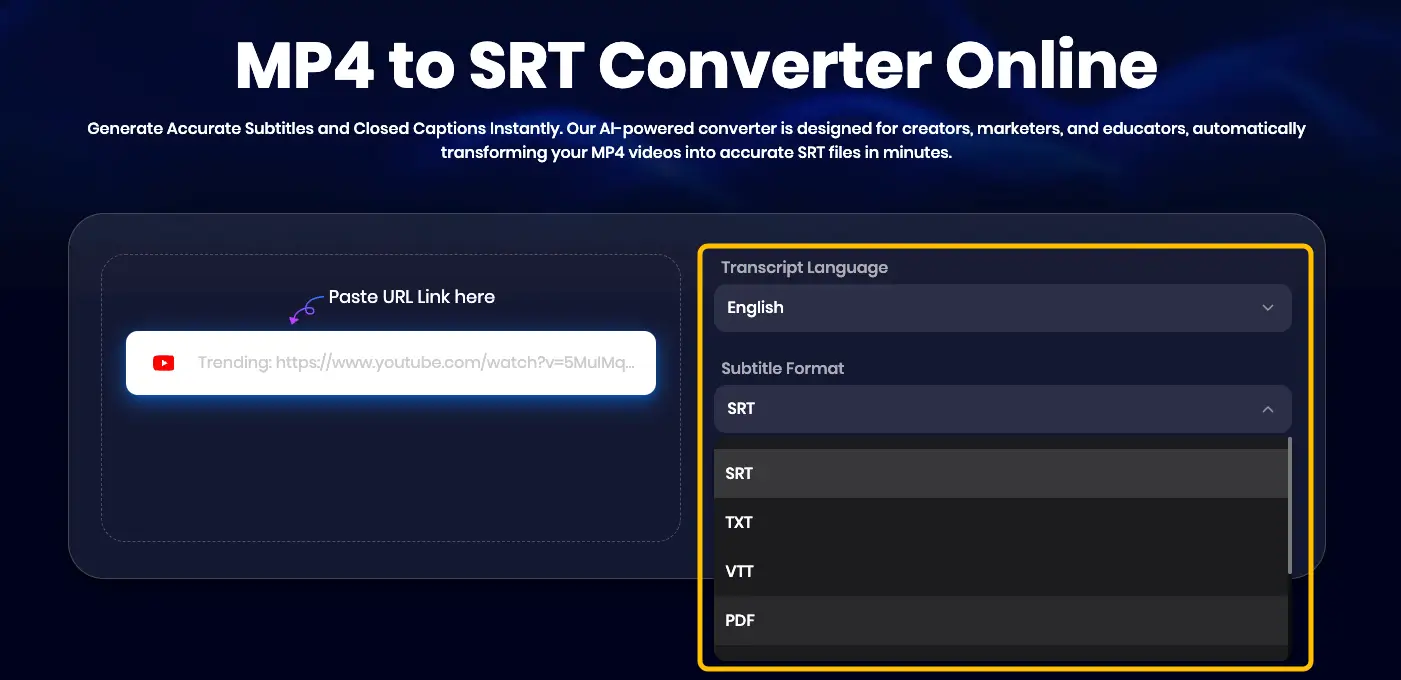
Select language and format: Choose the language spoken in the video and select your preferred output format (SRT, TXT, etc.).
-
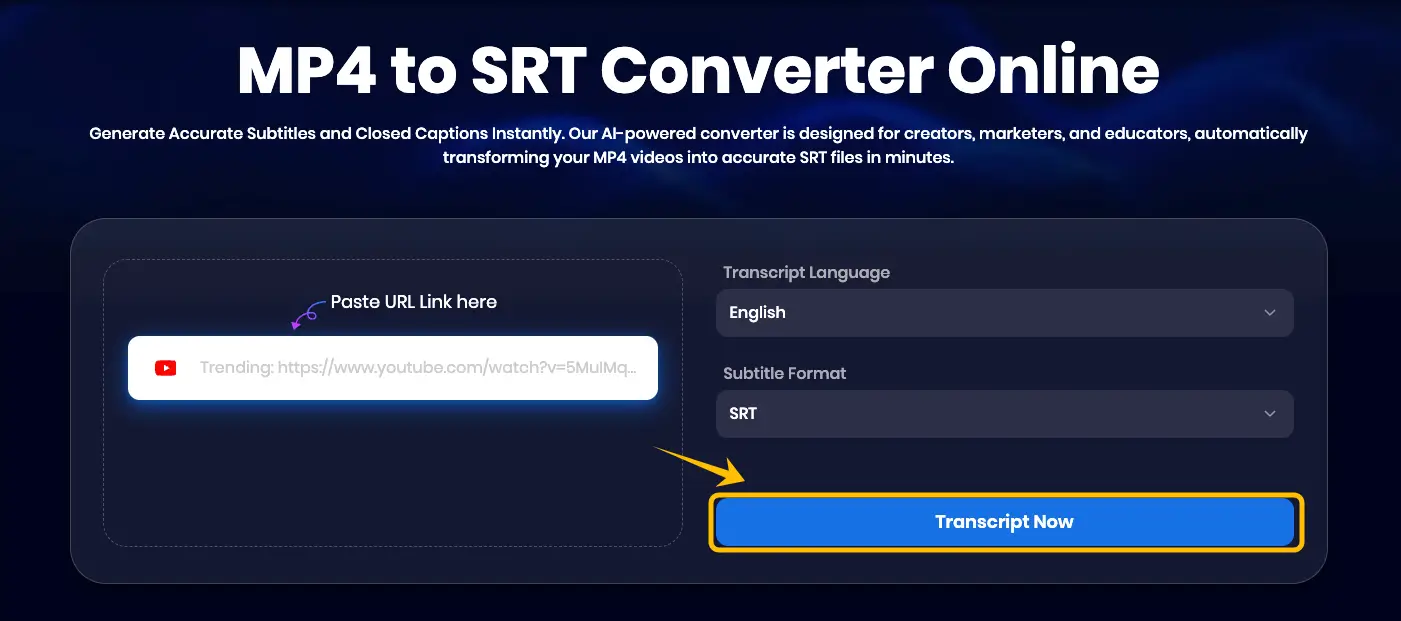
Click "Transcript Now" and then click download: Click the "Transcript Now" button to start the AI recognition, then click "Download" to save your subtitle file.
Conclusion
Super Bowl LX in 2026 is a massive opportunity to turn trending moments into viral hits. By using Snappixify to handle high-quality 4K downloads and AI-powered subtitling, you can stay ahead of the trends while the toolkit manages the technical heavy lifting. Whether you are capturing a viral meme or a historic halftime performance, having the right tools ensures your content stands out. Head over to Snappixify today and start preparing your content for the biggest game of the year!


