 Snappixify


In 2026, content creation isn't just about having a great idea; it’s about velocity. Creators are caught in a constant "format war," struggling to resize, re-code, and re-upload the same piece of content across five different platforms before the trend dies.
We wrote this guide to give you your time back. By pairing Snappixify’s lightning-fast conversion with Seedance 2.0’s AI generation, we are showing you a shortcut to high-quality, multi-platform dominance. This isn't just about tools; it's about a workflow that lets you produce more while working less.
Why Video Converters are Essential for Content Creators?
As platforms like TikTok, YouTube Shorts, and Instagram Reels evolve, they demand specific aspect ratios, codecs, and file sizes. A creator might capture a stunning 8K cinematic shot on a professional camera, only to find it won't upload to a mobile-first app. This is where video converters become the unsung heroes of the workflow, ensuring that technical barriers never stand in the way of a viral moment.
The Role of Snappixify
Enter Snappixify, the leading high-efficiency video conversion tool of 2026. Snappixify streamlines the production process by allowing creators to rapidly flip raw footage into platform-ready formats, solving compatibility issues in seconds rather than hours.
Getting the Right Footage with Snappixify
The Challenge of Sourcing Footage: How to Convert Fast?
Finding the perfect clip is only half the battle. Creators often need to pull inspiration or assets from various sources—be it a high-res landscape from a stock site or a quick clip from a social feed. The challenge lies in the "mismatch": a MKV file from a desktop source won't always play nice with mobile editing suites.
Snappixify’s Edge: Snappixify allows you to effortlessly convert videos from platforms like YouTube, TikTok, and Instagram into universal formats like MP4, MOV, and AVI. It supports 4K and even 8K inputs, ensuring your source material stays crisp.
Fast Batch Conversion: Time is money. Snappixify’s 2026 update features a "Power-Batch" mode, letting you drop dozens of clips into the queue and convert them all simultaneously with optimized GPU acceleration.
How to Efficiently Source and Convert Assets?
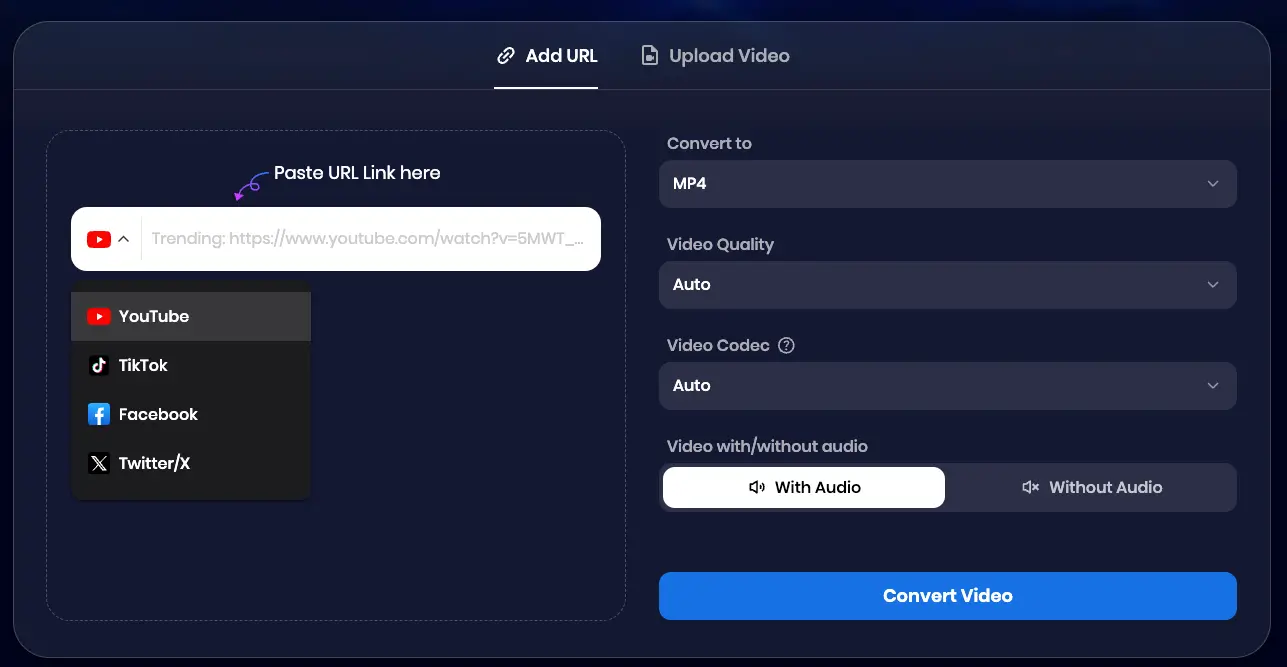
Method 1: Convert by Copying a Link (YouTube, TikTok, Facebook, X, etc.)
-
Copy the Link
-
Go to the video you wish to convert (on YouTube, TikTok, Facebook, X, or any supported platform).
-
Right-click on the video or click the share button to copy the video URL.
-
-
Paste the Link
-
Paste the copied URL into the input field on the converter page.
-
Choose Output Settings
-
Select the desired output format (MP4, MOV, MKV, etc.).
-
Choose the video quality you prefer, ranging from 240p to 8K.
-
Select your preferred video codec: H264, H265, or AV1.
-
-
Start the Conversion
-
Click the "Convert Video" button to begin the conversion process.
-
Wait as your video is processed.
-
-
Download the Converted Video
-
Once the conversion is complete, click the "Download" button.
-
The file will be ready for access on your device.
-
Method 2: Convert by Uploading a File
-
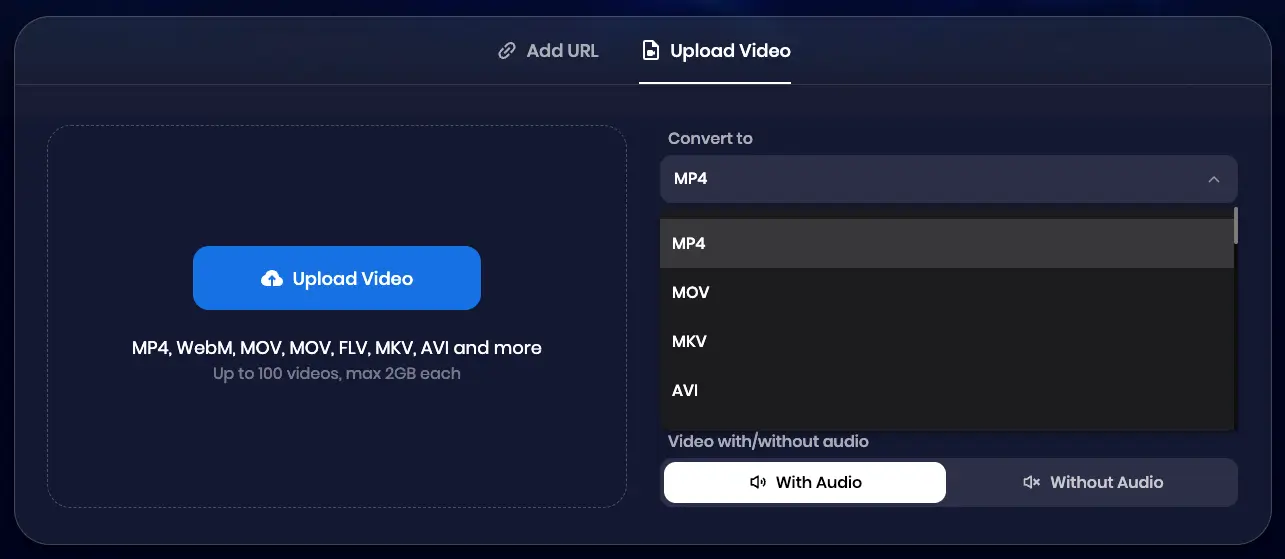
Select the File
-
Visit the video converter website of Snappixify.
-
Look for the "Upload Video" button.
-
Click on it and select the video file you want to convert from your device.
-
-
Choose Output Settings
-
Select your preferred output format (MP4, MOV, MKV, etc.).
-
Choose the desired video quality, ranging from 240p to 8K.
-
Select your preferred video codec: H264, H265, or AV1.
-
-
Start the Conversion
-
Click the "Convert All" button to begin the conversion process.
-
Once the conversion is complete, click "Download All" to save the converted files to your device.
-
Combining Snappixify with Seedance 2.0
How to Use Seedance 2.0 AI Video Generator
Once your footage is converted, it’s time for the magic. Seedance 2.0 (by Dreamina/ByteDance) has emerged as the premier AI video generator of 2026. Unlike older models, Seedance 2.0 uses multimodal input, meaning it doesn't just follow text—it "watches" your converted reference videos.
Material Upload & Processing: By uploading your Snappixify-converted clips to Seedance 2.0, you can use the AI to generate new scenes that maintain the same lighting, camera movement, or character consistency as your original footage.
From Raw Clips to a Complete Creation
Format Prep: Use Snappixify to convert your reference clips to a lightweight MP4 format for faster AI analysis.
Upload & Generate: Drop the clips into Seedance 2.0. Use the @Video tag to tell the AI: "Reference @Video1 for the camera movement but change the setting to a futuristic Mars colony."
Customization: Seedance 2.0’s "Director Mode" allows you to add AI-generated voiceovers and background music that sync perfectly with the converted visual rhythm.
Optimizing and Publishing Your Creation
Even AI-generated masterpieces need a final polish. After Seedance 2.0 finishes the render, you may need to run it back through Snappixify to ensure the final file size is small enough for mobile uploads without losing the 2K/4K clarity.
Video Optimization Tips: Use Snappixify to adjust the HEVC/H.265 settings for maximum compression and quality. In Seedance 2.0, utilize the "Refine" tool to sharpen textures and balance audio levels before the final export.
Publishing Across Social Platforms: Every platform has a "sweet spot": YouTube: 16:9, 4K, high bitrate.TikTok/Reels: 9:16, 1080p, optimized for mobile viewing. With Snappixify’s presets, you can export multiple versions of your Seedance creation at once, ensuring you hit every platform's requirements perfectly.
FAQ (Frequently Asked Questions)
Can Snappixify help me convert videos for different platforms?
Absolutely. Snappixify includes built-in presets for TikTok, Instagram, YouTube, and more, automatically adjusting resolution and aspect ratios.
Can I batch convert videos with Snappixify?
Yes! Snappixify is designed for high-volume creators, allowing you to convert multiple files at once to save hours of manual work.
How does Seedance 2.0 work with Snappixify?
You use Snappixify to prepare high-quality source material (MP4/MOV) that Seedance 2.0 then uses as a "reference" to generate new, AI-enhanced video content.
Can I customize voices and styles in Seedance 2.0?
Yes, Seedance 2.0 offers extensive customization for AI voices, artistic styles (from cinematic to anime), and character consistency.
Does Snappixify support 4K video conversion?
Yes, it fully supports 4K and 8K conversions, ensuring your AI-generated videos retain professional-grade resolution.
Conclusion: The Future of Video Creation
The combination of a robust converter like Snappixify and a powerhouse AI like Seedance 2.0 represents the "End-to-End" workflow of the future. Snappixify removes the technical friction of file formats, while Seedance 2.0 removes the creative ceiling.
The Power of the Combo: By letting AI handle the heavy lifting and Snappixify handle the compatibility, you can focus on what matters most: your vision.
Ready to revolutionize your workflow? Experience the lightning-fast conversion of Snappixify today and start building your next viral hit with Seedance 2.0!


