 Snappixify



In 2026, as digital media becomes more prevalent, many of us find ourselves working with large video files. Whether it’s a recording from a high-quality camera or a downloaded 4K video, the need to convert MP4 to MP3 often arises. You might want to extract the audio for listening to a podcast, an online lecture, or your favorite music while you're on the go.
However, many online tools and software fall short in terms of quality, functionality, or user experience, particularly when it comes to large files. But what if there was a tool that could convert MP4 to MP3 easily, with top-notch audio quality, no watermarks, and no ads? Enter Snappixify, the best MP4 to MP3 converter of 2026.
The Problem: Large MP4 Files and Inefficient Converters
Have you ever tried to convert a large MP4 video (say a 2GB) to MP3, only to encounter slow, error-prone converters that fail halfway through the process? Or perhaps you’ve been bombarded with endless pop-up ads, or forced to pay for a premium version just to get rid of watermarks.
In 2026, it’s still frustratingly common to encounter tools that are either unreliable, slow, or riddled with annoying ads. Some online converters even restrict file sizes, asking you to pay for the privilege of uploading large files. All of these issues make it hard to get the audio you need in the format you want.
That’s where Snappixify comes in. It’s a tool specifically designed to tackle the issues of large file conversion, ensuring that even massive video files can be processed quickly and efficiently, all while preserving the highest audio quality.
Why Snappixify Is the Best MP4 to MP3 Converter in 2026
Snappixify stands out for several reasons. It offers top-quality audio conversion, handles large files without crashing, and eliminates common annoyances like ads, watermarks, and file size limits.
1. Top-Quality Conversion with No Loss of Audio Fidelity
When it comes to MP4 to MP3 conversion, quality is key. Many converters promise fast results but compromise on audio quality, producing muffled or distorted sound. Snappixify ensures that the audio extracted from your MP4 file retains its original fidelity, with high bitrate output that delivers clear, crisp sound. Whether you're converting a video for a lesson, podcast, or music track, you won’t have to worry about audio degradation. You get the full richness of the original file, with no "radio-like" distortion often found in cheaper or less reliable tools.
2. Unlimited File Size Support—No More Restrictions
One of the major pain points when using other MP4 to MP3 converters is dealing with file size restrictions. Most online tools limit the size of the file you can upload, often capping it at 100MB or 500MB. This can be especially frustrating if you’re working with large 4K video files that exceed these limits. Snappixify breaks through these barriers, supporting files of all sizes—2GB, or even larger. You can upload and convert massive video files without worrying about hitting a size limit. No matter the size of the file, Snappixify handles it smoothly.
3. No Ads, No Watermarks, No Hidden Fees
One of the biggest annoyances when using free conversion tools is the constant barrage of ads and pop-ups. Some sites will make you watch a video or click through multiple ads before you can even begin the conversion process. And once the conversion is done, you’re often left with a file covered in a watermark, or worse, the tool asks you to pay for a premium version to remove it. With Snappixify, these issues are a thing of the past. The tool is ad-free and ensures that your converted MP3 files are clean, without any watermarks. Best of all, its core features are completely free—there are no hidden fees or subscription models to deal with.
4. Cross-Platform Compatibility
Another standout feature of Snappixify is its cross-platform compatibility. Whether you're using a Windows PC, Mac, Android device, or iPhone, Snappixify works seamlessly across all platforms. You don’t need to install any software or worry about compatibility issues between devices. Simply open your browser, visit the website, and start converting your files right away.
5. Lightning-Fast Conversion Speeds
Speed is crucial, especially when dealing with large files. Many converters can take minutes—or even hours—to process big video files, leaving you frustrated and wasting precious time. Snappixify’s optimized backend architecture allows it to handle large files with remarkable speed. Even large 2GB+ video files are converted in a matter of minutes, not hours. You can expect fast and efficient processing, allowing you to get your MP3 file quickly without sacrificing quality.
Real-World Benefits of Using Snappixify
Here’s how Snappixify stacks up in real-world use cases:
-
For Podcasters and Content Creators: You can convert high-quality MP4 videos from interviews, webinars, and podcasts into MP3s without losing any audio quality. The ability to process large files means you don’t have to worry about running into file size restrictions.
-
For Students and Professionals: If you’re extracting audio from long online lectures, tutorials, or presentations, Snappixify ensures that the quality of your audio remains intact. This is particularly useful for converting educational videos into audio files that you can listen to during your commute.
-
For Music Enthusiasts: Convert concert videos or 4K music videos into MP3s, preserving the clarity and depth of the sound for your listening pleasure. Snappixify is the best MP4 to MP3 converter for music lovers who don’t want to compromise on audio quality.
How to Use Snappixify to Convert MP4 to MP3
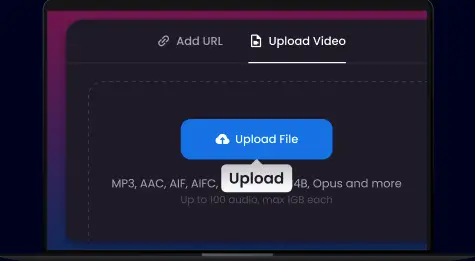
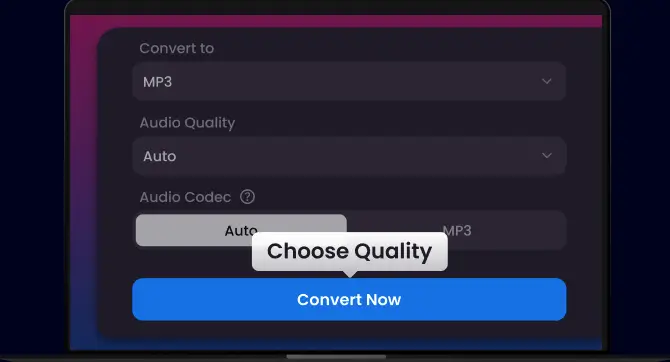
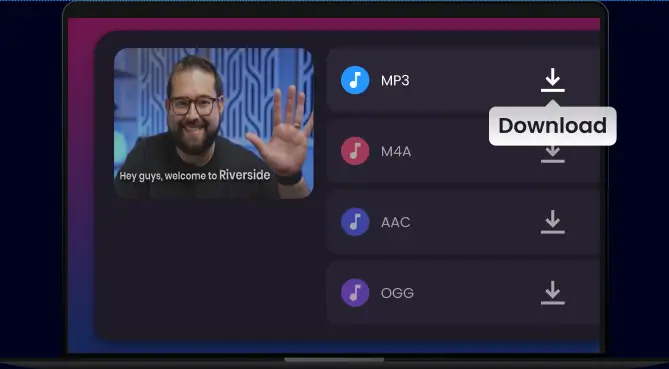
Converting MP4 to MP3 with Snappixify is simple and straightforward. Here’s a quick guide:
Conclusion
In 2026, Snappixify stands out as the best solution for anyone looking to convert MP4 videos to MP3 files with ease, speed, and top-tier quality. Unlike other converters that come with ads, limitations, and low-quality outputs, Snappixify offers a fast, ad-free, and hassle-free experience. Whether you’re converting large video files for a podcast, lecture, or music collection, Snappixify has you covered with unlimited file support, high-quality conversions, and compatibility across devices. It’s the ultimate tool for anyone who needs to convert MP4 to MP3 quickly and easily.
Ready to experience the best MP4 to MP3 converter of 2026? Visit Snappixify.com today and start converting your large files without the frustration!


