 Snappixify


In an era dominated by streaming giants, the desire for a permanent, offline collection hasn't faded. Whether you are a DJ looking for high-quality tracks, a content creator needing background scores, or a music lover heading into a dead zone, finding the best free mp3 music downloader is essential.
However, the internet is a minefield of "too good to be true" offers. To save you time and protect your devices, we’ve vetted the top options for every platform. Here is your definitive guide to best free mp3 music download site that are safe, legal, and high-quality.
Top Legal Sites for Best Free MP3 Music Downloads
Comparison of Top Legal Music Platforms
This table compares the three platforms based on their primary use case, library type, and how they handle downloads.
|
Platform |
Best For |
Content Type |
Download Format |
Key Advantage |
|
YouTube Audio Library |
Content Creators |
Background music & Sound effects |
Direct MP3 |
100% copyright-safe for YouTube videos; no "strikes." |
|
SoundCloud |
Music Discovery |
Indie, Remixes, & New Artists |
Direct MP3 (if enabled) |
Direct access to unique, underground, and non-mainstream tracks. |
|
Spotify |
Casual Listening |
Global Hits & Major Labels |
Encrypted Offline Files |
Largest library in the world; best for curation and playlists. |
How to Download Music from These Platforms
1. YouTube Audio Library
Designed specifically for creators who need high-quality, royalty-free music for their projects.
-
Step 1: Sign in to YouTube Studio.
-
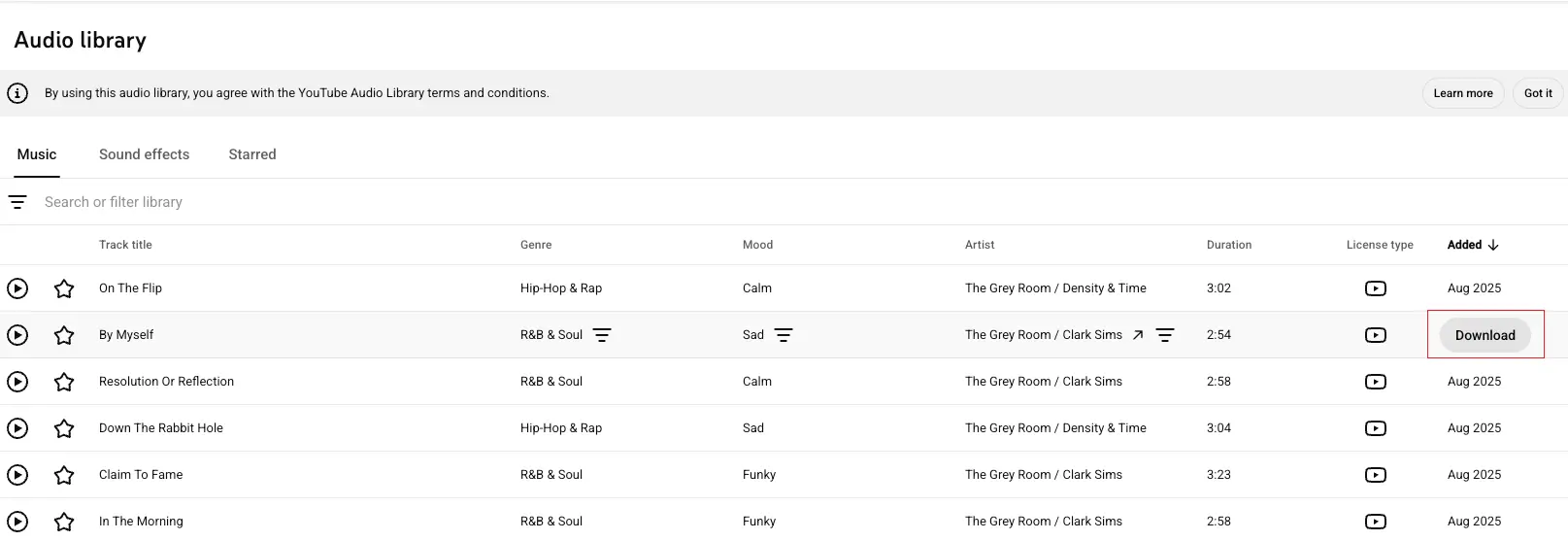
Step 2: From the left-hand menu, scroll to the bottom and select Audio Library.
-
Step 3: Use the filters (Genre, Mood, or Artist) to find a track. You can play a sample by clicking the "Play" icon.
-
Step 4: Hover over the date listed on the far right of the track, and a Download button will appear. Click it to save the MP3 directly to your computer.
2. SoundCloud
Case 1: Direct Native Downloads
Scenario: The artist has enabled downloads directly through SoundCloud's interface. This is the most seamless experience for the user.
-
Step 1: Log In: Ensure you are signed into your SoundCloud account. The download option is rarely visible to guests.
-
Step 2: Locate the Track: Navigate to the specific song you wish to save.
-
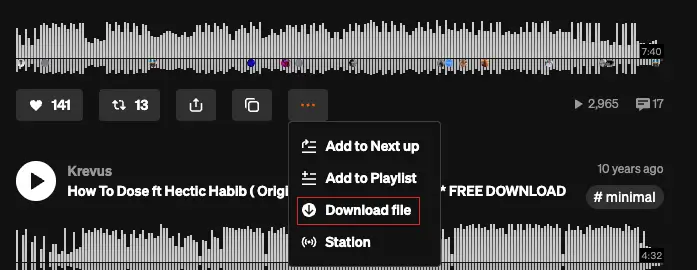
Step 3: Check the "More" Menu: Click the three dots (...) icon located below the waveform.
-
Step 4: Save the File: If permitted, "Download file" will appear in the dropdown. Click it to save the MP3 directly to your device.
Case 2: Third-Party Download Portals
Scenario: The artist uses a "Fan Gate" (like Hypeddit or ToneDen). This is common for independent artists who want to grow their social media following in exchange for the track.
-
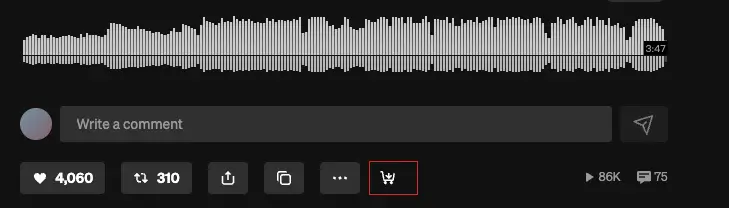
Step 1: Identify the Link: Look for a button that says "Free Download" or "Buy" (often labeled as "Free" in the description) instead of the standard SoundCloud download button.
-
Step 2: Redirect: Clicking this will take you to an external site (e.g., Hypeddit).
-
Step 3: Complete the Action: You will usually be asked to "Follow" the artist on SoundCloud or Spotify, or "Like" the track to unlock the download.
-
Step 4: Access the File: Once the social action is verified, the portal will provide the download link or email the file to you.
3. Spotify
It is important to understand that Spotify functions differently regarding "downloads."
-
For Premium Users: You can click the Download (downward arrow) icon on any album or playlist. This saves the music for offline listening within the app.
-
The Catch: You cannot export these files as MP3s to move them to a USB drive or other devices. They are encrypted files designed only for the Spotify player.
-
For Free Users: You can stream music with ads, but the "Download" feature for offline listening is not available.
Important Note on Attribution: Even on "Legal" sites, some tracks are protected under Creative Commons licenses. This means you are free to use the music, but you must credit the artist in your video description or project credits. Always check the license icon next to the track.
Key Factors to Consider When Choosing the Best Free MP3 Music Downloader
When selecting the Best Free MP3 Music Downloader, considering the following criteria is crucial to ensure a high-quality, safe, and efficient music download experience. Here’s a detailed breakdown of the key factors to look for:
1. Security and Reliability
Protection Against Malware: Ensure the downloader doesn’t bundle ads, malware, or viruses. Some unsafe download sites may secretly install unwanted plugins or even infect your device while you download files.
Privacy Protection: Opt for download tools that protect your personal data. Trusted sites use HTTPS encryption to ensure your data remains secure and is not compromised during the download process.
2. Multi-Platform Support
Compatibility: A good MP3 downloader should work smoothly across various operating systems and devices, including Windows, Mac, Android, and iOS. Multi-platform support ensures that you can enjoy offline music on any device.
Support for Multiple Sources: The downloader should support downloading from multiple mainstream platforms such as YouTube, SoundCloud, Spotify, Facebook, Instagram, TikTok, etc. This ensures you can access music from a variety of sources.
3. Download Speed and Stability
High-Speed Downloads: Download speed is a key factor in the user experience. Choose a tool that offers fast download speeds, especially for larger files, so you don’t waste time waiting.
Multi-Threading Support: Some downloaders support multi-threaded downloads, significantly boosting the speed, especially when the network connection is unstable, making it more reliable.
4. Audio Quality
High-Quality MP3 Format: Audio quality is a top priority for music downloaders. Ensure the tool supports high-quality audio downloads, such as 320kbps MP3, to provide the best listening experience.
Support for Other Audio Formats: While MP3 is the most common format, some tools also support other formats like FLAC, WAV, etc., catering to different user needs.
5. User Experience and Interface Design
Simple, Intuitive Interface: A user-friendly, easy-to-navigate interface enhances the experience. The tool should have a simple process, so even beginners can easily figure out how to use it.
Multi-Language Support: Multi-language support helps users from different linguistic backgrounds to easily use the downloader, especially if you're not familiar with English.
6. Batch Download Feature
Batch Download Support: For users who often need to download large amounts of music, the batch download feature is crucial. Choose a tool that allows you to download multiple files or entire playlists at once, saving time.
7. Ad-Free or Popup-Free
Ad Interference: Some free download tools may interrupt your experience with pop-up ads or intrusive banners. To enhance the user experience, it’s ideal to choose a tool that doesn’t have annoying ads or popups.
8. Technical Support and Updates
Frequent Updates: A top-quality MP3 downloader should be regularly updated to stay compatible with the latest music platforms, improve performance, and add new features.
Technical Support: Choose a tool that offers 24/7 customer support to resolve issues promptly if you encounter any problems.
9. Download Limits and File Size
No Download Limits: Some tools restrict the number of downloads or file size per day. Look for a downloader without these limitations, allowing you to freely download as much music as you want.
Support for Large File Downloads: If you plan to download a large volume of music or long audio files (e.g., albums, concerts), ensure the tool supports large file downloads without any issues.
Best Free MP3 Music Downloader for Mac and Windows
User Needs:
-
Wide platform support (YouTube, SoundCloud, Spotify etc.) for downloading MP3s.
-
High-speed, efficient downloads for large files.
-
Ad-free, simple interface for distraction-free use.
Why Snappixify Works:
-
Fast MP3 downloads without interruptions.
-
Clean, user-friendly interface with no ads.
Best Free MP3 Music Downloader for iPhone and Android
User Needs:
-
Mobile-optimized interface for quick and easy navigation.
-
Offline listening with fast MP3 downloads.
-
Simple file management for easy access and organization.
-
Safe and legal downloading, with no malware risks.
Why Snappixify Works:
-
Best MP3 music downloader for Android and iPhone, offering a seamless mobile experience.
-
Supports best free music downloads legally without the worry of ads or hidden costs.
-
Allows quick free MP3 music downloads for offline listening.
Conclusion
With the right tools and platforms, downloading music for free doesn't mean compromising on quality or legality. Whether you’re on Android, iPhone, or PC, trusted options like Snappixify allow you to enjoy unlimited music downloads securely, offering a hassle-free experience to expand your music collection without the risks. Stay informed, stay legal, and keep enjoying your favorite tracks.


