 Snappixify



Streaming music is great, but it comes with challenges like limited internet access or high data usage. Converting music files to MP3 solves this by letting you enjoy your favorite tracks offline, anytime, anywhere. MP3 is a widely supported format that works seamlessly across all devices, giving you freedom from constant streaming.
In this post, we’ll guide you on how to easily convert your music to MP3, providing a hassle-free way to keep your tunes with you at all times.
Why Snappixify Stands Out in Music to MP3 Conversions
Supports Over 400 Audio Formats
With support for 400+ formats like MP3, WAV, M4A, AAC, FLAC, OGG, AIFF, and WMA, convert your audio quickly and precisely.
Ad-Free Experience
Enjoy uninterrupted music! Convert MP3s at 320kbps without pop-ups, ads, or disruptions.
Offline Listening Anytime
Save your music and listen to it offline whenever you like. Perfect for travel, work, or daily commutes—no internet required.
Batch Conversion
Convert over 100 files at once! Streamline your process with fast and dependable batch conversions—ideal for large libraries or playlists.
Premium 320kbps Quality
Convert your music in crystal-clear 320kbps for a high-quality listening experience, whether online or offline.
Up to 10X Faster Conversions
Speed up your conversions by 10X! Enjoy instant music transfers with no delays or interruptions.
A Gentle Reminder: Honoring the Music We Love
Before we get into the tutorial, let’s talk about copyright. While converting files to MP3 makes it easier to enjoy music across different devices, we shouldn't forget the hard work behind every melody:
-
Support the Originals: Please only convert music from sources you legally own, such as digital albums you've purchased or physical CDs you already have.
-
For Personal Use Only: Keep those converted files for your own ears. Avoid uploading them to cloud drives for public sharing or using them for any commercial purposes.
-
Respect the Craft: By protecting copyright, we ensure that artists have the support they need to keep creating the songs we love.
How to Convert Music Files to MP3 from Music Platforms with Snappixify
Convert any song, podcast, or audiobook to MP3 online and get perfect sound quality and flawless ID3 metadata
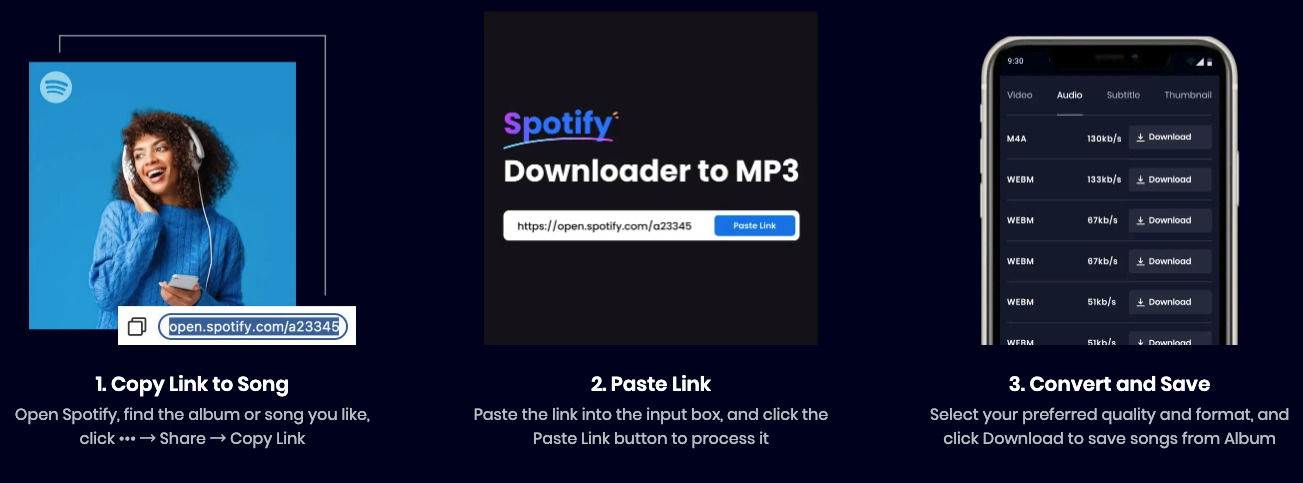
1. Copy Link to Song
Open Spotify, find the album or song you want, click the “•••” button, then choose “Share” and click “Copy Link.” This will copy the link to the song.
2. Paste Link
Paste the copied link into the input box of Snappixify. Click the “Paste Link” button, and the system will automatically process the link and prepare the song for conversion.
3. Convert and Save
Select your preferred quality and format. Click the “Download” button to save the song from the album as an MP3 file, ready for offline listening.
Convert playlist, song, and music to MP3 online in bulk, up to 320kbps quality
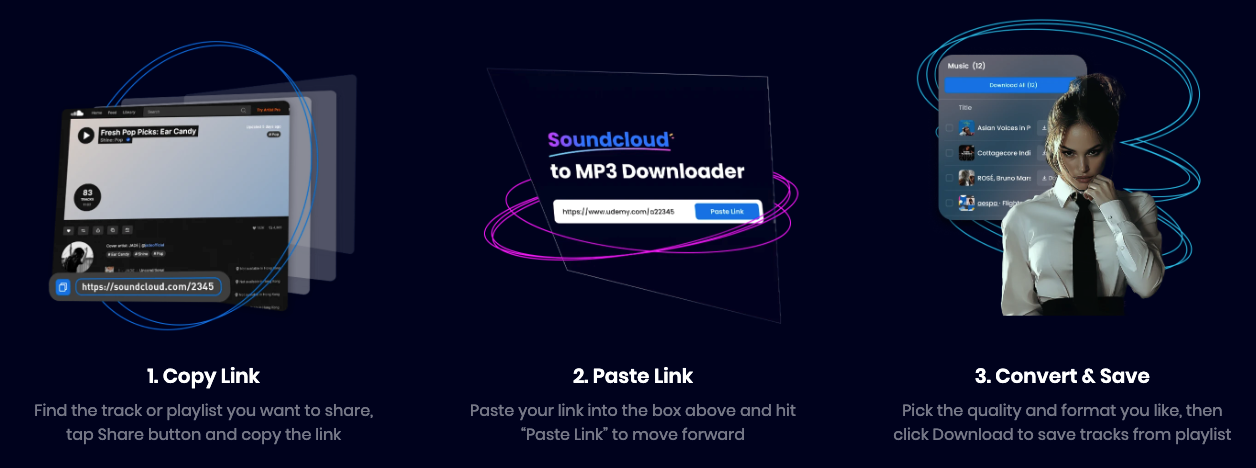
1. Copy Link
Find the track or playlist you want to share. Tap the “Share” button, then select “Copy Link” to copy the link to your clipboard.
2. Paste Link
Paste the copied link into the input box of Snappixify above and click the “Paste Link” button to proceed with the conversion process.
3. Convert & Save
Choose your preferred quality and format. Click “Download” to save the tracks from the playlist in MP3 format for offline listening.
Use Cases
Case 1: The Seamless Global Traveler
Pain Point:
No internet access during long-haul flights, high data roaming charges abroad, and unstable signals in remote destinations.
User Story:
Alex, a frequent international traveler, often spends 10+ hours on planes and explores remote areas with zero cell service. Relying on online streaming leads to constant buffering and expensive data bills.
The Solution:
Before heading to the airport, Alex uses a conversion tool to turn his favorite playlists into MP3s. He utilizes the Batch Conversions feature to save hundreds of tracks at once with 10X faster speeds.
Key Results:
Offline Independence: Full access to a personal library at 30,000 feet or in the middle of a desert.
Cost Efficiency: Saves money by avoiding premium "in-flight Wi-Fi" and international data roaming fees.
Universal Access: The files play on any device, from his smartphone to his laptop, without needing a specific app.
Case 2: The High-Performance Athlete & Minimalist
Pain Point:
Carrying a heavy smartphone during workouts, battery drain, and intrusive ads breaking the "flow" of a training session.
User Story:
The Solution:
Key Results:
Distraction-Free Focus: Zero ad interruptions or social media notifications during her run.
Ultra-Portable: Able to leave the phone at home while still enjoying high-fidelity sound.
Battery Longevity: Playing local MP3 files consumes significantly less power than streaming over LTE/5G.
Case 3: The Professional Content Creator
Pain Point:
Managing fragmented audio formats (WAV, AAC, M4A), software compatibility issues, and the need for organized metadata for editing.
User Story:
James is a video editor and podcaster who collects audio clips from various sources. With over 400 different audio formats in existence, his editing software often crashes or refuses to import specific files.
The Solution:
James uses a professional-grade converter to standardize all his incoming assets into high-quality MP3s. This ensures a smooth workflow regardless of the original file source.
Key Results:
Workflow Optimization: One-click conversion of 100+ files saves hours of manual troubleshooting.
Flawless Metadata: ID3 tags are preserved, making it easy to search for specific tracks or artists within his editing library.
Security & Stability: A clean, ad-free conversion process ensures his workstation remains secure and focused on the creative task.
FAQs About Convert Music Files to MP3
What is the best free MP3 converter?
Snappixify is an excellent free MP3 converter, offering quick and easy web-based conversion without the need for downloads. It ensures a smooth, ad-free experience with no extra steps.
Which is the safest MP3 converter?
Snappixify is a safe, ad-free online converter. Unlike many online tools that can have risky pop-ups, Snappixify prioritizes user security.
How can I convert and save free music to MP3?
Snappixify allows you to easily convert and save free music to MP3 without needing to sign up. It’s a fast and private way to enjoy your favorite music offline.
What is another name for MP3 file?
MP3 stands for MPEG-1 Audio Layer III, a widely used audio format developed by the Fraunhofer Society, known for its efficient compression and good sound quality.
What are the disadvantages of MP3 files?
MP3 files lose some sound quality due to compression, which may be noticeable on high-end audio systems. Additionally, MP3 doesn’t support high-resolution audio formats.
Conclusion
Whether you're a music lover, a content creator, or simply someone who wants to easily play music on any device, converting music files to MP3 format offers incredible convenience. With its widespread compatibility and efficient compression, MP3 has become the go-to format for audio files.
Using reliable conversion platforms like Snappixify, you can quickly and easily convert your files, ensuring high sound quality while maintaining manageable file sizes, allowing you to enjoy your music anytime, anywhere.
Start converting your music files today and say goodbye to format limitations, unlocking a world of seamless and portable listening enjoyment!


