 Snappixify


Meet the "Pioneer" of Music Downloading — MP3 Juice
Before music streaming subscriptions became the global norm, if you wanted to save a favorite track to your MP3 player, you almost certainly heard of MP3 Juice.
As a veteran free music search and download platform, MP3 Juice has stood the test of time thanks to its incredibly simple interface and powerful search capabilities. For many, it wasn't just a tool; it was their first introduction to converting YouTube videos into offline playlists. For early music enthusiasts, students, and aspiring video creators, MP3 Juice was once practically synonymous with "free music."
However, as we move through 2025, the demand for cybersecurity and high-fidelity audio has reached new heights, and this legacy downloading method is showing its age. Today, we are introducing a next-generation power tool: Snappixify—and exploring how it honors the classic experience while completely transcending it.
Deep Dive: MP3 Juice's Logic and Modern Shortcomings
A. How does it work?
In principle, MP3 Juice’s logic is very straightforward. It acts as a dedicated music search aggregator, integrating audio sources from platforms like YouTube, SoundCloud, VK, and Yandex Music. Users simply enter a song title or paste a video URL, and the system automatically crawls and generates download options.
B. Why is it still widely used today? (Pros)
Even with stiff competition, it retains a loyal user base due to several core advantages:
-
Completely Free: No subscription fees or hidden charges.
-
Zero Entry Barrier: It’s exceptionally easy to use; you only need to search for a song title to download audio or even the corresponding music video (MV).
-
Multilingual Search Support: Whether in English, Chinese, or other languages, its vast database provides accurate coverage.
-
No Registration Required: You can use it instantly without creating an account—a convenient feature for those who just want a quick, one-off download.
C. The Hidden Costs (Cons)
Frequent users of MP3 Juice eventually realize that the issue isn't whether it works, but how frustrating the experience can be:
-
Security Risks: Modern MP3 Juice sites survive via numerous mirror domains. Clicking "Download" often triggers redirects to intrusive ads or malicious scripts rather than starting your file download.
-
Audio Quality Bottleneck: Most downloads are capped at 128kbps. When played on modern high-quality headphones or speakers, the audio often sounds muffled and flat.
-
Fragmented Experience: Domains are frequently taken down due to copyright issues. A site you bookmarked today might be a 404 tomorrow, forcing you to constantly search for the latest "MP3 Juice new site."
Operation Guide: How to Download Audio Using MP3 Juice?
MP3 Juice was designed for speed. The core process is as follows:
-
Visit the Site: Open a currently active MP3 Juice mirror domain. A major plus is that it requires no registration and no software installation; everything happens in your browser.
-
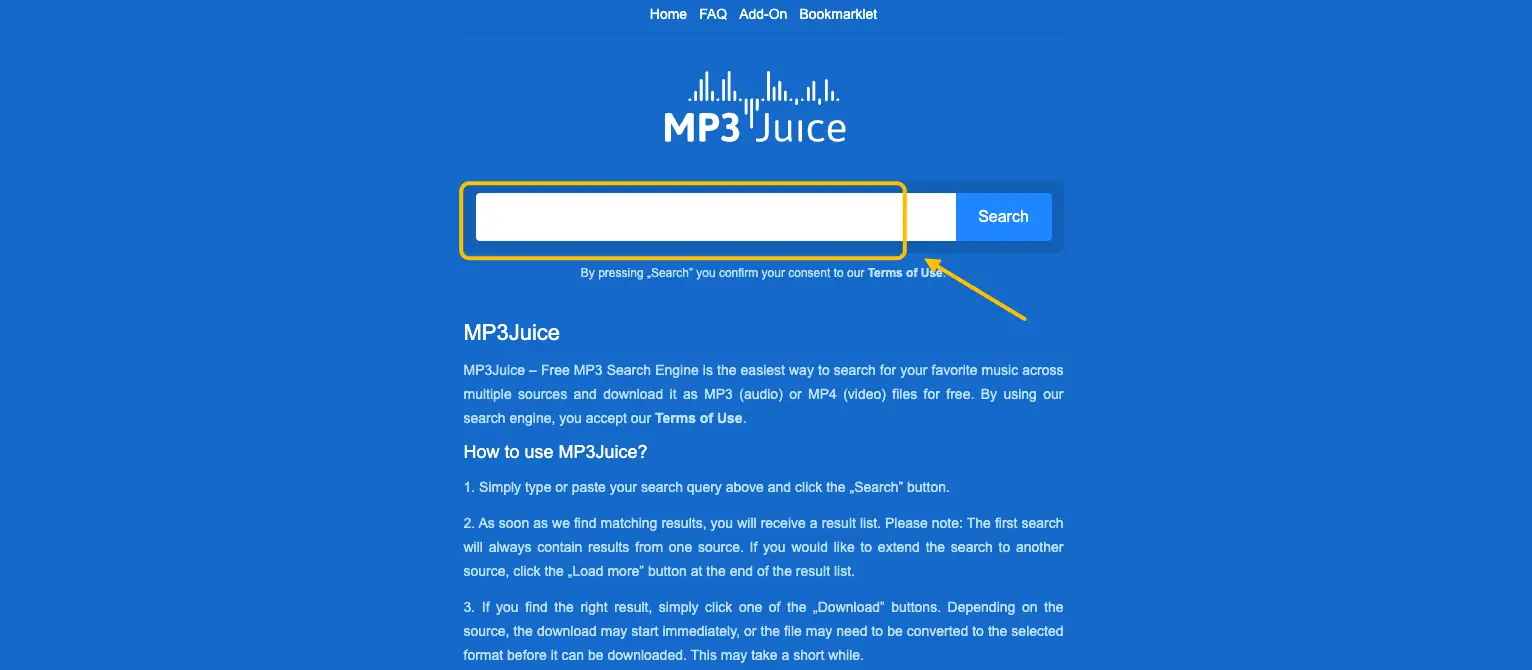
Enter Information: In the search box, you can directly type the song title, artist name, or paste a YouTube video URL.
-
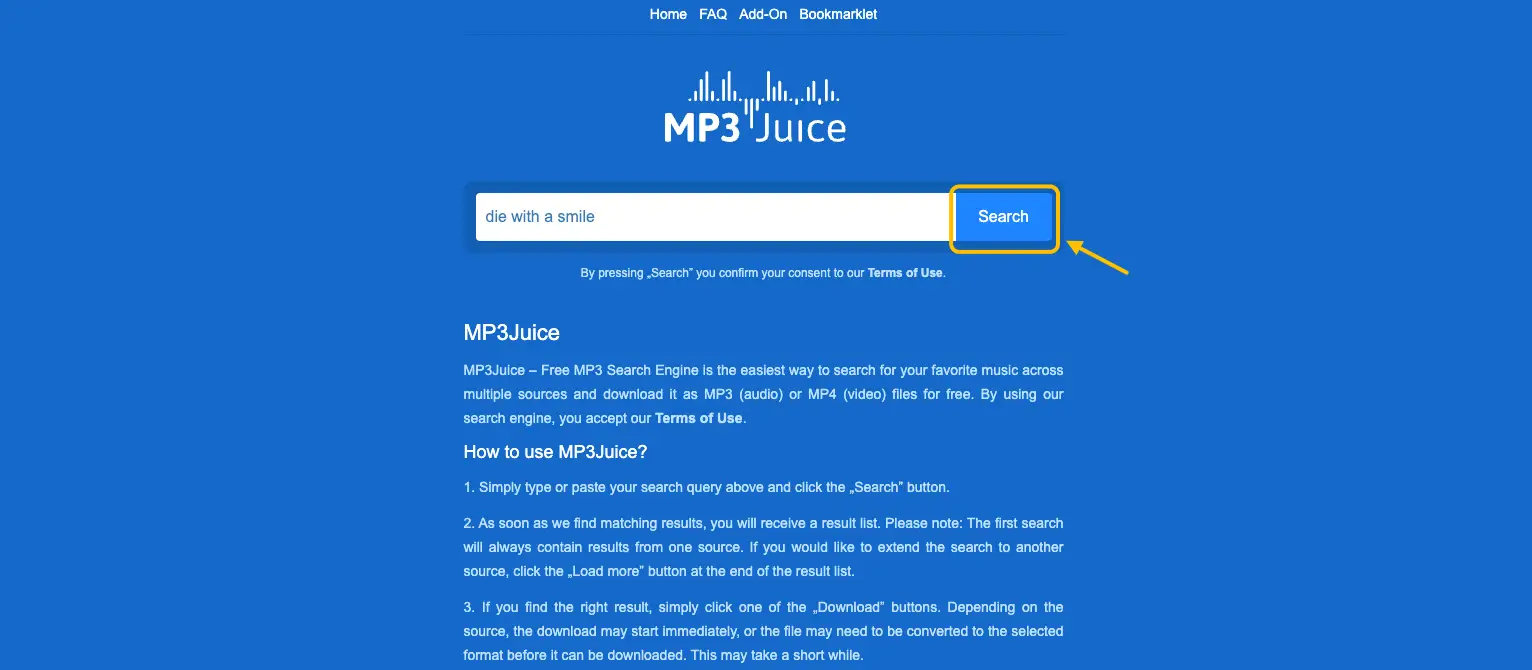
Start Search: Click the "Search" button, and the system will quickly pull relevant results from various platforms.
-
Choose Your Format: Find the version you want in the results list. From the available options, you can choose between MP3 or MP4 formats and select your preferred audio quality.

-
Click Download: Once you have made your selection, click the "Download" button to begin saving the file to your device.
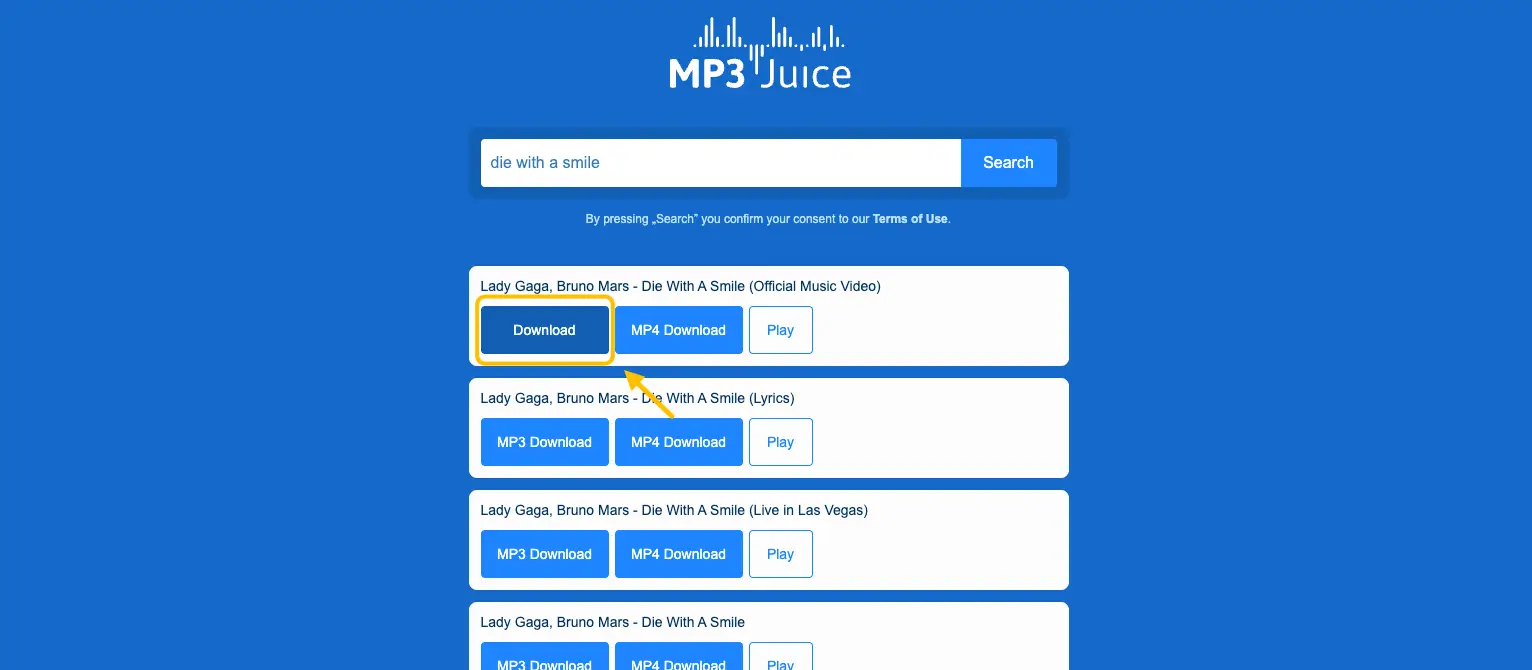
Pro Tips: While the process seems simple, be aware that clicking the "Download" button usually triggers 3 to 4 irrelevant pop-up ad windows. This constant redirection can be quite frustrating. We recommend staying patient and closing these pop-ups immediately until the actual download task is triggered.
Core Recommendation: Snappixify — Redefining the Experience
If MP3 Juice is an old-fashioned cassette tape, Snappixify is a high-definition digital audio terminal. It reconstructs the downloading experience from the ground up, ensuring you never have to sacrifice security or sound quality again.
The Snappixify Edge:
Quick Tutorial: How to Get Music Fast with Snappixify?
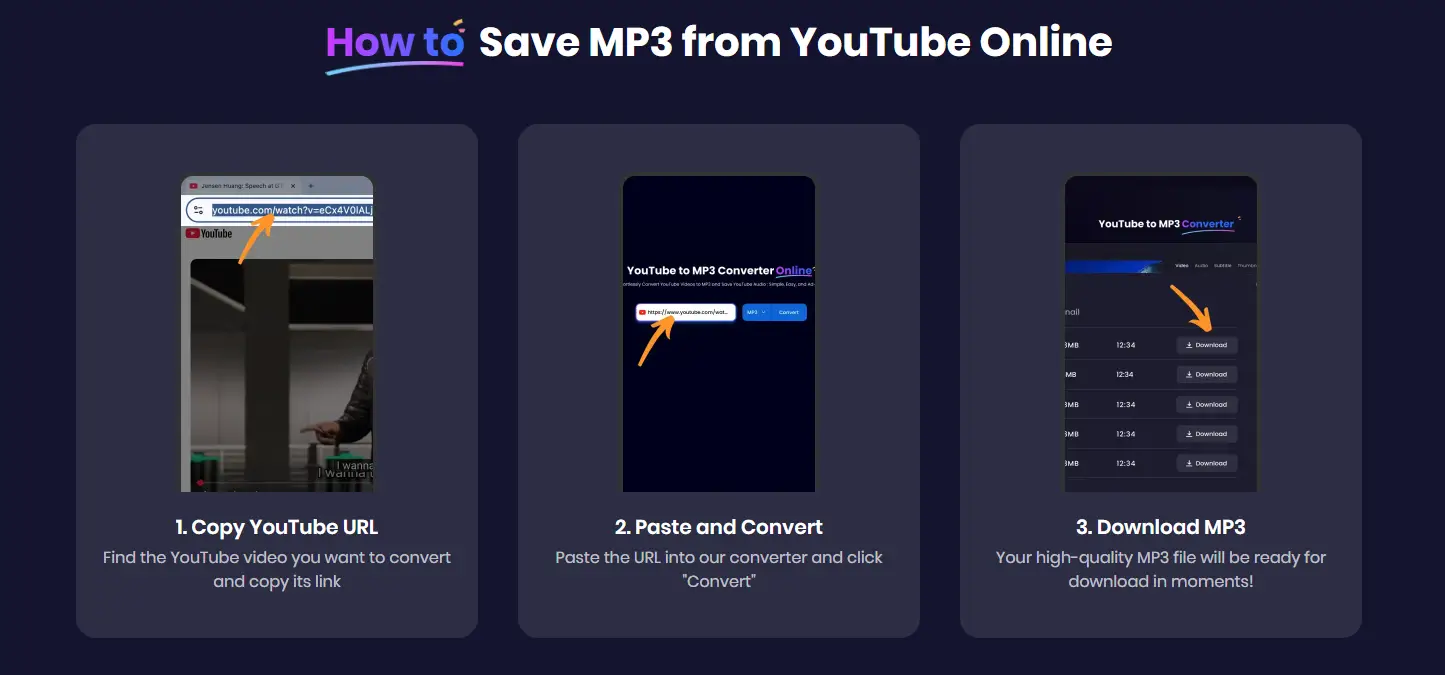
Snappixify optimizes the entire path into three simple steps: Copy Link → Paste → Download.
Path A: Extract Audio from YouTube Videos
-
Find the content you want to convert: either a single YouTube video or an entire playlist. Then, copy its URL.
-
Paste the URL into our converter and click "Convert"
-
Select your desired bitrate (e.g., 320kbps) and click download.
Path B: Download Spotify Tracks/Playlists
-
-
Copy the track or playlist link from Spotify.
-
Paste it into Snappixify.
-
Instantly analyze and save high-quality audio to your device—no recording necessary.
-
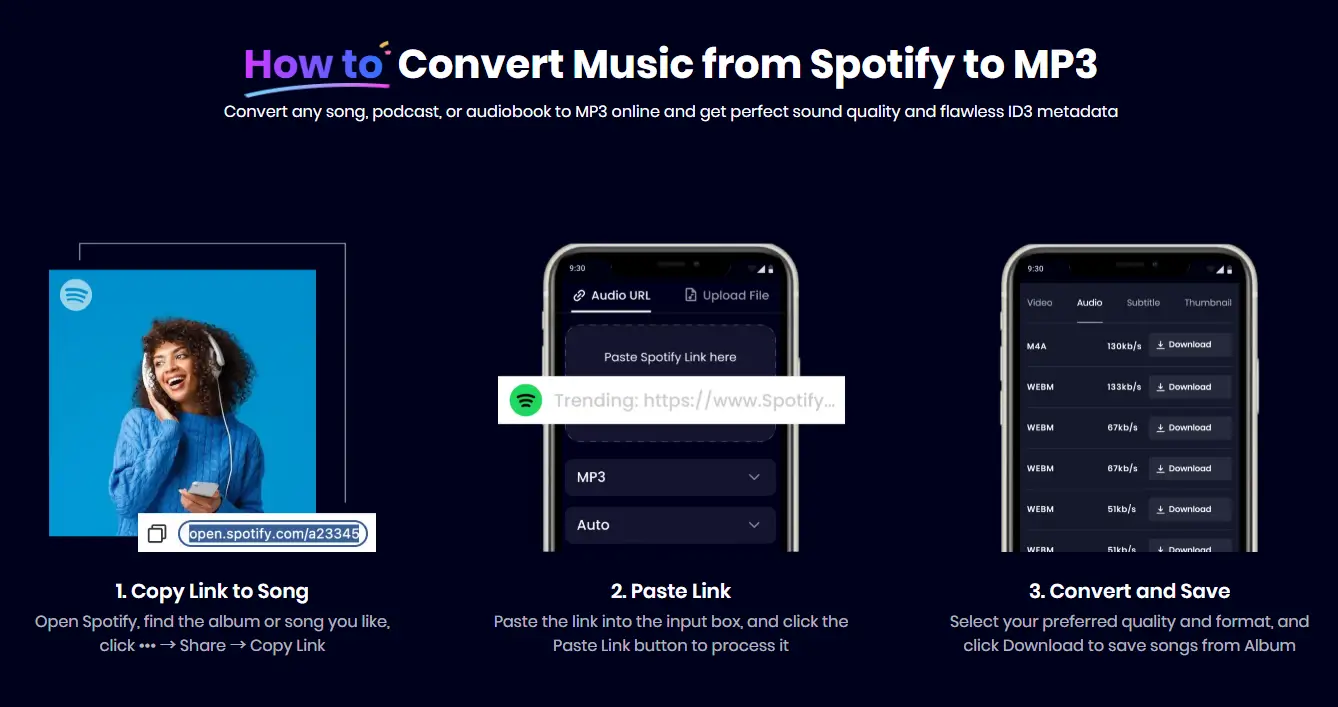
The Showdown: Snappixify vs. MP3 Juice
When put to the test, the gap between the two is undeniable:
|
Feature |
MP3 Juice (Mirror Sites) |
Snappixify |
|
Ads & Interruptions |
Severe (Constant Pop-ups) |
Zero Ads / Pure UI |
|
Max Audio Quality |
Usually 128kbps (Muffled) |
320kbps (High-Def) |
|
Security |
High Risk (Scripts/Redirects) |
High (Branded Protection) |
|
Batch Downloading |
Not Supported |
Supports Playlist Downloads |
|
Platform Support |
YouTube, SoundCloud, VK, Yandex |
Extensive — YouTube, Spotify, TikTok, Ins, etc. |
Conclusion: Choosing a More Efficient Lifestyle
MP3 Juice changed how a generation accessed music, and that legacy deserves respect. However, in 2025, we no longer need to endure intrusive ads and inferior sound quality just for "free" access.
Snappixify represents a safer, faster, and higher-quality choice that aligns with modern needs. If you are tired of navigating an "advertising jungle" just to find a download button, now is the perfect time to make the switch.
Stop worrying about pop-ups and low quality. Try [Snappixify] for free today and start your high-definition music journey!
FAQs About MP3 Converter
Q1: Is MP3 Juice safe? Does it have viruses?
Technically, it is a search tool, but the mirror sites it inhabits are high-risk. Many users report being redirected to malicious sites or prompted to install "security plugins" or "VPNs" that can drain battery life, slow down devices, or compromise privacy. If a site asks you to install an extra app, close it immediately.
Q2: Why do some MP3 Juice websites no longer work?
Due to strict DMCA (copyright) regulations, official domains are frequently shut down. The "clones" that replace them are often unstable, lack maintenance, or get blocked by browsers for security reasons.
Q3: Where can I safely download free MP3s?
For a stable and clean experience in 2025, Snappixify is the recommended choice. It provides a "brand-level" secure environment, keeping you safe from the "ad-jungle" typical of other sites.
Q4: What is the best free MP3 converter right now?
Snappixify is the top choice for 2025, combining speed, safety, and the ability to parse audio from nearly every major social and music platform.
Q5: What format are songs downloaded as with Snappixify?
Unlike Spotify’s native offline files (which use encrypted Ogg Vorbis and only work within their app), Snappixify offers total freedom. You can download tracks in MP3, M4A, WAV, or even lossless FLAC for the best possible listening experience on any device.


