 Snappixify


The NBA season is heating up! From the Warriors vs Thunder showdown to the Nuggets vs Kings Western clash and the Grizzlies vs Knicks thriller — every matchup has delivered non-stop excitement. Each game has those highlight-worthy moments you just can’t get enough of.
But here’s the struggle many basketball fans and content creators face: You record or download a highlight clip — only to find it won’t open on your phone, can’t be uploaded to Instagram, or takes forever to share because it’s just too big.
That’s where Snappixify changes the game — an online clip converter built for speed and simplicity. Instantly convert and compress your favorite basketball highlights, ready to share before the next play even starts.
Why Converting Clips to MP4 Matters for Basketball Fans
1. Sharing Across Platforms — Fast, Compatible, and Social-Ready
Let’s say you captured game highlights in Warriors vs Thunder. You’re hyped and ready to post it on TikTok — but it’s a massive 4K file and TikTok won’t take it.
Common issues:
-
The video exceeds the upload limit.
-
It takes forever to load or gets stuck halfway.
-
The resolution or format isn’t supported.
With Snappixify:
-
Smart compression presets reduce 4K files to 1080p or 1440p while maintaining impressive clarity.
-
Optimized H.264/H.265 encoding ensures your video is smaller but still looks smooth and detailed.
-
Instantly generate social-friendly versions ready for TikTok, Instagram Reels, or YouTube Shorts.
2.Preparing for Editing — Turn Raw Clips into Stunning Highlight Reels
If you’re editing a Nuggets vs Kings highlight mix, choosing the right format is the first step toward smooth, professional-looking results. But not all clips are ready to edit straight away.
Common problems:
-
Some formats like
.webmor.flvwon’t open in editors like Premiere Pro, Final Cut, or DaVinci Resolve. -
Converting files multiple times causes noticeable quality loss and frustrating delays.
How Snappixify helps:
-
Seamlessly converts any file —
.mov,.avi,.wmv,.mkv, and more — into an editor-ready MP4 format. -
Maintains crisp detail with lossless conversion options.
-
Ideal for fans who love making recap videos, social highlight edits, or even YouTube game commentary.
How to Use Video Clip Converter for Basketball Game Highlights
When it comes to converting basketball highlights, Snappixify isn’t just another online tool — it’s a powerful, all-in-one clip converter built for fans, creators, and editors who care about both quality and convenience.
Why users love Snappixify
-
Lightning-fast conversion: Upload, convert, and download within seconds — even for large 4K game recordings.
-
Fully browser-based: No installation, no plugins, and zero ads — it runs smoothly on PC, Mac, or mobile.
-
Smart compression engine: Reduce file size without sacrificing image sharpness or smooth motion.
-
Universal format support: Whether it’s .mov, .avi, .mkv, or .wmv, Snappixify instantly converts it into a highly compatible MP4 format.
-
Audio-only option: Extract the best game commentary or post-game interviews in M4A format — perfect for podcast creators.
How to Use Snappixify (Step-by-Step)
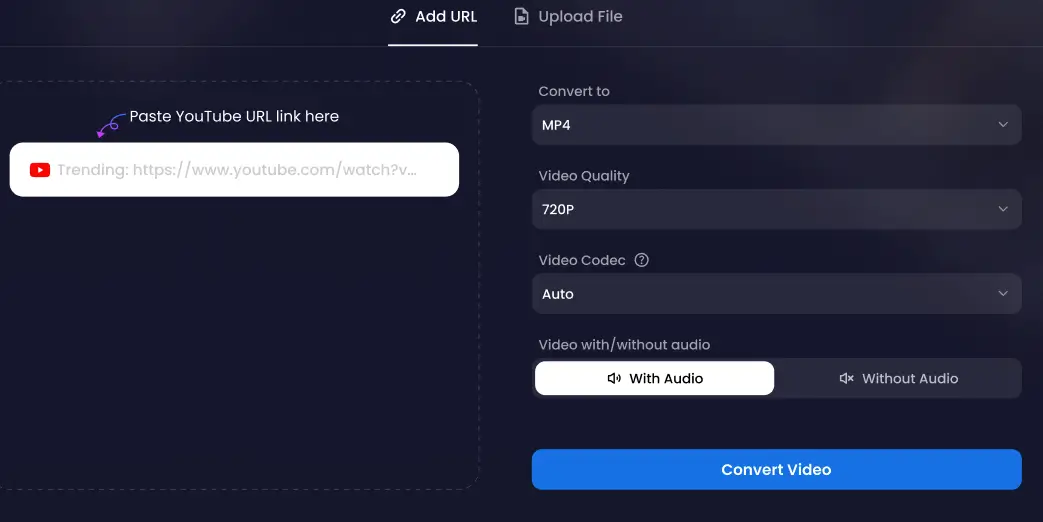
Visit snappixify.com in your browser:
Upload your basketball video — for example, Warriors vs Thunder highlights or your own court-side recording.
Select your target format:
MP4 for video (best compatibility and performance)
M4A if you only need the audio portion
Customize your output:
Choose resolution (1080p, 720p, or 480p)
Adjust bitrate to balance between quality and file size
Click “Convert” — in just a few seconds, your clip will be ready to download and share.
With Snappixify, turning your favorite basketball moments into crisp, shareable clips has never been easier. No waiting, no software, no hassle — just upload, convert, and share your game highlights anytime, anywhere.
Extra Features That Make Snappixify Stand Out
-
Batch Conversion: Easily convert multiple clips from different games all at once, saving you time and effort.
-
100% Online and Secure: Fully browser-based with no software installation required, so you never have to worry about malware or storage issues.
-
Wide Format Support: Compatible with all popular video and audio formats including MP4, MOV, AVI, WMV, M4A, and many more.
-
Intelligent Audio Extraction: Effortlessly convert game interviews, commentaries, or podcasts from video files into standalone audio tracks.
-
Privacy by Design: Your files are fully encrypted during upload and processing, and automatically deleted after conversion, so your basketball clips stay private and secure at all times.
-
AI-Powered Optimization: Snappixify automatically balances bitrate, resolution, and codec to produce the smallest file sizes without sacrificing quality — ideal for quickly uploading full games or highlight reels.
Final Thoughts — Keep Your Basketball Passion Alive
Every shot, every pass, every buzzer-beater deserves to be remembered.
Snappixify removes the technical barriers that stop fans from enjoying or sharing their favorite NBA moments.
Whether you want to replay Warriors vs Thunder’s final seconds or create your own Nuggets vs Kings highlight reel, Snappixify gives you the power to convert, compress, and share with zero hassle.
Visit Snappixify.com today — relive your basketball highlights anytime, anywhere.
Common Questions About Clip Converter
Is Clip Converter free to use?
Yes, Snappixify's Clip Converter offers free video and audio conversion services without requiring software installation.
Which websites does Clip Converter support?
It works with many videos from popular platforms such as YouTube, Facebook, and Instagram.
What formats can I convert videos to?
Common formats include MP4 (video), MP3 (audio), AVI, MOV, and others, depending on the original content.
Can I convert videos in HD quality?
Yes, Snappixify's Clip Converter can convert videos in HD quality if the source video is available in HD.
How long does the conversion take?
Conversion time depends on the video length, your internet speed, and server load but usually takes just a few minutes.
Can I convert multiple videos at once?
Most online converters, including Snappixify's Clip Converter, typically support batch video conversion at a time.


