 Snappixify


Finding a reliable way to convert OGG audio files to MP3 can be frustrating. As many users on Reddit and tech forums have pointed out, the internet is full of "dodgy" websites and software that promise free conversions but come bundled with malware or intrusive ads.
Whether you have personal recordings you want to share with family or a music library that isn't playing nice with your car stereo, this guide will show you how to get the job done—safely and easily.
What is an OGG File?
OGG is a high-quality, open-source audio container format designed to provide efficient streaming and high-quality digital multimedia.
High Quality, Small Size
It uses advanced compression (primarily the Vorbis codec) to deliver better sound quality than MP3 while maintaining a smaller file size.
Open-Source & Royalty-Free
Unlike many other formats, OGG is completely free for anyone to use, making it a favorite for developers and independent creators.
The Gamer's Choice
Because it supports seamless looping and takes up very little memory, it is the industry standard for background music and sound effects in video games.
Versatile Use
Beyond music, it is widely used in web applications and mobile apps to reduce data usage without sacrificing audio clarity.
Why Converting to MP3 is Often the Smarter Choice
While audiophiles often praise OGG Vorbis for delivering superior sound quality at lower bitrates, the MP3 format remains the undisputed industry standard. If you’re struggling with files that won't play, here is why converting OGG to MP3 is a game-changer.
Universal Compatibility: Play Your Music Anywhere
The biggest drawback of OGG is its limited support. MP3 is the universal language of digital audio. Whether you are using a vintage iPod, a modern car stereo, or the latest smart TV, MP3 guarantees your files will work without needing specialized software or plugins.
Seamless Sharing: Ensure Your Files Always Just Work
As many users on platforms like Reddit have noted, sharing OGG files often leads to technical headaches for the receiver. By converting OGG to MP3, you eliminate the "I can't open this" follow-up message. It’s the safest, most reliable format for sending audio to family, friends, or clients.
Optimized for Every Device: The Practical Standard
While both are lossy audio formats, MP3’s massive ecosystem makes it more efficient for everyday use. Most hardware-based decoders are specifically optimized for MP3, meaning it often consumes less battery power on mobile devices compared to processing less common formats like OGG.
The Easiest Way to Convert OGG to MP3 Online
While OGG files offer great sound quality at smaller sizes, they often struggle with compatibility on standard media players and mobile devices. If you've ever tried to play a voice note or a rare track only to be met with an "Unsupported Format" error, you know the frustration.
Snappixify is designed to bridge this gap, offering a seamless, browser-based solution to transform your audio files in seconds.
Why Choose Snappixify for Your Conversions?
-
Platform Independence
-
Batch & Multi-Format Mastery
-
Privacy First
How to Convert OGG to MP3 in 3 Simple Steps?
1. Upload Your Audio
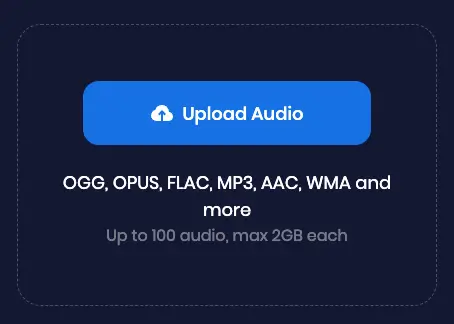
Start by bringing your files into our ecosystem. You can:
-
Drag and Drop: Move your OGG files directly from your folder into the upload zone.
-
URL Support: Paste a direct link from supported social media platforms.
-
Versatile Content: From high-fidelity music tracks and long-form podcasts to short voice notes and gaming sound effects, we handle it all.
2. Set Output Preferences
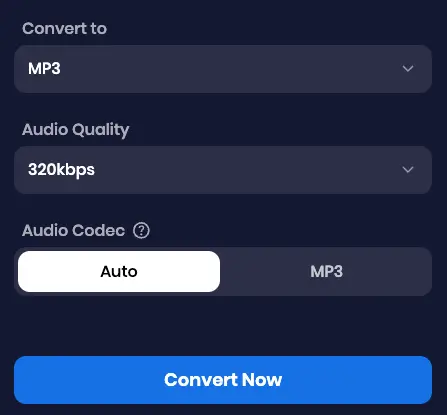
Customization is key to getting the perfect sound. Once your file is uploaded:
-
Select MP3: Choose MP3 as your target format for maximum compatibility.
-
Adjust Bitrate: Fine-tune your audio quality. Choose 320kbps for crystal-clear music or a lower bitrate (like 128kbps) to save storage space for simple voice recordings.
3. Convert & Download
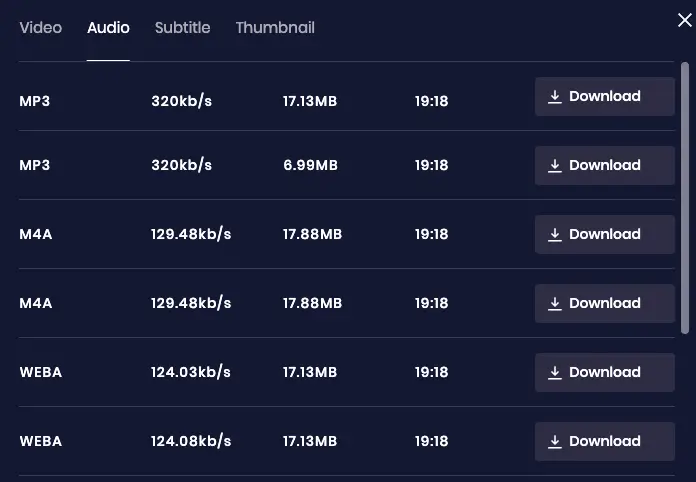
Hit the Convert button and watch our high-speed engine work its magic.
-
Instant Processing: Most conversions finish in under 30 seconds.
-
Universal Saving: Once ready, download your high-quality MP3 directly to your device. Whether it’s your Windows PC, Mac, or your mobile music library, your audio is now ready to play anywhere.
FAQs About Converting OGG to MP3
1. Does converting OGG to MP3 reduce quality?
Yes, technically it does. Both OGG and MP3 are lossy formats, meaning they discard data to reduce file size. When you convert from one lossy format to another (transcoding), you undergo "generation loss."
However, Snappixify uses advanced encoding algorithms to minimize this impact. If you use a high bitrate (like 320kbps) during the conversion in Snappixify, the quality loss is usually imperceptible to the human ear.
2. What is the best free OGG to MP3 converter?
While there are many tools available, the "best" one balances speed, privacy, and ease of use. Snappixify is a top contender because it offers a seamless, browser-based experience without the need to install heavy software. It’s designed to be lightweight and fast, making it ideal for users who need high-quality results instantly.
3. What are the disadvantages of OGG?
While OGG is an excellent format, it has two main drawbacks:
-
Compatibility: Many older car stereos and some Apple devices do not support OGG files natively.
-
Standardization: MP3 is the global standard. If you are sharing audio for a podcast or a professional project, OGG might require the recipient to download extra codecs.
4. Is OGG better quality than MP3?
At the same bitrate, OGG (Vorbis) is generally superior to MP3. It handles complex frequencies better and doesn't suffer from the same "clipping" issues at lower bitrates. This is why many streaming services, like Spotify, use OGG. However, because MP3 is so universal, most people prefer to convert their OGG files to MP3 using Snappixify to ensure they can play their music anywhere.
5. What is the highest quality audio format?
The highest quality formats are Lossless formats, such as WAV, FLAC, or ALAC. These formats contain 100% of the original audio data.
-
FLAC is the favorite for audiophiles because it provides CD-quality sound at a smaller file size than WAV.
-
Note: If you start with an OGG file, converting it to FLAC won't "fix" the quality—it will just preserve what is already there.
6. Which is the safest MP3 converter?
The safest converters are those that process files without storing them permanently or requiring suspicious "plug-in" downloads. Snappixify prioritizes user security by using encrypted connections and ensuring that your files are processed and then deleted from our servers shortly after. We don't bundle malware or bombard you with intrusive pop-up ads, which is a common risk with many older "free" converter sites.
Conclusion
You don't need a technical degree to manage your audio files. Whether you're on Windows, Mac, or Linux, Snappixify simplifies the process, allowing you to convert OGG to MP3 in just a few clicks. It’s the secure, hassle-free alternative to bulky desktop converters.
Give Snappixify a spin and get your files ready for any device in seconds!


