 Snappixify


In an era of high-definition content, many users find themselves needing to convert large MP4 files to MP3 format. Whether it's a recorded webinar, a lengthy podcast video, or a concert film, the MP3 format offers a much more compact alternative. By stripping away the video data, you create a lightweight audio file that is ideal for saving storage space and ensuring smooth playback across all your devices.
Navigating file size limits can be frustrating. In this guide, we will show you exactly how to convert large MP4 files to MP3 online for free, featuring powerful tools like Snappixify that are specifically designed to handle heavy lifting without costing you a penny.
Why Choose MP3 Format for Your Large Files?
Drastic Space Savings
MP3 files are significantly smaller than MP4s. Converting a multi-gigabyte video into a high-quality audio file allows you to manage your library more efficiently without cluttering your hard drive.
Universal Compatibility
While MP4 is a standard for video, MP3 remains the undisputed king of audio. It is natively supported by every smartphone, car audio system, and streaming platform in existence.
How to Choose the Right MP4 to MP3 Converter for Large Files
Prioritize File Size Capacity
Not all converters are created equal. When dealing with high-res videos, it is essential to select a large file MP4 to MP3 converter like Snappixify that won't crash mid-process or impose hidden "premium" limits on file size.
Online vs. Offline Tools
Online tools offer the ultimate convenience for quick tasks. However, many online platforms struggle with big data—this is where a dedicated MP4 to MP3 converter online for large files becomes essential to ensure the process doesn't time out.
Top Free Online Tools: Snappixify
No Size Limits for Large Files
Unlike other platforms that cap uploads at 100MB, Snappixify removes these restrictions, enabling you to convert large MP4 files to MP3 without worrying about file size. This makes it perfect for handling high-definition video sources effortlessly.
Fast and Easy Conversion
With Snappixify, the conversion process is lightning-fast. You can convert MP4 files to MP3 in just a few clicks, saving you time while ensuring high-quality results.
No Ads or Watermarks
Enjoy a smooth, uninterrupted experience with zero ads and no watermarks. Snappixify provides a clean, user-friendly interface, allowing you to focus solely on your task.
High-Quality Audio Output
Snappixify ensures studio-quality MP3 audio, with output up to 320kbps, so you get the best sound quality from your converted files.
Browser-Based Convenience
Accessible directly from your browser, Snappixify works seamlessly across multiple platforms, including Chrome, Safari, Opera, Edge, and Firefox, without requiring any software downloads or installations.
Step-by-Step Guide: How to Convert Large MP4 Files to MP3 Online Free
Select Snappixify
Start by choosing a reliable MP4 to MP3 online free tool like Snappixify that explicitly supports large file uploads.
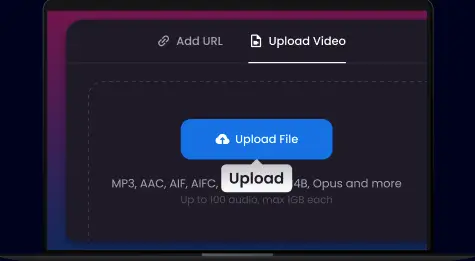
Upload Your MP4 File
Click the "Upload" button. Depending on your internet speed, large files may take a moment to sync with the server.
Choose MP3 Output
While MP3 is usually the default, ensure you select a high bitrate (e.g., 320kbps) if you want the audio to remain crisp.
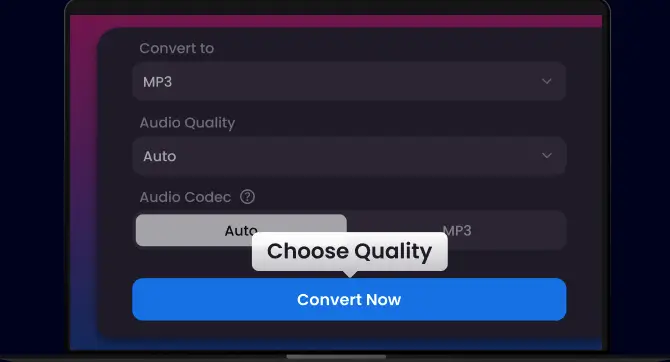
Initiate Conversion
Click the "Convert" button. The tool will strip the video track and encode the audio.
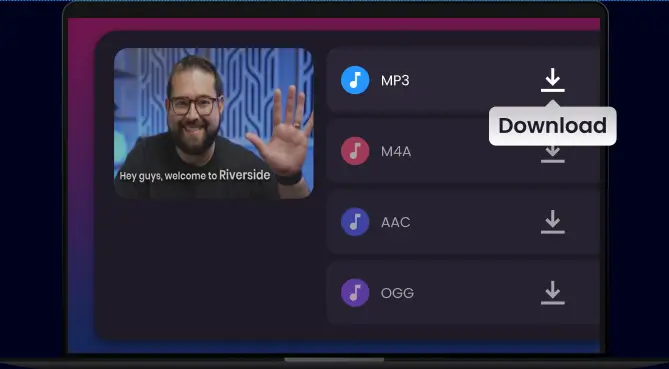
Download and Save
Once the status bar hits 100%, download your new MP3 file directly to your device.
FAQs About MP4 to MP3 Conversion
How can I convert a large MP4 file to MP3 without quality loss?
The key to preserving audio integrity is the bitrate. When you use Snappixify, our converter allows you to select high-fidelity output settings (up to 320kbps). This ensures that even when the heavy video data is removed, the resulting MP3 remains rich, clear, and professional-grade.
Can I truly convert large MP4 files to MP3 for free?
Absolutely. Snappixify provides a dedicated "MP4 to MP3 online free" service designed specifically for large files. Unlike other tools that hide their best features behind a paywall, we allow you to process substantial video files without hidden fees, watermarks, or mandatory subscriptions.
What if my MP4 file is exceptionally large?
Many browser-based tools crash when a file exceeds a few hundred MBs. Snappixify is optimized for stability; it’s an MP4 to MP3 converter online for large files that offers robust support for heavy uploads. If you’re dealing with ultra-large 4K video files, our cloud-processing ensures the conversion stays smooth and your browser remains responsive.
Is it safe to upload my videos to Snappixify?
Your privacy is our priority. All files uploaded to Snappixify are processed through an encrypted connection and are automatically purged from our servers after the conversion is complete. No one has access to your files but you.
Do I need to install any software or plugins?
Not at all. Snappixify is a fully web-based solution. Whether you are on Windows, macOS, Linux, or using a mobile device, you can extract audio from your MP4s directly through your browser without cluttering your hard drive with unnecessary apps.
How long does the conversion process take?
While file size and your internet speed play a role, Snappixify uses high-speed server-side processing. Most conversions are completed in a matter of seconds, allowing you to download your audio file and get on with your day.
Summary
When you need to convert large MP4 files to MP3, the key is choosing a tool that balances speed with capacity. We recommend Snappixify as a top-tier MP4 to MP3 converter for large files because it is free and supports unlimited large file uploads.


