 Snappixify


Have you ever stumbled upon an incredible DJ set, an insightful podcast, or a rare acoustic performance on YouTube and wished you could keep it in your pocket?
For many iOS users, the challenge isn't just finding the content—it's finding a way to convert youtube to m4a that is safe, high-quality, and easy to manage offline. If you’ve been searching for a youtube to m4a converter that won't compromise your device's security or your audio's clarity, you're in the right place.
Why Should You Convert YouTube to M4A?
While video is great, audio is often more practical. Users frequently look to convert from youtube to m4a for several key reasons:
iPhone Optimization
M4A is the native format for Apple’s ecosystem. It integrates seamlessly with Apple Music and the Files app.
Storage Efficiency
A youtube video to m4a converter allows you to save the essence of a 2GB video in a fraction of the space, perfect for users with limited iPhone storage.
Offline Convenience
Whether you are on a long flight or commuting through a tunnel, having your files locally means your music never stops.
M4A vs. MP3: Which One is Better?
While "YouTube to MP3" is a common search, M4A (AAC) is often the superior technical choice, especially for users within the Apple ecosystem or those prioritizing audio fidelity.
1. Comparison Table: M4A vs. MP3
|
Feature |
M4A (AAC) |
MP3 |
|
Sound Quality |
Superior. Provides better transparency and detail than MP3 at the same bitrate. |
Standard. Noticeable loss in high-frequency detail due to older compression. |
|
Architecture |
Modern. The official successor to MP3, designed for higher efficiency. |
Legacy. A 30-year-old format that lacks modern encoding optimizations. |
|
Metadata |
Reliable. Handles album art, lyrics, and track info seamlessly in iTunes/macOS. |
Flexible but Aging. Uses ID3 tags which can occasionally glitch or lose formatting. |
|
File Size |
Smaller. Achieves better quality with a smaller footprint than a high-quality MP3. |
Larger. Requires higher bitrates (and larger files) to match M4A quality. |
|
Compatibility |
Great. Native to all Apple devices, modern browsers, and Android. |
Universal. Plays on virtually every digital device ever made. |
2. Why Choose M4A?
Better Performance:
As frequently noted on Reddit's "YouTube to M4A" threads, M4A uses Advanced Audio Coding (AAC) to provide "CD-quality" sound at lower bitrates.
Future-Proof:
M4A is the standard for platforms like YouTube and Apple Music. Converting to MP3 often involves a "transcoding" process that actually lowers the quality further.
Optimized for Mobile:
If you use an iPhone or Mac, M4A is the native language of your device, ensuring better battery life and smoother library management.
How to Convert YouTube to M4A with Snappixify
If you need a reliable online youtube to m4a converter, Snappixify offers a streamlined, "no-install" experience. Here is how to use it:
Copy the URL:
Find the video on YouTube and copy the link from your browser or the "Share" button.
Paste & Search:
Go to Snappixify and paste the link into the converter youtube to m4a input field.
Select M4A:
Choose M4A from the dropdown menu to ensure you get the best format for your iPhone.
Convert and Save:
Click the Convert Now button. The tool will extract the audio track in seconds. Save the file directly to your device.
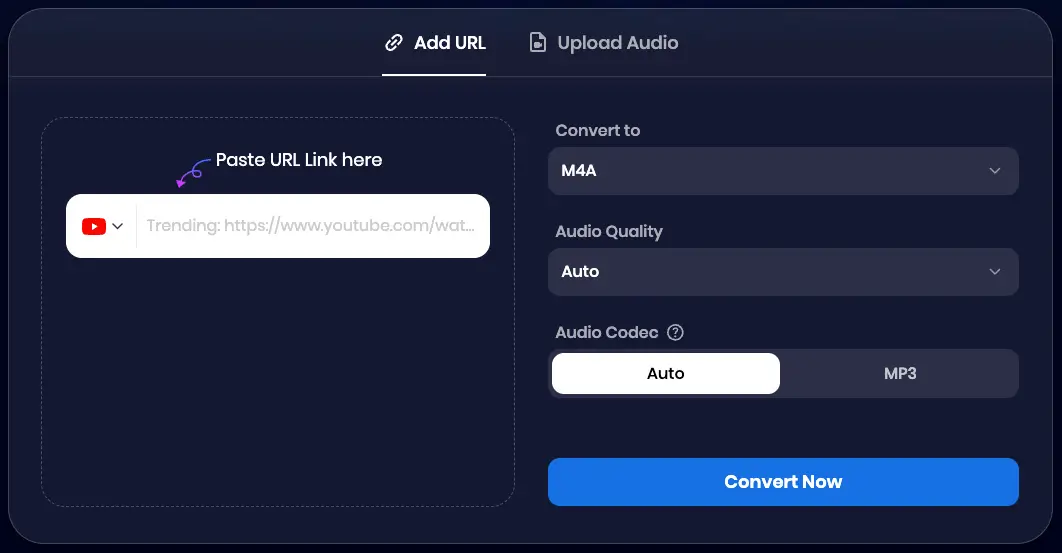
Note: You can also upload audio or video files to Snappixify for direct online conversion to M4A!
Why Snappixify is the Best Choice for YouTube to M4A
Not every youtube video converter to m4a is created equal. Snappixify addresses the most common user pain points:
Safety First:
Unlike many "free" sites, Snappixify avoids malicious pop-ups and forced software installs, making it a safe convert youtube to m4a online solution.
High Fidelity:
It captures the highest available audio stream, so you don't lose the crispness of the original upload.
Cross-Platform:
Whether you need to convert youtube video to m4a on a PC, Mac, or directly on your iPhone, the interface adapts perfectly.
FAQs about Converting YouTube to M4A
Is it safe to use an online YouTube to M4A converter?
Absolutely. Safety is our priority at Snappixify. Unlike desktop software that may require risky .exe or .dmgdownloads, our tool is 100% web-based. You get high-quality audio conversions directly in your browser without compromising your device's security.
Can I play M4A files on my iPhone without iTunes?
Yes, easily! Once you convert your video with Snappixify, simply save the M4A file to your Files app. You can play it instantly using the native iOS player, share it via AirDrop, or import it into your favorite third-party music apps—no cables or iTunes syncing required.
Why choose M4A over MP3 for my Mac?
M4A is the gold standard for the Apple ecosystem. It uses the AAC codec, which provides superior sound quality at a smaller file size compared to MP3. For Mac users, Snappixify’s M4A output ensures your library stays lightweight while maintaining crisp, high-fidelity audio.
How do I download YouTube in audio format?
Using Snappixify is a simple three-step process:
-
Copy the YouTube URL you want to convert.
-
Paste the link into the Snappixify search bar and select M4A as your format.
-
Hit Convert and download your high-quality audio file in seconds.
Is it legal to extract audio from YouTube?
It is legal to extract audio from YouTube content that is not protected by copyright, falls under Creative Commons licensing, or is your own original creation. We always recommend respecting the rights of content creators and using Snappixify for personal, fair-use purposes.
Conclusion
Mastering how to convert youtube to m4a is the best way to build a high-quality, offline audio library for your Apple devices. By choosing the right format and a secure youtube to m4a converter like Snappixify, you can enjoy your favorite content without worrying about data usage or internet connectivity.
Ready to start your collection? Paste your first link into Snappixify today and experience the best way to youtube video to m4a converter technology!


