 Snappixify




In today's streaming-driven world, YouTube stands as the go-to platform for video content. However, there are times when reliable internet access isn't available—whether you're traveling, preparing for a presentation, or curating an offline media library.
This guide will walk you through the process of converting YouTube videos to MP4, ensuring you can enjoy them offline, whenever and wherever you need.
Understanding YouTube Video Formats
YouTube uses a sophisticated delivery system to ensure videos play smoothly, whether you're on a 5G flagship phone or a desktop with a slow connection.
1. The Power of Codecs
A video file is like a suitcase (the Container) holding a compressed movie (the Codec). YouTube primarily uses three:
H.264 (AVC): The "Old Reliable." It is the most compatible codec in the world. Almost any device made in the last 15 years can play this using hardware acceleration, which saves battery life.
VP9: Developed by Google. It offers much better compression than H.264. YouTube uses this for most videos at 1080p and higher to save bandwidth without losing quality.
AV1: The cutting-edge successor to VP9. It provides even better efficiency (about 30% better than VP9). While it requires more processing power to encode, it allows for high-quality 4K streaming on slower internet connections.
2. Containers: MP4 vs. WebM
MP4: Usually paired with H.264. It’s the standard for downloads and mobile playback.
WebM: Usually paired with VP9 or AV1. This is the preferred format for modern web browsers (Chrome, Firefox, Edge).
3. Resolution & Frame Rates
YouTube supports a massive range of playback options:
Standard: 144p to 1080p.
High Resolution: 1440p (QHD), 2160p (4K), and 4320p (8K).
High Frame Rate (HFR): Supports 60fps (frames per second), which is essential for gaming and sports content to look fluid.
Why You Need YouTube to MP4 Conversion
While streaming is the standard for casual browsing, converting high-value content to MP4 provides a level of control and reliability that a "Play" button simply can't match. Here is why local hosting is often the smarter choice:
1. Seamless Offline Accessibility
Streaming relies on a perfect handshake between your ISP and the platform. By converting to MP4, you remove the middleman.
-
Travel & Commutes: Ensure uninterrupted viewing during long-haul flights, underground subway rides, or road trips through "dead zones."
-
Remote Productivity: Access essential tutorials or focus-music playlists in areas where Wi-Fi is either paid, sluggish, or non-existent.
2. High-Precision Content Creation
For editors and educators, a browser window is a cage. Local files are the raw materials for professional work.
-
Fair-Use Integration: Easily import clips into editing software (like Premiere Pro or DaVinci Resolve) for video essays, critical commentary, or news reporting.
-
Educational Montages: Teachers can curate specific segments from long lectures to create more engaging, focused presentations without relying on a live internet connection in the classroom.
3. Data Efficiency and Bandwidth Management
Repeatedly streaming 4K video is a massive drain on data caps and network resources.
-
One-and-Done Downloads: Downloading a video once consumes a fixed amount of data, whereas re-watching a favorite video ten times over LTE can lead to unexpected overage charges.
-
Congestion Relief: In households with multiple users, playing a local MP4 file frees up bandwidth for others who might be gaming or on video calls.
4. Personal Archiving and Digital Sovereignty
The internet is surprisingly fragile; videos are deleted, accounts are banned, and licensing agreements expire every day.
-
Permanent Reference: Save vital "How-To" guides, rare interviews, or niche historical footage that might not stay online forever.
-
Protection Against Link Rot: Ensure that your curated library remains intact even if the original creator decides to set their channel to private or the platform’s algorithm suppresses the content.
Legal and Ethical Considerations
Before proceeding, it is essential to understand the regulatory landscape and ensure your actions remain within legal and ethical boundaries.
1. Copyright and Intellectual Property
Most content on the platform—including music, cinematic works, and original creative media—is protected by international copyright laws. Downloading copyrighted material without the express permission of the rights holder is considered illegal in many jurisdictions and can lead to legal consequences.
2. Ethical Standards and Creator Support
Creators rely on platform engagement and ad revenue to sustain their work. From an ethical standpoint, you should always prioritize supporting original creators. If you must save a file, ensure it is strictly for personal, non-commercial use, and never re-upload, distribute, or claim someone else’s intellectual property as your own.
What Users Care About Most During Conversion
1. Lightning-Fast Processing Power
Time is the most valuable currency in digital workflows. Users shouldn't have to endure a twenty-minute wait for a mere five-minute clip; they expect high-velocity rendering that keeps pace with their creativity. By optimizing server-side performance, the conversion process becomes near-instant, eliminating the frustration of idle progress bars and stagnant productivity.
2. Ironclad Security and Privacy
The modern web is fraught with digital risks, making a "safety-first" environment non-negotiable. A truly reliable tool provides an ironclad experience—one that is entirely free from intrusive pop-up ads, malicious redirects, or "shady" third-party scripts. Beyond just blocking malware, it’s about fostering a sense of trust where data remains private and every click is guaranteed to be secure.
3. Uncompromising, Lossless Quality
High-definition content loses its impact if it suffers from compression artifacts or pixelation. Whether the source is 1080p or a high-bitrate 4K masterpiece, users demand total visual fidelity. Our priority is to preserve the original clarity, ensuring that the final output is as sharp and vibrant as the creator intended, regardless of the format change.
4. Intuitive Design and Mobile Versatility
Sophisticated technology shouldn’t require a degree in computer science to navigate. An ideal interface is clean, logical, and designed to be mastered in seconds rather than hours. This accessibility must extend across devices; whether you are working from a high-powered desktop or a smartphone on the go, the experience should remain seamless, responsive, and perfectly optimized for mobile use.
Why Snappixify is the Ultimate MP4 Converter: Fast, Easy & Powerful
In a world where video content is king, file incompatibility shouldn't be the bottleneck for your creativity. Snappixify stands out as the premier solution for creators and professionals who demand speed without compromising quality.
1. 180X Faster Conversion Speed
Stop watching progress bars and start creating. Leveraging advanced hardware acceleration, Snappixify delivers speeds up to 180X faster than standard converters. What used to take an hour now takes seconds, saving you massive amounts of time and effort.
2. Efficient Batch Conversion
Managing a large library? Snappixify’s Batch Conversion feature allows you to process dozens of videos simultaneously. Simply drag, drop, and convert your entire folder in one go—it’s the ultimate productivity hack for high-volume workflows.
3. 4K & 3D Ready: Ultra-HD Output
Don't settle for blurry results. Snappixify is built for the future of display technology. It preserves every detail of your 4K and 3D videos, ensuring your output is crisp, vibrant, and professional. Whether it's for a cinema screen or a high-end VR headset, the quality remains pristine.
4. Flexible Format Options
Snappixify offers the versatility you need to handle any project:
-
Editing Ready: Convert to M4V or iMovie formats for seamless integration into your editing software.
-
Custom Control: Tailor your files to meet specific project requirements with ease.
5. Perfect Universal Compatibility
Take your media anywhere. Snappixify provides optimized presets that guarantee your videos will play perfectly on:
-
Mobile: iPhone and iPad.
-
Android: All major smartphones and tablets.
-
Gaming: Popular Game Consoles for a smooth entertainment experience.
Step-by-Step Guide: How to Convert YouTube to MP4 with Snappixify
Transforming your videos into the perfect format is a breeze. Whether you are working with a web link or a file on your hard drive, just follow these three simple steps:
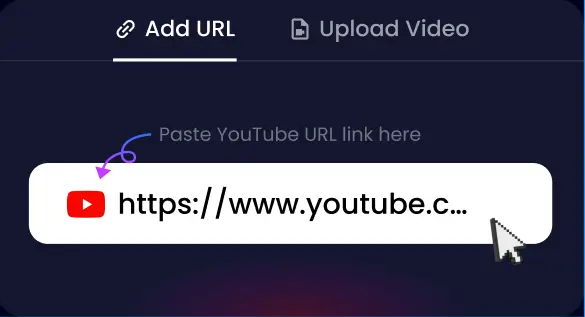
1. Add URL or Upload Video
Start by bringing your content into the editor. You can drag and drop your local video file directly into the upload area, or simply paste the video URL into the input box to begin.
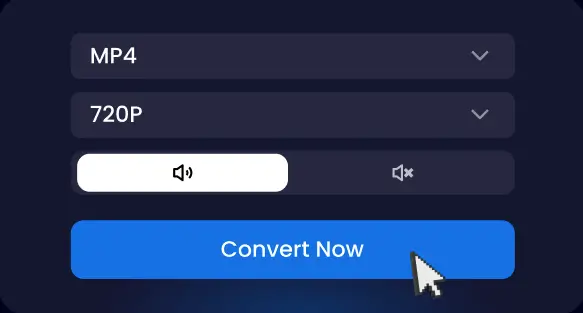
2. Select Format & Quality
Tailor the output to your specific needs. Snappixify supports a wide range of conversions (such as MP4 to MP3 or MOV to MP4). Choose your desired format and resolution, then click "Convert" to start the process.
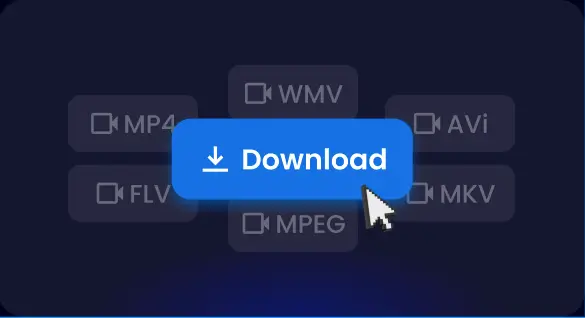
3. Convert & Save
Our high-speed engine handles the rest. Wait just a few seconds for the processing to finish, then click Download to save your new file, optimized and ready to play on any device.
Conclusion
Converting YouTube to MP4 is a powerful way to make the world's largest video library work for your lifestyle. By choosing the right tools and respecting the rights of creators, you can build a high-quality offline collection that is both useful and safe.


