 Snappixify




When it comes to audio projects, quality is everything. While MP3 is the go-to for casual listening, professionals and audiophiles know that a youtube to wav converter is the only way to ensure your samples, podcasts, or background tracks maintain their integrity.
In this guide, we’ll explore why WAV is king and how to find a free online youtube to wav converter that actually delivers without the "trashware."
What is a WAV File?
A WAV (Waveform Audio File Format) is an uncompressed audio format. Unlike MP3s, which use "lossy" compression to save space, WAV files are "lossless." This means they preserve every bit of data from the original recording.
Why Convert YouTube to WAV Instead of MP3?
If you want to convert youtube to wav format, it’s likely because you value fidelity.
-
No Data Loss: Every time you compress audio to MP3, you lose high-frequency detail.
-
Better for Editing: If you are a producer, using a youtube to wav audio converter ensures that when you drop the file into a DAW (like Ableton or Logic), the waveform is clean and ready for processing.
-
Archive Quality: A youtube convert to wav file acts as a master copy that won't degrade over time.
|
Feature |
WAV (Uncompressed) |
MP3 (Compressed) |
|
Audio Quality |
Lossless: Bit-for-bit accuracy of the original source. |
Lossy: Discards "unnecessary" data to save space. |
|
Frequency Range |
Full spectrum (up to 22kHz and beyond). |
High-frequency "shelf" (usually cuts off at 16kHz). |
|
Editing Flexibly |
High. Can be stretched and processed without artifacts. |
Low. Processing an MP3 can introduce "metallic" digital noise. |
|
File Size |
Large (~10MB per minute). |
Small (~1MB per minute). |
Critical Pre-Conversion Tips
Before you convert a video, remember that the quality and legality of your output depend on two main factors: the source file and the permissions attached to it.
1. The Quality Ceiling
YouTube usually caps audio at around 126–160kbps (AAC). While a converter won't magically turn a low-quality upload into studio-grade sound, converting to a lossless format like WAV prevents further compression loss during the extraction process. Essentially, you are "freezing" the audio at its current quality.
2. Respect Copyright & Intellectual Property
This is the most important step before hitting "Convert." Most content on YouTube is protected by copyright law.
Personal Use vs. Distribution: Downloading copyrighted music, movies, or creative content without permission is generally a violation of YouTube’s Terms of Service and may infringe on the creator's legal rights.
Public Domain & Creative Commons: Look for videos labeled with a Creative Commons (CC) license or works that are in the Public Domain. These are generally safe to convert for various uses.
Support the Creators: Whenever possible, use official platforms (like YouTube Music, Spotify, or Bandcamp) to listen to or purchase audio. This ensures creators get the credit and royalties they deserve.
3. Check for Audio Glitches
Before converting a long video, skim through the source.
Artifacts: Listen for "pops," "hisses," or "muffled" sections in the original video. If the source is bad, the WAV file will inherit those flaws.
Volume Levels: Some videos have "normalized" audio that might be too quiet or too loud (clipping). It’s easier to find a high-quality source than to fix bad audio in post-production.
Top Tools: From Reddit Favorites to Desktop Powerhouses
If you browse a youtube to wav converter reddit thread, you’ll see users constantly debating the best tools. The community generally favors tools that are open-source or ad-free. Popular choices include:
-
Desktop Apps: Great for batching.
Why Snappixify is the Top Choice
Among the sea of options, Snappixify stands out as a premier youtube to wave converter. It solves the biggest pain points for users:
-
Clean Interface: No deceptive "Download" buttons that lead to malware.
-
Zero Cost: It is a truly youtube to wav converter free experience.
-
High Speed: Its server-side processing makes it a lightning-fast converter from youtube to wav.
How to Use Snappixify to Convert YouTube to WAV
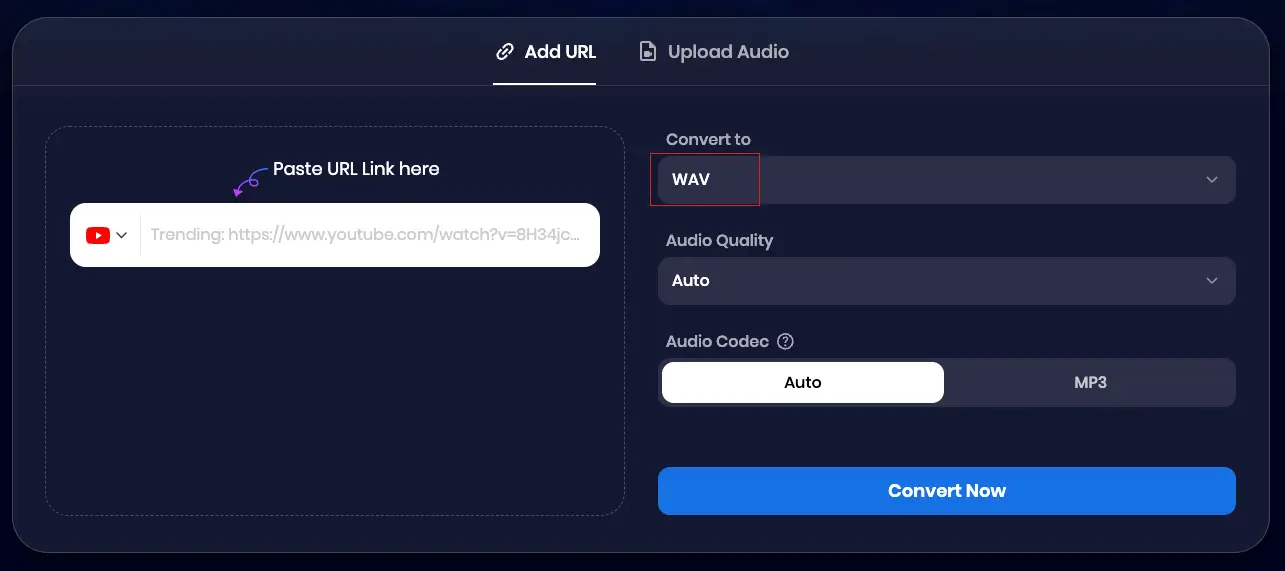
Using a youtube to .wav converter shouldn't be rocket science. Here is how to do it with Snappixify:
-
Copy the Link: Grab the URL of the video you want to extract.
-
Paste & Select: Go to Snappixify, paste the link, and choose "WAV" from the dropdown.
-
Convert: Hit the button to let the youtube convert to wave process begin.
-
Download: Once the youtube to wav convert is finished, save the high-quality file to your PC.
FAQ: Everything You Need to Know About YouTube to WAV Conversion
Is it better to convert YouTube to WAV or MP3?
If you are editing audio or want the highest possible quality, WAV is superior. Unlike MP3, which is a compressed format, WAV is lossless. Using Snappixify to convert youtube to wav format ensures that you don't lose any additional audio data during the extraction process, making it perfect for professional use.
Is Snappixify really a free online youtube to wav converter?
Yes! Snappixify is a 100% free online youtube to wav converter. We don't believe in hidden fees or "premium" paywalls for high-quality audio. You can convert youtube video to wav as many times as you need without spending a dime.
Why do some converters give me "trashware" or ads?
A: Many sites monetise through aggressive advertising. Snappixify was built to be a "clean" youtube to wav audio converter. Our priority is user experience, meaning no intrusive pop-ups, no malware, and no "fake" download buttons—just a straightforward converter from youtube to wav.
Will converting to WAV improve the sound of a low-quality YouTube video?
A: A youtube converter to wav cannot "create" quality that isn't there in the source. However, it prevents further degradation. By choosing Snappixify to youtube convert to wave, you are capturing the best possible version of the current stream without the "muffled" artifacts often found in low-bitrate MP3s.
Is there a limit to how many videos I can convert?
Unlike other tools that cap your daily usage, our youtube to .wav converter allows for unlimited conversions. Whether you need one sample or a whole playlist’s worth of audio, Snappixify is designed to handle it efficiently.
Can I use Snappixify on my phone?
Absolutely. Snappixify is a fully responsive online youtube to wav convert tool. You can use it on Windows, Mac, iOS, or Android—all you need is a browser and a YouTube link.
Conclusion
Whether you are looking for a youtube to wave converter for a professional project or just want the best sounding offline library, choosing WAV is the right move. By using Snappixify, a trusted youtube to wav converter, you ensure your audio remains crisp, clear, and ready for any creative endeavor.


