 Snappixify


Have you ever found the perfect video, copied the link, and rushed to a video downloader url site only to be met with an "Unsupported URL" or "Video Not Found" error? It’s a modern frustration. You have the link right there, but standard tools just can't seem to "see" the media behind the code.
If you are tired of playing hide-and-seek with your favorite content, it’s time to switch to a tool that actually understands the modern web. Snappixify has emerged as the premier choice for handling complex and long links that leave other downloaders hanging.
Why Do Ordinary Downloaders Fail?
As web video technology advances at lightning speed, many basic downloaders simply can't keep up. These traditional tools often fail because they aren't built to handle the rapidly evolving techniques used by modern video streaming services. Downloader Compatibility is the primary culprit.
1. Limited Website Support
The first issue lies in the sheer number of websites that most ordinary downloaders support. While basic tools may work with popular sites, they often struggle with newer or more specialized platforms. As video services become more complex, including dynamic video loading or fragmented streaming protocols like DASH (Dynamic Adaptive Streaming over HTTP) and HLS (HTTP Live Streaming), most standard downloaders are left behind, unable to reconstruct the video properly.
2. Long URLs & Technical Challenges
Another major obstacle comes from long and complex URLs. As video content becomes more fragmented and dynamically loaded across various sections of a page, traditional downloaders can't effectively parse these long URLs, often rendering the tool useless. Many downloaders still operate with outdated tech that simply isn't equipped to handle these intricate links, resulting in errors or failure to even begin the download.
How to Correctly Find a Video URL?
Before you can download, you need the right "address." Depending on the platform, there are three ways to grab it:
The Direct Method
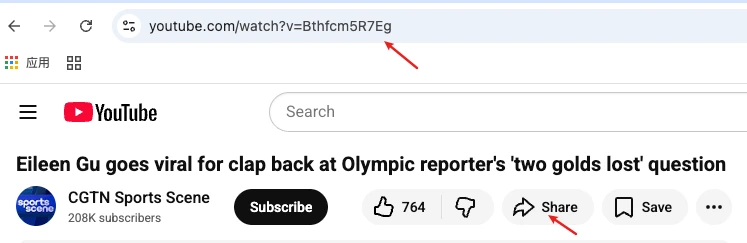
Simply highlight and copy the URL from your browser’s address bar.
For example, after the recent Winter Olympics, many people wanted to download the impressive performances of athletes. So, I might type "Eileen Gu Interview Winter Olympic" in the search box, find her amazing video, click on it, and then discover the video link.
Step 1:

Step 2:

The Share Method
Click the YouTube button to go to the platform, then either copy the URL directly from the address bar or click on the "Share" button to copy the link.
Step 1:

Step 2:
Snappixify: Best Universal Video Downloader URL
If you're looking for a seamless, no-hassle experience when downloading videos, Snappixify is the ideal solution. Designed to meet the needs of both casual users and power users, it brings a host of core advantages that make video downloading easier and faster:
1. Universal Compatibility
2. Handles Complex Links
3. Ultra-High Quality
One of the standout features of Snappixify is its ability to deliver videos in ultra-high definition. It supports resolutions up to 4K, ensuring you get crystal-clear quality, whether you're watching on a large screen or storing for future offline use. Enjoy a premium viewing experience, no matter where you are.
4. Lightning Speed
5. Format Flexibility
Whether you're a casual user looking to download a quick video or a power user who needs advanced capabilities, Snappixify Video Downloader offers a complete video downloading solution with all the features and flexibility you need.
How to Download Videos in 3 Easy Steps with Snappixify
Downloading videos should be quick and hassle-free! Follow these simple steps to get started:
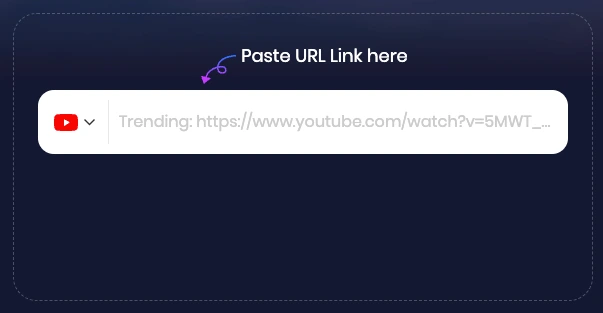
1. Paste Your Video URL
First, copy the video link from your preferred platform. Then, paste the link directly into the search box on the Snappixify Video Downloader page. It's that easy! Snappixify supports a wide range of video platforms, making it a versatile solution for all your downloading needs.
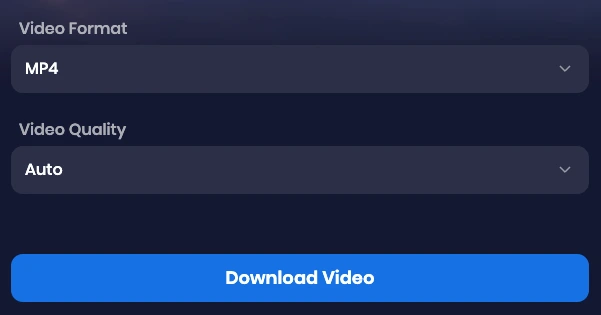
2. Select Your Preferred Format & Quality
After pasting your URL, Snappixify will analyze the video and present you with various download options. Choose the format (such as MP4, WebM, etc.) that works best for you. You can also select your desired video quality, from standard 720p all the way up to stunning 4K resolution, ensuring that you get the best viewing experience on any device.
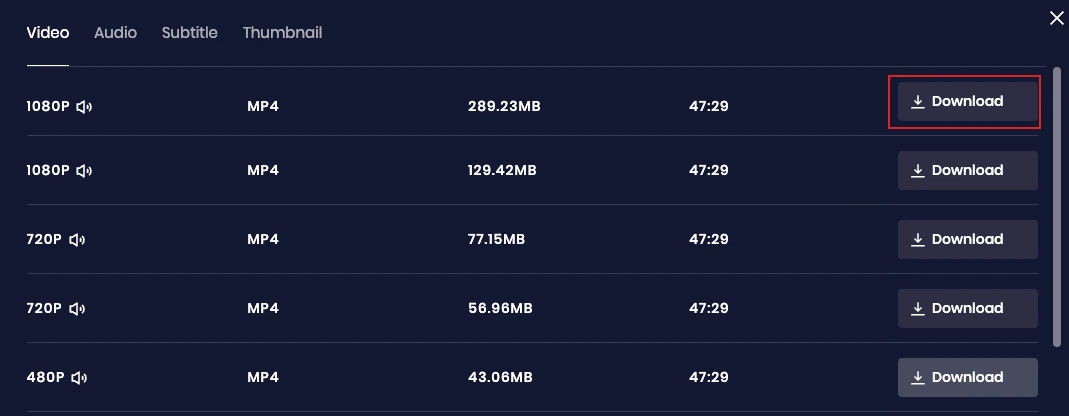
3. Download the Video
Once you've selected the format and resolution, simply click the "Download Video" button. You will then be redirected to the video parsing page, where you can choose the exact quality and format you prefer for the download. After making your selection, click the "Download" button, and the video will be saved directly to your device, ready to be enjoyed anytime, anywhere. Snappixify ensures a fast, secure, and straightforward download process.
Frequently Asked Questions (FAQ)
Which platforms are supported via URL?
Most major platforms including YouTube, Facebook, Instagram, and TikTok are fully supported.
Is a video URL downloader safe?
Snappixify prioritizes user privacy. Unlike some tools, we don't require software installations that could contain malware, and we do not store your personal data.
What if the download speed is slow?
Download speed usually depends on your internet connection. However, Snappixify uses high-speed edge servers to ensure the bottleneck is never on our end.
What file formats are supported?
We primarily support MP4 (the most compatible) and WebM. You can also extract audio as an MP3.
Can I download videos on mobile?
Yes! Snappixify Video Downloader is a web-based tool, meaning it works perfectly on Chrome or Safari on both iOS and Android devices.
How do I avoid copyright infringement?
Always ensure you have the creator's permission or are downloading content for personal, "fair use" educational purposes. Never redistribute copyrighted material without a license.
Conclusion: Simplifying Video Downloads for Everyone
Ready to start downloading? Visit Snappixify now and discover the most reliable, one-click video downloader on the web!


