 Snappixify


Have you ever faced this frustration: you find a fantastic video on TikTok, but when you use the official download feature, the quality degrades significantly, and a persistent, bulky watermark plagues all four corners of the clip?
For content creators, data archiving enthusiasts, or anyone simply looking to preserve precious memories, accessing videos that are high-quality and watermark-free is a necessity.
This article will deeply analyze the pain points of TikTok downloading and provide you with a comprehensive, effective 2025 ultimate solution set, allowing you to easily download authentic, high-definition TikTok content.
Targeting the Pain Points: The Three Obstacles to HD Downloads
Discussions about "fixing compressed TikTok download quality" are constant in communities like Reddit. The core issues primarily center around three aspects:
-
The Watermark Dilemma: Official downloads include the TikTok user's ID watermark at the beginning and end of the video. While necessary for platform copyright protection and promotion, this severely impacts visual quality and secondary use.
-
Quality Degradation: The official download channel compresses the video again to optimize transmission efficiency. This results in the final MP4 file having a resolution and bitrate much lower than the original video.
-
Bulk Archiving Nightmare: If you want to download all your "Liked" or "Favorited" videos, the platform does not offer a one-click export function, forcing you to save them manually, which is tedious and time-consuming.
Comprehensive Comparison: Pros and Cons of Four Main TikTok Con Tools
To meet the user demand for watermark-free, high-quality video, third-party tools on the market fall into two main categories: instant online tools and professional installed tools. Below is a detailed comparison of their advantages and disadvantages:
|
Tool Name |
Type |
Pros |
Cons |
Ideal User |
|
Online Tool |
No installation required; compatible with all devices; fast conversion and download speeds; reliably offers watermark-free HD format. |
Dependent on a stable internet connection. |
Users prioritizing efficiency and convenience. |
|
|
Online Tool |
No installation required; simple to use. |
Relatively slow download speed; poor experience during peak hours. |
Casual users who download occasionally and have low speed requirements. |
|
|
Installation Required / Extension |
Often stable once installed; some offer download list management. |
Requires installationof a browser extension or software; carries potential security and permission risks; uses system resources. |
Frequent downloaders who primarily use desktop browsers. |
|
|
yt-dlp |
Command-Line Tool |
Most powerful downloading capability; supports bulk downloadof Likes/Favorites; retrieves the highest possible original quality. |
Requires installation and configuration; needs basic command-line knowledge; higher operational barrier. |
Geeks, developers, and professional usersrequiring bulk archiving. |
1. The Top Choice for Online Convenience: The High Efficiency of Snappixify
For the vast majority of users who want a "use-and-go" solution, online tools are the best option. High-quality online tools like Snappixify use advanced parsing technology to achieve extremely fast conversion speeds and stable HD output.
Core Steps:
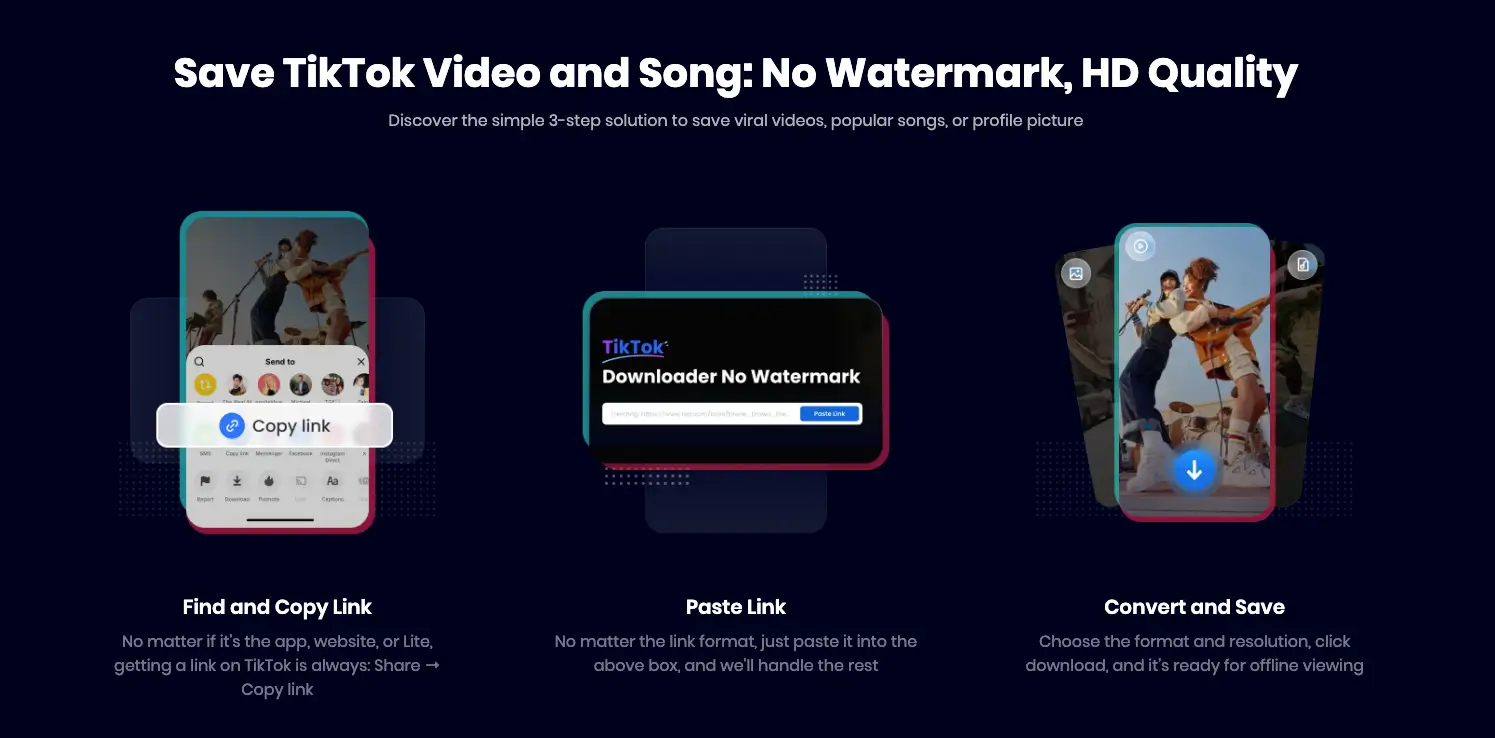
To ensure you get the best quality and remove the watermark, the process is streamlined into three simple steps:
-
Find and Copy Link:
-
No matter if you are using the app, website, or TikTok Lite, getting the link is always: Share → Copy link.
-
-
Paste Link:
-
No matter the link format, just paste it into the input box on the Snappixify download page—the tool will handle the rest of the parsing.
-
-
Convert and Save:
-
Choose the desired format and resolution (e.g., "No Watermark HQ"), click download, and the video is ready for offline viewing.
-
The entire download process completes quickly, without the need for registration or installation.
2. The Geek's Tool: Detailed Functionality and Usage of yt-dlp
For professional users who need bulk downloads or are pursuing the absolute highest quality, the open-source command-line tool yt-dlp is the powerful solution.
How to Use (Basic Concepts):
-
Install yt-dlp: You first need to install
yt-dlpon your computer (usually via a package manager or Python PIP). For Mac users, the easiest way is via Homebrew:brew install yt-dlp.
-
Copy the TikTok Link: Find the TikTok video you wish to download and copy its share link.
-
Run in Command Line: Open your command-line interface and enter:
yt-dlp [Video Link]. -
Find the Downloaded File: The file will be saved in your user's Home Directory (
~, e.g.,/Users/yourusername/). On Mac, you can quickly navigate there in Finder using the shortcut: Shift + Command + H. -
Bulk Download: Downloading an entire "Liked" list requires additional parameters for login and data scraping.
Core Advantages:
-
Broad Support: It supports not only TikTok but also YouTube, Bilibili, and countless other video platforms.
-
Watermark-Free Download: It can usually download the watermark-free version, providing the highest quality video file.
-
Free and Open Source: Free to use, with an active community and frequent functional updates.
Overall, yt-dlp is the powerful key for downloading online videos, including TikTok, and is the primary choice for professional users undertaking bulk archiving.
Conclusion: Choosing the Right Tool Makes All the Difference
To download high-quality, watermark-free TikTok videos, the key is to bypass the official download's "compression trap" and select a tool that is stable, efficient, and suitable for your needs:
-
For users prioritizing convenience and instant downloads, we recommend professional online tools like Snappixify.
-
For professional users pursuing extreme functionality and bulk archiving,
yt-dlpis an indispensable powerful tool.
Choose the right tool, and your TikTok video library will finally be free from the hassle of blur and watermarks!
FAQs About Downloading TikTok Video in Full HD
Q: Is there a way to download all my Liked / Favorited videos from TikTok?
A: Yes. While advanced users can utilize powerful command-line tools like yt-dlp to scrape entire lists, many users prefer a simpler, web-based approach. Snappixify is designed to handle batch conversion by allowing users to submit multiple links at once, making it a highly efficient solution for bulk downloading without requiring any software installation.
Q: Will the downloaded video quality be exactly the same as the original upload?
A: Tools like Snappixify and yt-dlp are designed to extract the highest quality file available on the TikTok server, bypassing the quality reduction of the official download. In most cases, the quality will be virtually indistinguishable from the original high-definition source.
Q: Are these third-party download methods safe to use?
A: When using online tools, stick to reputable services like Snappixify that do not require you to install software or grant excessive permissions. Avoid any site that asks for your TikTok login credentials. Command-line tools like yt-dlpare open-source and generally considered safe, provided you download them from the official source.


