 Snappixify


Ever stumbled upon a hilarious meme video, a breaking news clip, or a rare behind-the-scenes moment on Twitter (now X)—and wanted to save it right now—only to realize you can't?
You're not alone.
Despite Twitter/X being a video-rich platform, there's still no built-in download button. That's where online video downloaders come in—and not all are created equal.
In this guide, we're diving into how to easily download Twitter videos online using tools like Snappixify, and why doing it right matters. Whether you're a casual scroller, content creator, researcher, or social media manager, this article is for you.
Why Twitter Makes It So Hard to Save Videos
Twitter was designed for real-time conversation, not content archiving. Here are the common frustrations users face:
-
No official download button for videos (unlike YouTube Premium or TikTok).
-
Mobile limitations: Can't “right-click and save” on your phone.
-
Threaded tweets often bury video sources or split context.
-
Third-party apps require annoying installs or account access.
All this creates a demand for simple, no-signup tools that just work.
What Most People Try (and Why It Doesn't Work)
If you've tried to save Twitter videos before, you probably fell into one of these traps:
Screenshotting a video (just… don't).
Screen recording — time-consuming, poor quality, and clunky.
Using shady download sites that flood you with popups or ask for personal info.
Installing browser extensions that either don't work or compromise your privacy.
None of these are ideal—especially if you just want a 10-second clip to share in a group chat.
The Right Way: Using an Online Twitter Video Downloader (Like Snappixify)
Here's where Snappixify comes in—a free, web-based Twitter video downloader that requires zero installs or logins.
It's fast, secure, and super easy to use.
How to Use Snappixify to Download Twitter Videos:
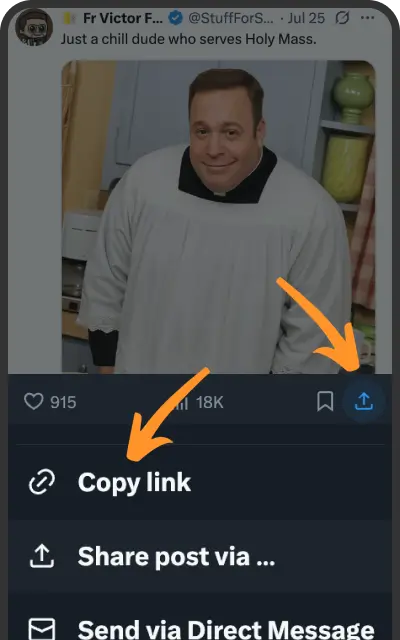
Copy the tweet link with the video you want.
Example: https://twitter.com/user/status/1234567890
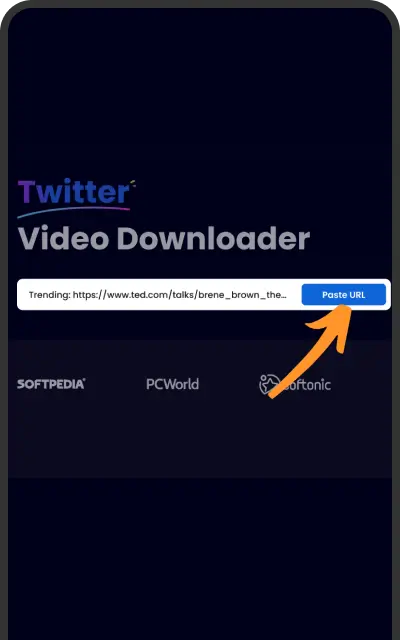
Go to Snappixify
Paste the URL into the search bar.
Click Download. Choose your desired format (MP4, MP3) and resolution (1080p, 720p, etc.).
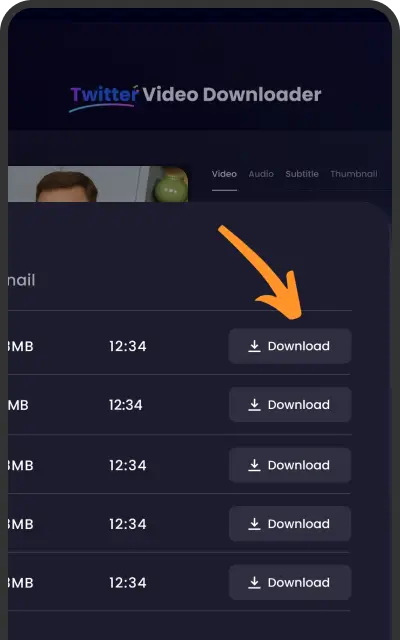
That's it. Your video is ready for offline viewing or reposting (with credit, of course).
✅ No account needed
✅ No software downloads
✅ Compatible with mobile & desktop
✅ Secure with SSL encryption
Who Uses These Tools (And Why You Might, Too)
Snappixify isn't just for meme hoarders. People across different fields use video downloaders every day:
Journalists and Researchers
Use case: Archiving newsworthy video clips before tweets get deleted.
Did you know? According to MIT Technology Review, over 60% of viral tweets with video get deleted or buried within 48 hours.
Teachers and Educators
Use case: Embedding examples or interviews in lessons—without relying on live Twitter feeds.
Content Creators & Editors
Use case: Downloading source clips for commentary videos, reactions, or edits.
Snappixify even supports audio-only downloads for podcast soundbites.
Social Media Managers
Use case: Keeping backup copies of brand-related tweets or reposting highlights across platforms like Instagram or TikTok.
Everyday Users
Use case: Saving that perfect video to send in a WhatsApp group, without losing quality.
Is Downloading Twitter Videos Legal?
This is a common question, and the answer depends on how you use the content.
-
Fair use: Commentary, criticism, parody, or education may qualify under fair use in many regions.
-
Personal use: Downloading a video to watch offline or share privately is generally okay.
-
Reposting without credit or for profit: Risky. Always credit the original creator if you share the content elsewhere.
ℹ️ Tip: When in doubt, use downloaded videos responsibly—or better yet, ask for permission.
How Snappixify Stands Out (Not Just Another Downloader)
With so many Twitter video downloaders out there, why choose Snappixify?
Here's what makes it different:
-
No registration required: Most “free” tools ask for email or sign-up. Not here.
-
Lightning fast: Downloads start in seconds, even for longer clips.
-
Multi-platform support: It also works for YouTube, Instagram, Facebook, and more.
-
Multiple formats: Convert Twitter videos into MP4, MP3, or even WebM formats.
-
Encrypted and secure: Files are protected during upload/download and deleted shortly after.
In short: Snappixify makes video downloading simple, safe, and fast—no strings attached.
Snappixify's Other Features You Might Love
Snappixify isn't just a one-trick tool. It's designed to handle multiple types of content from different platforms. Here's a quick look at its extended functionality:
-
YouTube Video Downloader: Download long-form content or Shorts in HD or audio-only formats.
-
Instagram Reels and Stories: Save content before it disappears—great for archiving stories.
-
TikTok Support: Download watermark-free TikTok videos effortlessly.
-
Facebook Video Downloader: Useful for pulling event streams, tutorials, or saved live sessions.
-
Cross-format Conversion: MP4 to MP3, WebM to MP4, and more—great for podcast creators and editors.
-
Batch Download Support (coming soon): Plan to grab multiple clips in one go.
Whether you're a multi-platform content creator or just want your favorite clips offline, Snappixify adapts to your needs.
Bonus: Twitter Video Downloader Use Tips & Tricks
-
Bookmark Snappixify.com on your browser or phone home screen for quick access.
-
Download while it's live: Twitter/X often removes controversial or sensitive content.
-
Use filenames that help you organize (e.g.,
elon-interview-jan2025.mp4). -
Check file size if you're on mobile data—Snappixify lets you choose lower resolutions.
-
Combine with editing apps to trim, subtitle, or remix clips creatively.
A Real-Life Example
Let's say you're a football fan and just saw a viral Messi assist on Twitter. It's only posted by a fan account. You want to save it before it disappears.
Here's what you'd do:
Copy the tweet link.
Paste it into Snappixify.
Choose 720p resolution.
Download and save to your camera roll.
Share it with your group chat or remix it with goal commentary.
Done in under 30 seconds.
Final Thoughts: Don't Miss Out on Good Content
Twitter/X is one of the fastest-moving platforms on the internet. That also means great content disappears quickly—whether it's news, memes, sports highlights, or culture moments.
With tools like Snappixify, you can take back control of the content you love without technical hassle or privacy concerns.
So next time you see a must-save video on Twitter, don't scramble for a sketchy app or record your screen like it's 2013.
Just Snappixify it with our online video saving tool.


