 Snappixify


Annoyed by watermarks on Instagram Reels or Stories? They ruin the look, block reuse, and make reposting frustrating. Sure, you can try removing them with tools like After Effects or Premiere Pro—but that takes time, skill, and effort. A faster option? Use Snappixify to download Instagram videos directly without any watermark—no editing needed.
In this guide, we'll cover three methods to deal with Instagram watermarks, from pro tools to the easiest click-and-save solution.
Best Tools: How to Remove Instagram Watermark
Method 1: Download Instagram Videos Without Watermark
The smartest way to "remove" a watermark—is to avoid it in the first place. That's where Snappixify comes in. If you want to remove instagram reel watermark online free, try Snappixify.
Unlike editing tools that try to erase or hide watermarks after downloading, Snappixify directly fetches clean, watermark-free Instagram videos from the original source.
Step-by-Step Guide
-
Find the video you want to download on Instagram.
-
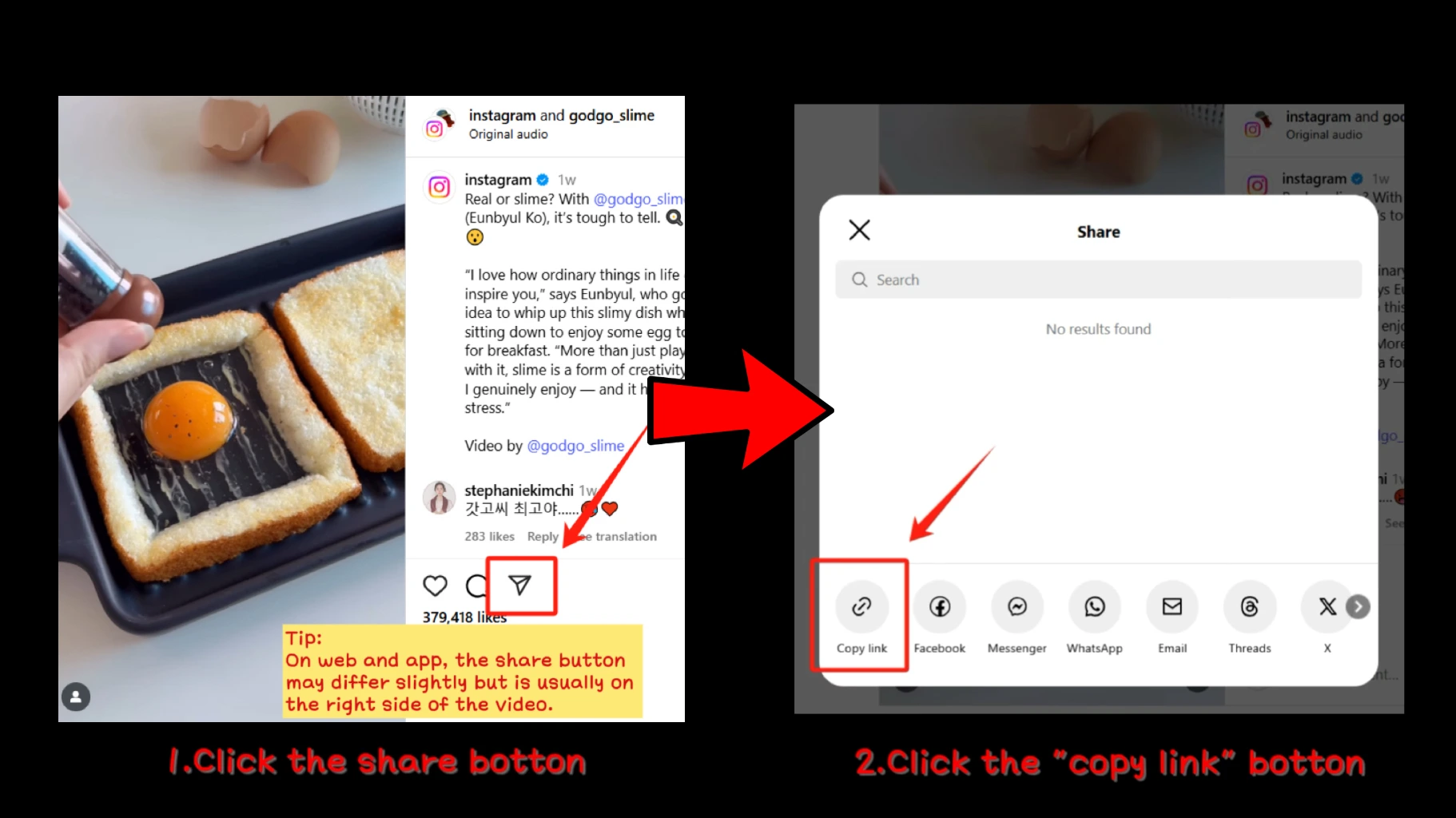
Copy the Link from the post (tap the share botton > Copy Link).
-
Paste the Instagram Link into the input field.

-
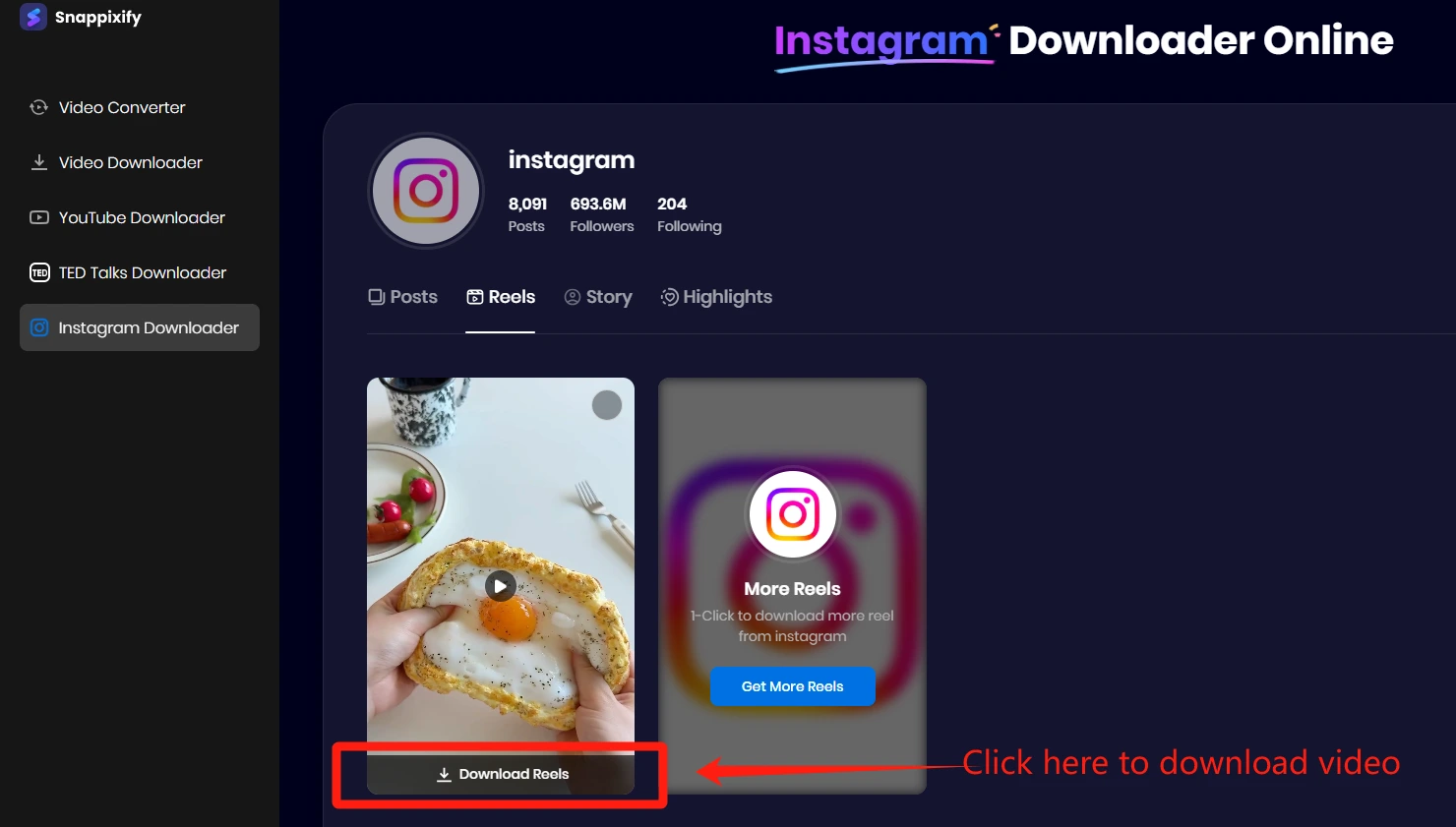
Click "Download Reels" to download the video.
-
Done! Your video is saved without any watermark, instantly.
Perfect for creators, marketers, and social media managers who need clean assets for reuse across platforms.
Method 2: Remove Watermark Using Editing Software
If you've already downloaded a video with a watermark, you can use professional editing tools to remove or conceal it. Depending on where the watermark appears and how complex it is, there are two main approaches:
2.1 Crop the Watermark (Best for Watermarks on the Edge)
Brief: This method is effective when the watermark is located at the edge of the video or image. It involves trimming out the marked area using cropping tools. Although it may slightly affect the composition, it's quick and easy for static watermarks.
Steps (Premiere Pro):
-
Import your video into Adobe Premiere Pro.
-
Go to the Effects panel and apply the "Crop" effect.
-
Adjust the Top, Bottom, Left, and Right sliders to remove the watermark.
-
Maintain a common aspect ratio (e.g., 9:16 or 1:1) for platform compatibility.
-
Export the video in your preferred format.
Steps (Photoshop - for images):
-
Open the image in Adobe Photoshop.
-
Use the Crop Tool to trim the watermark area.
-
Apply sharpening or minor adjustments to enhance visual quality.
-
Save as PNG or JPG for reuse.
2.2 Cover or Replace the Watermark (Best for Centered Watermarks)
Brief: When the watermark is positioned near the center or overlaps important content, cropping isn’t ideal. Instead, you can hide it with overlays or use advanced masking techniques to blend it into the background.
Steps (Premiere Pro - basic overlay):
-
Import your video into Premiere Pro.
-
Add a blur effect, shape overlay, or custom logo over the watermark.
-
Adjust placement and opacity for best results.
-
Export the final video.
Steps (After Effects - advanced replacement):
-
Import the video into Adobe After Effects.
-
Use the Tracker panel to track the watermark’s movement.
-
Apply a mask to isolate the watermark area.
-
Add blur, graphics, or duplicate and reposition background pixels to cover it.
-
Render and export the final edited video.
This technique requires more editing experience but produces professional-grade results. It’s especially useful for creators working on branded or commercial content.
If you need guidance, here is a tutorial video to remove instagram watermark.
Which Method Should You Choose?
|
Scenario |
Best Method |
|
You want the easiest, fastest way |
Snappixify (Method 1) |
|
Watermark is at the edge |
Crop via Premiere Pro |
|
You're working with static images |
Photoshop |
|
Watermark overlaps the content |
After Effects replacement |
Why Snappixify?
Snappixify offers one of the simplest and most reliable ways to download Instagram videos without watermarks. Unlike many other tools, it delivers high-resolution videos that maintain the original quality without compression or added branding.
The service is completely free and ad-free, requiring no account or software installation. Just paste your Instagram video link, and you can quickly download your video hassle-free.
Snappixify works seamlessly across all devices—whether you're using a desktop, mobile, or tablet. It also supports multiple formats like MP4 and MP3, making it versatile for creators, marketers, and casual users alike.
Get Clean Videos, No Matter Your Job
-
For content creators, reposting Instagram Reels on platforms like YouTube Shorts or TikTok often requires videos without distracting watermarks. Clean downloads make your content look more polished and professional.
-
Influencers and marketers frequently reuse Instagram videos in ads, where watermarks can reduce credibility or distract viewers. Having watermark-free videos ensures brand consistency and higher engagement.
-
Embedding Instagram videos on websites or presentations also demands a clean look. Removing or avoiding watermarks helps maintain a sleek and distraction-free appearance.
-
Social media managers benefit by creating reposts and promotional content that feels native and ad-free, improving audience experience and campaign effectiveness.
Conclusion - How to remove instagram watermark
Watermarks on Instagram videos can be frustrating, especially when you want clean, professional content for reposting or marketing. While advanced editing tools like Premiere Pro or After Effects allow you to cover or replace watermarks, these require time and skill.
For a faster, hassle-free solution, Snappixify lets you download Instagram videos directly without any watermark—saving you effort and preserving quality. Whether you're a creator, marketer, or casual user, Snappixify makes getting high-quality Instagram videos simple, free, and convenient.
Frequently Asked Questions
Can you remove an Instagram watermark?
This article introduced three professional tools—Premiere Pro, After Effects, and Photoshop—that can help cover or edit out watermarks. However, the quickest and easiest way is to avoid the watermark altogether by using Snappixify to download Instagram videos without any watermark.
How to save from Instagram without a watermark?
Use Snappixify with these simple steps:
-
Copy Link
Copy the link of the photo, video, Reels, profile, carousel, or IGTV from Instagram. -
Paste Link
Go to Snappixify's Instagram downloader page and click the "Paste Link" button. -
Download
Wait as our server extracts the data, then save the photo or video you want—completely watermark-free.
Is there a way to clear display on Instagram Reels?
If you mean removing on-screen overlays or text, that usually requires editing software. However, downloading the original video without any third-party additions is best done via tools like Snappixify.
How do I remove a watermark from a saved photo?
Removing watermarks from images typically requires manual editing using software such as Adobe Photoshop or specialized watermark removal apps.
How to remove watermark for free?
You can use professional tools mentioned in this article, or simply download watermark-free videos directly from Instagram using Snappixify—completely free and without any ads.


