 Snappixify


If you're looking to download videos—whether it's a viral Short, an educational tutorial, or a full-length video—you might have heard about yt-dlp, a popular command-line downloader. While yt-dlp is powerful and flexible, it's often too complex for most users who just want a quick, hassle-free way to save videos.
Enter Snappixify—a free, web-based video downloader that makes saving videos (and more) from Youtube as simple as copy, paste, and click. No downloads, no coding, no fuss.
In this article, we'll explore how yt-dlp works, why many find it hard to use, and why Snappixify is the best alternative for downloading videos quickly and easily. We'll also briefly mention how Snappixify supports Instagram and X (Twitter) videos, with a special emphasis on its excellent mobile performance.
What is yt-dlp and Why is It Popular for Video Downloads?
yt-dlp is a command-line program designed to download videos from YouTube and hundreds of other websites. It is a fork of the once-famous youtube-dl project, updated and improved by the community.
People love yt-dlp because it can:
-
Download high-quality videos, including 4K
-
Grab entire playlists or channels
-
Extract subtitles and metadata
-
Bypass age restrictions and regional blocks
-
Convert videos to MP3 or other audio formats
However, using yt-dlp requires installing Python, ffmpeg, and running commands in the terminal—skills many casual users don't have or want to learn.
Why Downloading Shorts Is So Hot Right Now
YouTube Shorts are YouTube's answer to TikTok-style vertical short videos. These quick clips have exploded in popularity, with over 15 billion daily views worldwide as of 2024.
Downloading Shorts offline is useful if you want to:
-
Watch videos without internet connection
-
Save viral clips for content inspiration
-
Use segments in your own videos
-
Avoid autoplay distractions on the app
yt-dlp supports Shorts, but the process is technical. Snappixify makes this effortless.
How yt-dlp Works: A Quick Overview
Here's a typical yt-dlp workflow:
Install Python and ffmpeg on your PC or Mac
Download yt-dlp executable
Open terminal or command prompt
Run commands like:
yt-dlphttps://youtube.com/shorts/VIDEO_ID
Wait for the download, then find the file on your computer
For many users, this is too complicated and time-consuming.
Snappixify: The Simple Video Downloader You Need
Snappixify: The Simple Unlike yt-dlp, Snappixify is:
-
Browser-based: Works on desktop and mobile without any installation
-
Free and secure: No ads or malware risks
-
Fast: Download YouTube videos and Shorts in seconds
-
Versatile: Supports MP4 video and MP3 audio downloads
-
Multi-platform: Also works with Instagram Reels and X (Twitter) videos
? Especially Good on Mobile
Snappixify is fully optimized for mobile browsers. Whether you're on an iPhone or Android, you can use Snappixify directly from Safari or Chrome. No app downloads. No redirects. Just copy the video URL and paste it into the site. It even works smoothly on slow connections and older devices.
Use cases:
-
Save videos for flights, subways, or offline study sessions
-
Quickly convert music videos to MP3 while commuting
-
Download tutorials to review later without eating data
Downloading Videos With Snappixify: Step-by-Step
Step 1: Copy the Video or Shorts URL
Open YouTube, find the video or Short you want, and copy its URL.
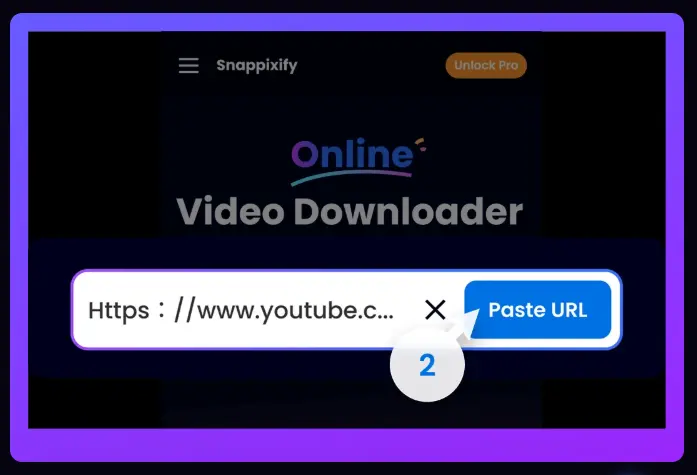
Step 2: Paste the Link on Snappixify.com
Go to Snappixify.com, paste your copied link in the input box.
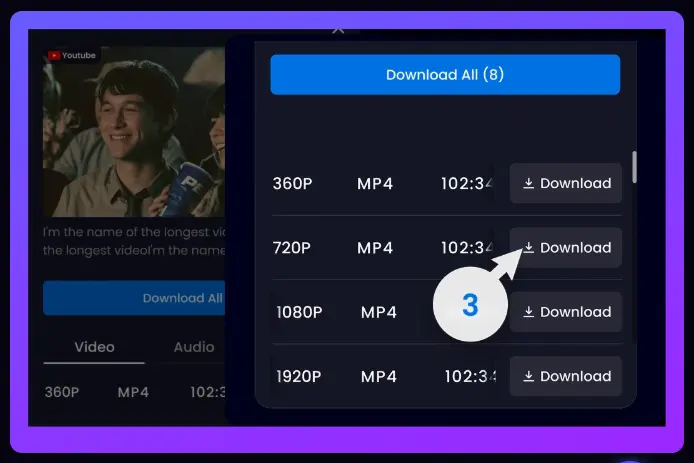
Step 3: Choose Format and Download
Select MP4 for video or MP3 for audio, then hit "Download." Your file will be ready instantly.
No popups, no fake buttons, no installations—just results.
Why Snappixify Outshines yt-dlp for Most Users
|
Feature |
yt-dlp |
Snappixify |
|
Installation Required |
Yes |
No |
|
Technical Skills Needed |
High |
None |
|
Works on Mobile |
No |
Yes |
|
Download YouTube Shorts |
Yes |
Yes |
|
Supports Instagram & X |
Yes |
Yes |
|
Converts to MP3 |
Yes |
Yes |
|
Speed |
Depends on Setup |
Instant |
Snappixify removes all technical barriers, making video downloading accessible to everyone.
Quick Mention: Instagram Reels and X (Twitter) Videos
While YouTube is the star, Snappixify also supports downloading:
-
Instagram Reels: Save trending dances, tutorials, and fun clips offline.
-
X (Twitter) Videos: Download videos or GIFs posted on X quickly.
Perfect for social media users who want to back up or reuse visual content.
Trending Now: Why Offline Video Viewing is Growing
People are watching videos on the go, especially on mobile devices. According to Statista, over 60% of YouTube views happen on mobile. Having a tool like Snappixify to quickly save videos means:
-
Watch anytime, anywhere without buffering
-
Avoid distractions from ads and autoplay
-
Save data by watching offline
Whether you're downloading videos to study, entertain kids, or build a content library, Snappixify fits right in your pocket.
Tips for Downloading Videos Safely and Efficiently
-
Always use the full video URL for best results.
-
Choose MP4 for video, MP3 for audio extraction.
-
Download only videos you have rights to use (personal use recommended).
-
Use Snappixify on trusted networks to ensure security.
-
Clear your browser cache if downloads stall (rare).
-
Use incognito mode to avoid browser plugin interference
-
Bookmark Snappixify for faster access next time
Final Thoughts: Download Videos Without the Headache
yt-dlp is powerful but not beginner-friendly. For everyday users wanting to download YouTube videos, Snappixify offers:
-
No installs or commands needed
-
Instant downloads on desktop and mobile
-
Support for Shorts, full videos, Instagram Reels, and X videos
-
Safe, fast, and free service
Whether you're a student, marketer, traveler, or just someone who wants to save a cool video, Snappixify is your go-to.
So next time yt-dlp gives you a headache, give Snappixify a shot—it works anywhere, anytime.


