 Snappixify


Tried to download an Instagram video or photo but it didn't work?
You're not alone. In 2025, many users are running into issues with Instagram download tools—whether it's a Chrome extension, third-party app, or GitHub script.
This guide breaks down what's going wrong, why some tools fail, and what still works when it comes to saving Instagram content reliably.
Common Issues & Solutions When Instagram Downloader Fails
Instagram frequently updates its backend, often breaking existing downloaders or scripts. Below are the most reported issues from the community—and what you can do about them.
1.1 Cannot Fetch Video Info Error
(Reported from GitHub Issues on tools like yt-dlp or instaloader)
-
Symptoms
The downloader throws an error like:Cannot fetch video info,403 Forbidden, orLogin required even with cookies. -
Causes
Instagram changed its video metadata endpoints. Some tools can't bypass login checks or parse the new structure. -
Solutions
-
Update to the latest version of the tool (e.g., yt-dlp, instaloader).
-
Provide fresh session cookies manually.
-
1.2 Download Button Missing
(Common on Chrome Extensions—Reddit users report sudden disappearances)
-
Symptoms
Previously visible "Download" or "Save" buttons no longer appear on the Instagram interface. -
Causes
Instagram's HTML and CSS layout changed, breaking extension-based selectors.
Chrome security updates may also block injection scripts. -
Solutions
-
Try re-enabling the extension or clearing browser cache.
-
Look for extensions that are still actively maintained (check update dates).
-
Switch to a web-based downloader with a stable interface.
-
1.3 Some Instagram Posts or Videos Don't Download
(Mostly reported in GitHub issues for multi-post carousels or Reels)
-
Symptoms
Tools download only one image from a multi-photo post, or fail silently on Reels. -
Causes
Not all tools support Instagram's newer content types like Reels or carousel posts.
Some rely on outdated scraping logic. -
Solutions
-
Use a tool explicitly supporting carousels and Reels (e.g., Snappixify or up-to-date instaloader).
-
Paste the specific Reel or carousel URL instead of a profile URL.
-
Double-check post visibility (private vs. public).
-
1.4 Instaloader Only Downloads Partial Photos
(From GitHub discussions on edge cases)
-
Symptoms
The tool downloads thumbnails or low-resolution versions instead of full-sized photos. -
Causes
Without login cookies, Instagram serves compressed or partial media.
Some endpoints throttle access for unauthenticated users. -
Solutions
-
Use session cookies for better access (exported from your browser).
-
Switch to a downloader that fetches original content through backend APIs.
-
Avoid scraping Stories or Highlights without login.
-
1.5 Chrome Extensions No Longer Work
(Heavily discussed in Vivaldi/Reddit forums in 2024–2025)
-
Symptoms
Long-trusted extensions suddenly stop working. Some disappear from the Chrome Web Store. -
Causes
Instagram obfuscates its frontend code more frequently.
Chrome's Manifest V3 limits script injection.
Extensions fall behind or are removed for violating store policies. -
Solutions
-
Try Firefox-based extensions, which are often less restricted.
-
Always keep a backup method, such as a command-line downloader or mobile shortcut.
What Still Works in 2025
Despite frequent Instagram API updates and download restrictions, several methods remain functional and reliable. Whether you're using online tools, login-based services, or proxy-enabled platforms, here's what still works—and how to get the best results.
2.1 Instagram Downloader Online – Snappixify
Snappixify remains one of the most reliable ways to download Instagram videos, Reels, and Stories in 2025. It requires no installation, login, or plugin.
Step-by-step Guide:
-
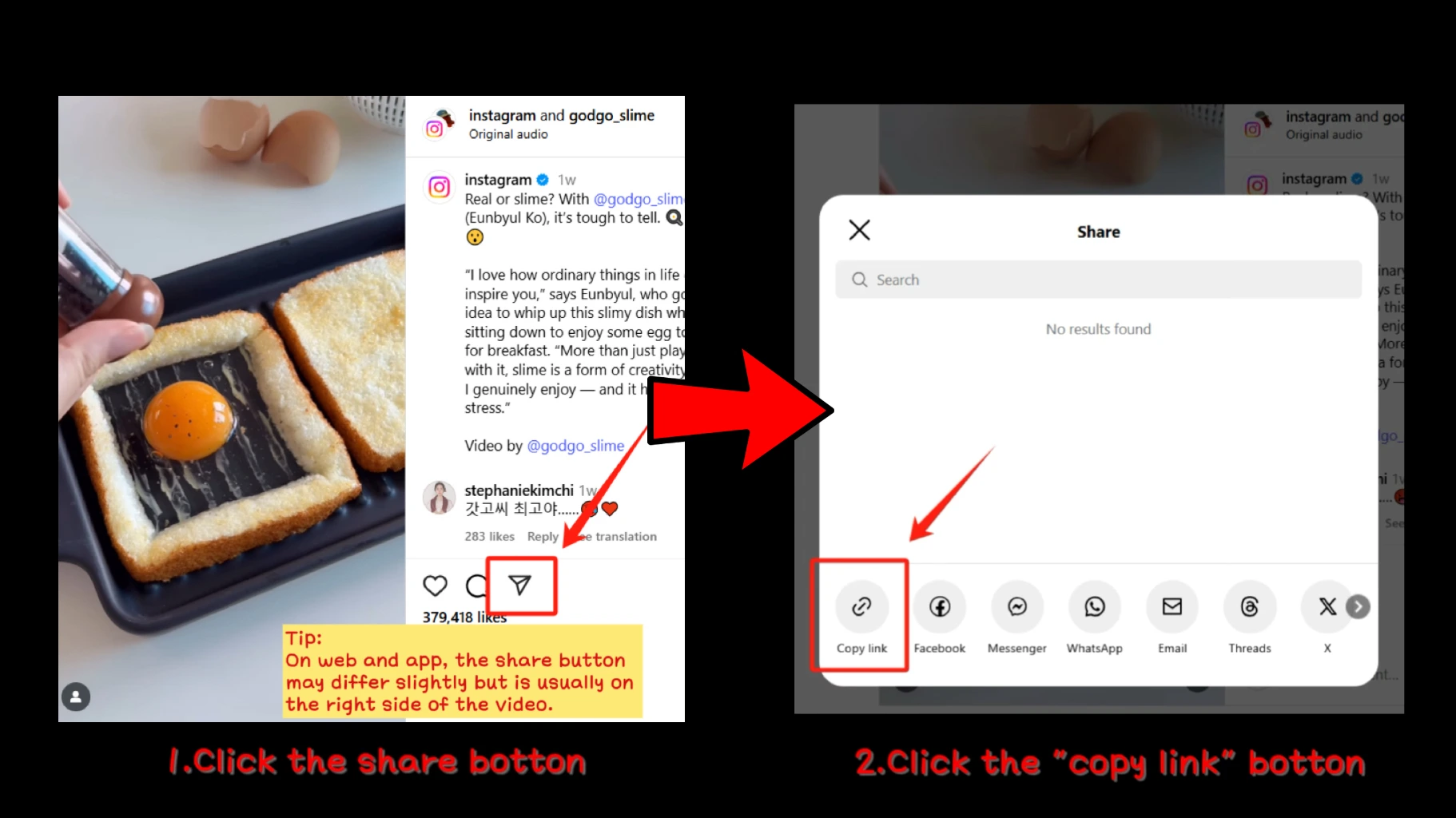
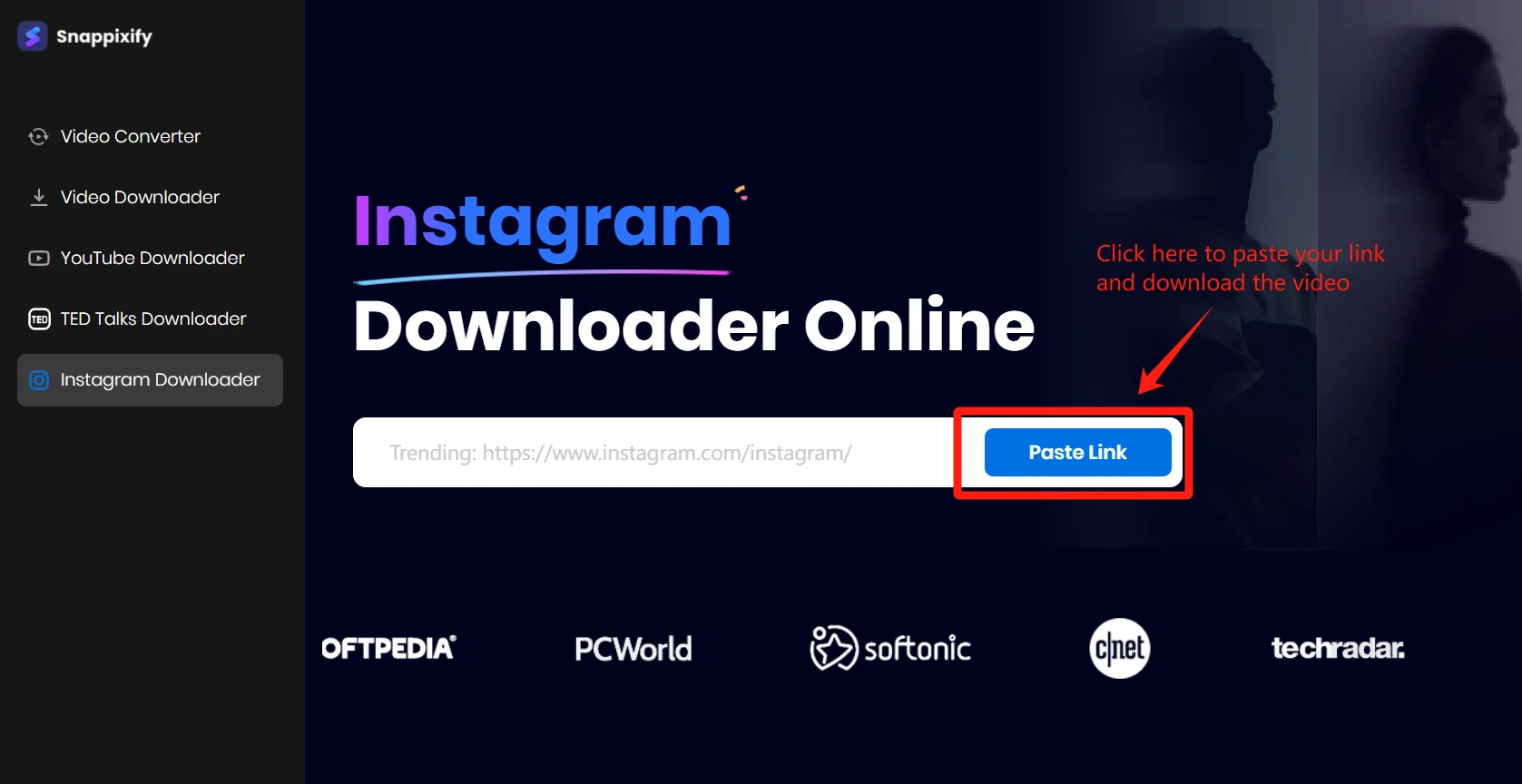
Copy the URL of the Instagram video you want to download.
-
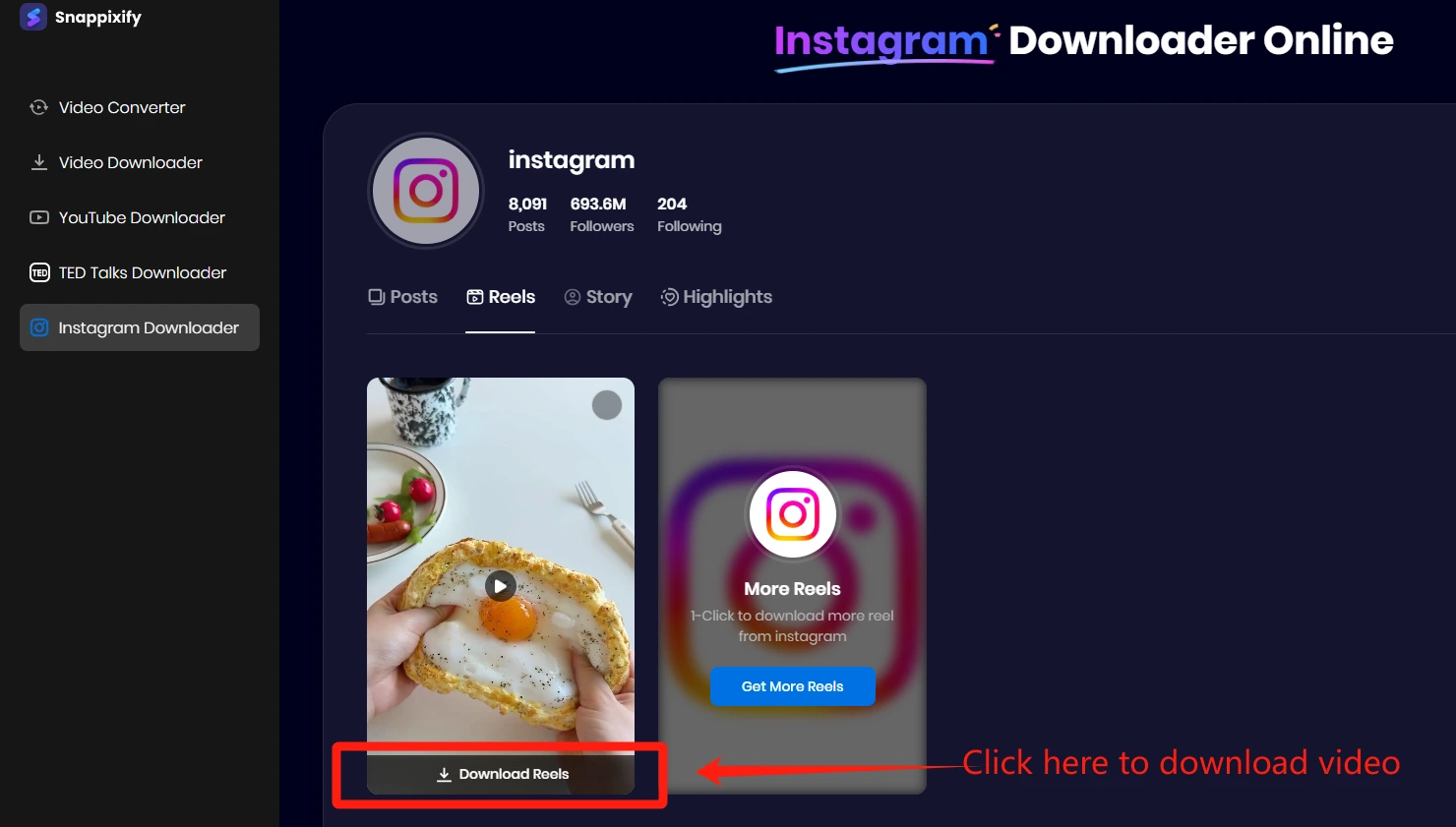
Click the Download button to save the video.
-
Done! Now you save the file locally—no watermark, no signup required.
Snappixify supports both desktop and mobile browsers, making it ideal for users who want quick results with minimal friction.
2.2 Basic Troubleshooting for Instagram Download Issues
Some users report issues like broken links, 404 errors, or videos not processing. These can often be resolved with simple fixes.
Common Fixes Include:
-
Clear browser cache and cookies.
-
Try using an incognito/private window.
-
Ensure the Instagram link is public and not from a private account.
-
If the download fails, wait a few minutes and retry—Instagram rate-limits some access.
Pro Tip: Watch the tutorial "How to Fix Instagram Not Downloading Files" to see step-by-step solutions in action and fix your instagram video downloader.
2.3 Login-Based Tools
Tools like 4K Stogram or Instaloader may still work for private accounts or batch downloads, but they now often require login credentials and Instagram cookies to function correctly.
Note: These tools may break if Instagram changes its authentication flow. They're best suited for advanced users who need full account access for archiving.
2.4 Online Services with Proxy Support
Some third-party websites have added proxy layers to bypass regional restrictions or Instagram's rate-limiting. These platforms may still work in 2025, but:
-
They can be slower due to relay through multiple servers.
-
Not all of them support Stories or private account content.
-
Be cautious of malware and pop-up ads on lesser-known services.
Stick to tools with solid reputations and avoid services requiring suspicious permissions.
Final Thoughts
Many users still find themselves asking why the download all not working issue persists across tools. While Instagram continues tightening restrictions, solutions haven't disappeared.
If you're struggling to save content, using a downloader for Instagram like Snappixify offers a safe, browser-based alternative—no login or installation needed. Whether you're trying to capture Reels, Stories, or profile videos, a reliable Instagram downloader remains the most effective way to access and preserve content offline. Just remember to use these tools responsibly and within legal boundaries.
FAQ
Why can't I download Instagram videos anymore?
Instagram frequently updates its platform, which can break old tools. If your current tool isn't working, try Snappixify – a downloader for Instagramthat's still reliable in 2025.
Did Instagram remove the download option?
Instagram never officially allowed downloads. Most tools simulate it through workarounds. If download all is not working, switch to services that adapt to API changes.
How do I download all content from an Instagram account?
Use a bulk-capable Instagram downloader like Snappixify. Just enter the username, and it fetches videos, reels, and more—without login or limits.


