 Snappixify


Struggling to save your favorite Instagram Stories before they vanish in 24 hours? You’re not alone. With over 500 million users viewing Stories daily (source: Meta), it's no surprise that people want a reliable way to download and keep them. Whether it’s a behind-the-scenes look from your favorite creator, a limited-time promo, or a friend’s important update, Stories often capture content that’s worth saving.
That’s where an Instagram Story video downloader like Snappixify can help.
What Are Instagram Stories and Why Are They So Popular?
Instagram Stories are short-form, ephemeral content that disappears after 24 hours. They allow users to:
-
Share fleeting moments without cluttering their main feed
-
Add interactive stickers, polls, and music
-
Go live or repost others' content
-
Create Highlights for evergreen content

This temporary nature fuels urgency and engagement. But it also means that unless you act quickly, you could lose access to great content.
Can You Download Instagram Stories Directly From the App?
The short answer: Not really. Instagram doesn’t offer a built-in feature to download others’ Stories unless:
-
It’s your own Story (via Archive)
-
The person has allowed sharing, and you use "Add to Story"
-
You take a screen recording or screenshot (but these may be low-quality or missing audio)
Even then, the media may be compressed, incomplete, or lack original features like captions or music.
That’s why users turn to third-party Instagram Story downloaders—and among them, Snappixify stands out.
Meet Snappixify: A Fast, Free, and Secure Way to Download Stories
Snappixify is a free online tool that supports downloading videos from major platforms, including YouTube, Instagram, and X (Twitter). But what makes it different?
-
No sign-up required
-
Zero ads or pop-ups
-
SSL encryption for privacy
-
Works on mobile and desktop
-
Supports stories, reels, posts, and more
Most importantly, it doesn’t force you to install any shady browser extension or app.
How to Use Snappixify as an Instagram Story Video Downloader
Here’s a simple tutorial to save Instagram Story videos using Snappixify.
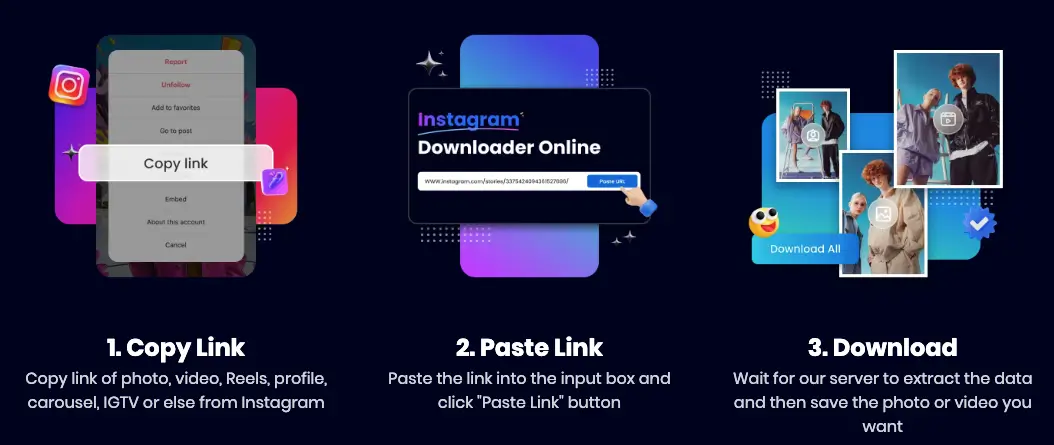
? Step 1: Get the Instagram Story Link
Instagram doesn’t make it easy to copy a Story link, but here are two workarounds:
For public profiles:
-
Open Instagram in a browser (not the app)
-
Click on the user’s profile and right-click the Story ring (if active)
-
Select "Copy link address"
Alternative: Use tools like StoriesIG.me to find a Story link if it’s public.
? Step 2: Visit Snappixify
Go to Snappixify’s video downloader page.
? Step 3: Paste the URL
Paste the Story URL into the box and click "Download".
? Step 4: Choose Format and Save
Select your desired resolution (e.g., 1080p) and format (MP4), then download the file directly—ad-free.
Real-Life Use Case: Marketers Saving Brand Mentions
Case Study:
A social media manager for a skincare brand monitors Instagram Stories for influencer shoutouts. Since these are often time-sensitive and disappear in 24 hours, she uses Snappixify to download and archive them for:
-
Reposting as UGC (with permission)
-
Creating case study content
-
Tracking influencer performance
Without a tool like Snappixify, she’d lose access to most ephemeral content—and valuable marketing proof.
Is Downloading Instagram Stories Legal?
This is a common concern, and the answer is: It depends on how you use the content.
✅ Fair Use: For personal backup, education, or commentary
❌ Violation: Reuploading someone’s content without permission or monetizing it
Best practice: Always ask for permission before using someone else’s Story publicly, especially for commercial purposes.
Topic Cluster: Other Instagram Download Needs
Snappixify isn’t just for Stories. It also handles:
? Reels Downloader
Want to download a viral Instagram Reel? Use the same process—just grab the Reel’s link and paste it into Snappixify.
? Instagram Video to MP3
Need to extract audio from an Instagram video? Try Snappixify’s video converter to convert MP4 to MP3 directly in your browser.
? Instagram Highlights Downloader
Highlights are just archived Stories. Copy the link from a public profile’s Highlights, and Snappixify can save it for you.
Data Spotlight: Why Downloading Stories Matters
-
68% of users watch Instagram Stories daily
-
1 in 3 Stories leads to a direct message from viewers (source: Meta)
-
50% of marketers plan to invest more in ephemeral content in 2025
In short: Instagram Stories are not just fun—they’re high-converting and fast-disappearing. That’s why saving them for personal or professional use is critical.
Safety and Privacy: What Makes Snappixify Trustworthy?
Unlike many free tools that bombard users with pop-ups, Snappixify prioritizes your digital safety:
-
No hidden malware or download traps
-
Uses SSL encryption to protect data
-
Does not collect personal information
-
Doesn’t require app installation or extensions
This makes it ideal for educators, marketers, influencers, and everyday users who value simplicity and privacy.
Final Thoughts: The Smart Way to Keep Your Favorite Stories
Instagram Stories are fast, fun, and fleeting—but your favorite content doesn’t have to disappear forever. Whether you're a fan archiving travel vlogs, a marketer saving UGC, or just someone who loves a good meme, a tool like Snappixify helps you stay ahead of the 24-hour deadline.
So next time you see a Story worth saving, don’t scramble. Just copy the link and let Snappixify handle the rest.
Frequently Asked Questions (FAQ)
? Can I download private Instagram Stories?
No—only public content is accessible through tools like Snappixify. Respect privacy boundaries.
? Does Snappixify store my downloads?
No. Snappixify doesn’t store files or track user history. Downloads are user-initiated and direct.
? Is it free forever?
Yes. Snappixify offers unlimited downloads for free—no strings attached.


