 Snappixify


Getting Ummy Video Downloader for Free
Ummy Video Downloader does have a free version you can download directly from its website. Simply:
1. Go to the official Ummy site.
2. Click “Download” under the free section.
3. Run the installer on your Windows PC.
Once installed, you can paste a YouTube link into the program, choose MP4 or MP3, and save the file. It really is a free video downloader, at least in its basic form—no payment required to get started.
Limitations of Ummy Video Downloader's Free Edition
While Ummy's free edition lets you download videos, it does have some restrictions:
-
Speed Caps: The free tier throttles your download rate. Full HD videos may take a long time.
-
Limited Site Support: Ummy primarily focuses on YouTube and Vimeo. If you find a cool clip elsewhere, you may need another tool.
-
Watermark Prompts: Every so often, Ummy suggests upgrading to remove on-screen prompts or logos.
-
No Batch Downloads: You must save each video one by one—playlists and multiple files aren't supported in the free plan.
These caps can be frustrating if you save videos often or need high resolution quickly.
Why Look Beyond Ummy Video Downloader?
You might wonder whether it's worth sticking with Ummy's free version despite its downsides. If you only grab a quick clip now and then, it may work. But serious users—students, teachers, content creators—tend to need more:
-
Higher Resolutions for big-screen viewing.
-
Multiple Site Support so you don't juggle tools.
-
Fast Downloads for long videos or large playlists.
-
Clean Files without unwanted logos or pop-ups.
For these reasons, many people search for alternatives that truly match the promise of a free video downloader without strings attached.
Meet Snappixify: A Truly Free Alternative
Snappixify is a brand-new web tool built for anyone who wants a powerful yet simple downloader. It doesn't hide features behind paywalls or bombard you with ads. From day one, Snappixify gives you everything you need—totally free.
Unleash Content from 1000+ Websites
One standout feature of Snappixify is its vast compatibility. YouTube and Vimeo are just the start. Snappixify can download videos from over a thousand platforms:

-
Social media sites like Facebook and Instagram
-
News outlets and educational pages
-
Music streaming pages and niche video portals
Instead of switching apps for each site, you use one tool for Stop Buffering and uninterrupted downloads, no matter where the video lives.
Get Ultra-Clear Footage with 4K Video Download
Free downloaders often cap out at 720p or 1080p. But Snappixify supports true 4K resolution:
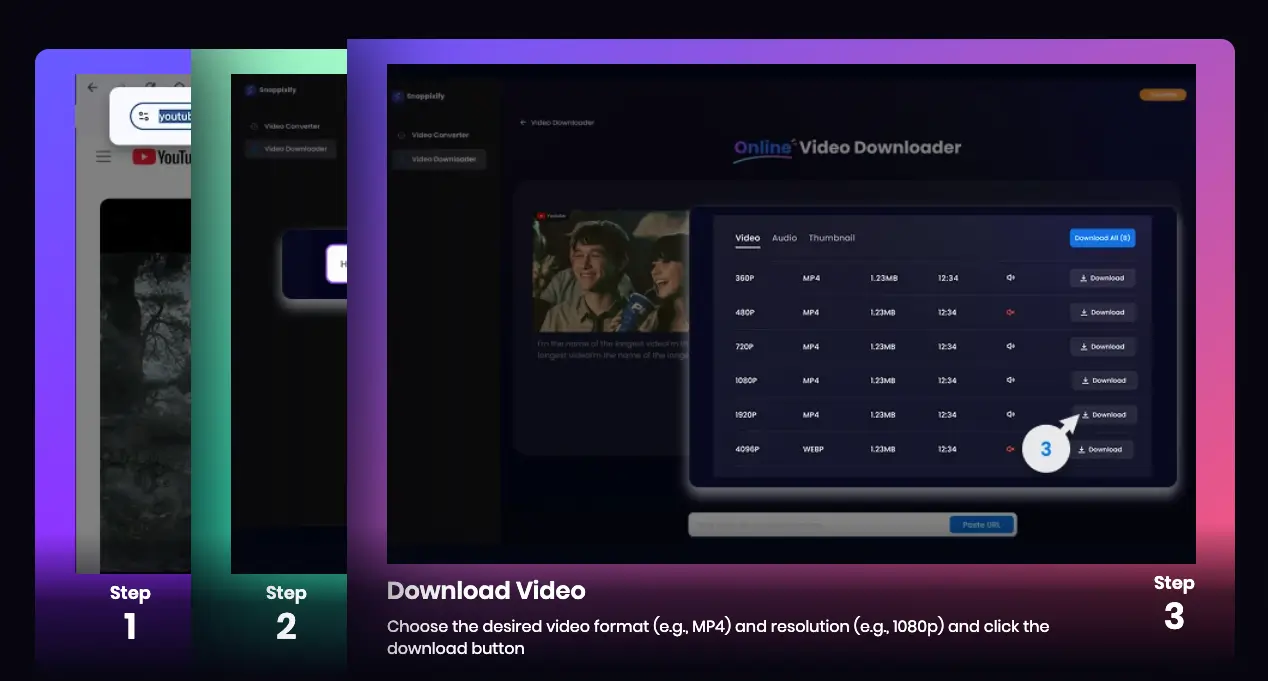
Paste your video link.
Select “4K” in the quality dropdown.
Download a crystal-clear file that looks amazing on a big TV or high-end monitor.
This means you capture every detail—from the tiny ripples in water to the fine print in on-screen text—without paying a cent.
Choose Between MP4, MKV and More
Not all devices play every format. Snappixify lets you pick:
-
MP4 for universal compatibility on phones, tablets, and smart TVs
-
MKV for high dynamic range and rich color (ideal for HDR content)
-
Extra options like WEBM or audio-only files
By offering multiple formats in one go, Snappixify saves you from hunting down separate converters—everything happens in a single step.
Truly No Ads and No Watermark
When you hit “Download,” you won't see banners, pop-ups, or upgrade prompts. Snappixify's interface stays clean, and the files you save contain No Watermark. That makes your videos perfect for sharing, teaching, or archiving—without cropping out logos or covering corners with brand names.
Enjoy Watch Videos Offline Freedom
Once you have the file, you can play it anytime, anywhere. Snappixify helps you avoid buffering circles and lags. Perfect for flights, road trips, or waiting rooms—your videos are stored directly on your device, so you never need an internet connection to watch.
Comparing Ummy vs. Snappixify
|
Feature |
Ummy |
Snappixify |
|
Supported Sites |
YouTube, Vimeo |
1000+ Websites |
|
Max Resolution |
1080p |
Up to 4K |
|
Ads/Upgrade Prompts |
Yes |
No |
|
Watermark |
Occasionally |
No |
|
Format Choices |
MP4, MP3 |
MP4, MKV, WEBM, Audio |
|
Security |
Standard |
HTTPS-encrypted, browser-based |
|
Offline Watching |
Yes, with limits |
Yes, smooth playback |
As the table shows, Snappixify offers a wider range of features without any hidden costs or restrictions.
How to Start Downloading Videos with Snappixify?
Getting started takes just a minute:
1. Copy the Video URL from any supported site.
2. Paste It into Snappixify in your browser.
3. Select Format and Quality, such as MP4 or MKV up to 4K.
4. Click Download.
5. Your file appears instantly—no waiting for installs, no ads, and no watermarks.
Conclusion
If you've been hunting for “how to get Ummy Video Downloader for free,” you've seen that the true free version comes with speed limits, ads, and watermarks. Snappixify changes the game by delivering a fully free video downloader that unlocks all features right away. With support for over a thousand websites, 4K Video Download, flexible MP4, MKV and More formats, Safe video downloader, No Ads, No Watermark, and seamless Watch Videos Offline, Snappixify is the simplest, cleanest way to save your favorite clips. Try it today and see how easy video downloading can really be!


