 Snappixify


If you're looking to download MediaHuman YouTube Downloader to save your favorite YouTube videos quickly and efficiently, you're not alone. While MediaHuman offers a strong platform, many users are also exploring browser-based alternatives like Snappixify, which offers similar functionalities without the need for installation. In this guide, we’ll explore how to download MediaHuman YouTube Downloader, how it compares with Snappixify, and why Snappixify may be the smarter option in 2025 and beyond.
What Is MediaHuman YouTube Downloader?
MediaHuman YouTube Downloader is a downloadable desktop software designed to save YouTube videos in various formats and resolutions. Users can choose from MP4, MP3, and even HD options, depending on their preferences. The program also supports playlist downloads, audio extraction, and even subtitle preservation.
Key Features of MediaHuman YouTube Downloader
-
Download videos in 720p, 1080p, 4K, and even 8K resolution.
-
Convert videos to MP3 with metadata support.
-
Simultaneous downloads.
-
Support for playlists and channels.
-
Built-in YouTube browser.
These features make it a powerful choice, especially for power users who need consistent offline access to video or audio content.
How to Download MediaHuman YouTube Downloader
Downloading and installing MediaHuman YouTube Downloader is fairly straightforward:
For Windows:
-
Go to the official MediaHuman website.
-
Download the
.exefile for Windows. -
Run the setup file and follow on-screen instructions.
-
Once installed, launch the program and start downloading.
For macOS:
-
Visit the MediaHuman website.
-
Download the
.dmgfile for macOS. -
Open the file and drag the application into your Applications folder.
-
Run the program and paste the video URLs to start downloading.
For Linux:
MediaHuman doesn’t officially support Linux, but some users manage to run it via Wine or by using alternative Linux-compatible tools like yt-dlp.
However, installation requires storage, admin privileges, and time—factors that many users seek to avoid in favor of web-based solutions.
Limitations of MediaHuman YouTube Downloader
Despite its strengths, there are some downsides:
-
Requires installation and system resources.
-
Updates are less frequent compared to open-source tools.
-
Limited browser integration.
-
Not ideal for mobile users.
-
No support for niche websites beyond mainstream platforms.
These limitations often push users toward more lightweight, browser-based solutions such as Snappixify.
A Smarter Alternative: Snappixify
If you prefer a no-installation, free, and easy solution, Snappixify is the perfect alternative to MediaHuman YouTube Downloader. Accessible directly through your browser, it simplifies the downloading process to just a few clicks.
Try Snappixify Online Video Downloader
Why Choose Snappixify?
-
No Installation Required: Simply open the site and start downloading.
-
Cross-Platform Support: Works on Windows, macOS, Linux, Android, and iOS.
-
Supports 1000+ Websites: Beyond YouTube, Snappixify also supports platforms like TikTok, Instagram, Facebook, Dailymotion, and more.
-
Multiple Download Options: You can download videos, audio, subtitles, thumbnails, and even entire playlists.
How to Use Snappixify as an Alternative to MediaHuman YouTube Downloader
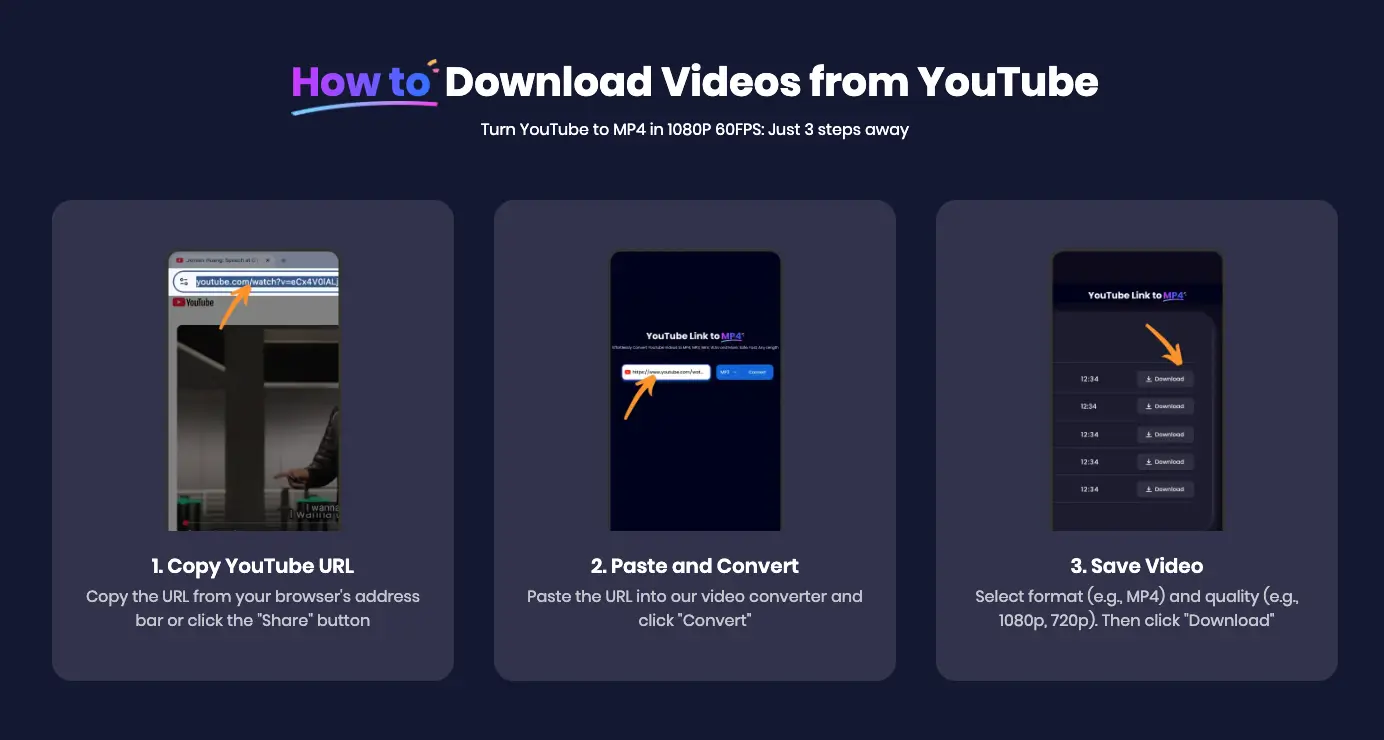
Using Snappixify is incredibly straightforward:
-
Copy the URL of the video you want to download from YouTube or any supported platform.
-
Paste the URL into the input field.
-
Select the format and resolution.
-
Click Download, and the file will be saved to your device instantly.
It’s that simple—no software, no sign-ups, and no delays.
Snappixify vs. MediaHuman YouTube Downloader
Let’s dive into a more detailed comparison to help you decide which tool best fits your needs.
Functionality
|
Feature |
MediaHuman |
Snappixify |
|
YouTube Video Download |
✅ Yes |
✅ Yes |
|
Audio Only (MP3) |
✅ Yes |
✅ Yes |
|
Playlist Support |
✅ Yes |
✅ Yes |
|
Subtitles and Captions |
✅ Yes |
✅ Yes |
|
Browser-Based |
❌ No |
✅ Yes |
|
Installation Required |
✅ Yes |
❌ No |
|
Supported Platforms |
Limited |
1000+ Sites |
|
Mobile Support |
❌ Limited |
✅ Full Support |
User Experience
-
Snappixify wins when it comes to simplicity. There’s no learning curve, making it suitable for all ages and skill levels.
-
MediaHuman, while rich in features, feels more technical and is tailored to advanced users.
Performance
-
Snappixify is optimized for fast, reliable downloads directly through your browser.
-
MediaHuman may offer slightly more advanced features like bulk conversion, but at the cost of system resource usage.
When Should You Use Snappixify?
-
You’re using a shared or public computer.
-
You need a quick download on mobile.
-
You don’t want to install software.
-
You want access to websites beyond YouTube.
-
You want the fastest, most user-friendly experience.
Snappixify lets you download YouTube videos effortlessly, making it a strong contender even for users considering to download MediaHuman YouTube Downloader.
Tips for Downloading Videos Safely and Effectively
While tools like Snappixify and MediaHuman simplify the download process, it’s essential to:
-
Only download content you have the right to save.
-
Avoid copyrighted materials unless it's for fair use, education, or personal backup.
-
Use a VPN for extra security.
-
Avoid suspicious download sources or fake clones.
-
Always choose official or well-reviewed tools.
Final Thoughts on Downloading MediaHuman YouTube Downloader
In conclusion, while many users still prefer to download MediaHuman YouTube Downloader for its powerful desktop features, tools like Snappixify are revolutionizing how we interact with online media. Snappixify's browser-based design removes the hassle of installation and compatibility issues, offering a streamlined, fast, and user-centric downloading experience.
If your primary goal is convenience, speed, and flexibility across devices, Snappixify is the better choice. On the other hand, if you require advanced customization, bulk management, or offline processing capabilities, MediaHuman remains a reliable tool.
Ultimately, the best solution depends on your specific needs. But with Snappixify’s constantly evolving platform and support for 1000+ websites, it’s clearly leading the charge in accessible online video downloading.
FAQs about YouTube Downloader
Q: What is Snappixify, and how does it compare?
Snappixify is a browser-based YouTube downloader that requires no installation. Unlike MediaHuman, it supports 1000+ websites (YouTube, TikTok, Instagram, Facebook, and more) and works on Windows, macOS, Linux, iOS, and Android.
Q: Why should I choose Snappixify over MediaHuman?
-
No installation needed—works directly in your browser
-
Full mobile and cross-platform support
-
Supports more websites beyond YouTube
-
Fast, simple, and user-friendly experience
Q: Is it legal to download YouTube videos?
Downloading videos is legal only if you have the rights or if it falls under fair use (education, personal backup, etc.). Avoid copyrighted materials unless you’re authorized to use them.
Q: How can I download videos safely?
-
Use official or trusted downloaders like Snappixify
-
Avoid fake clones or suspicious sites
-
Use a VPN for extra privacy
-
Stick to content you’re allowed to save


